Editorial review: 3 November 2026. Original APYS illustration and technical visuals. Examples are hypothetical, not APYS customer measurements.
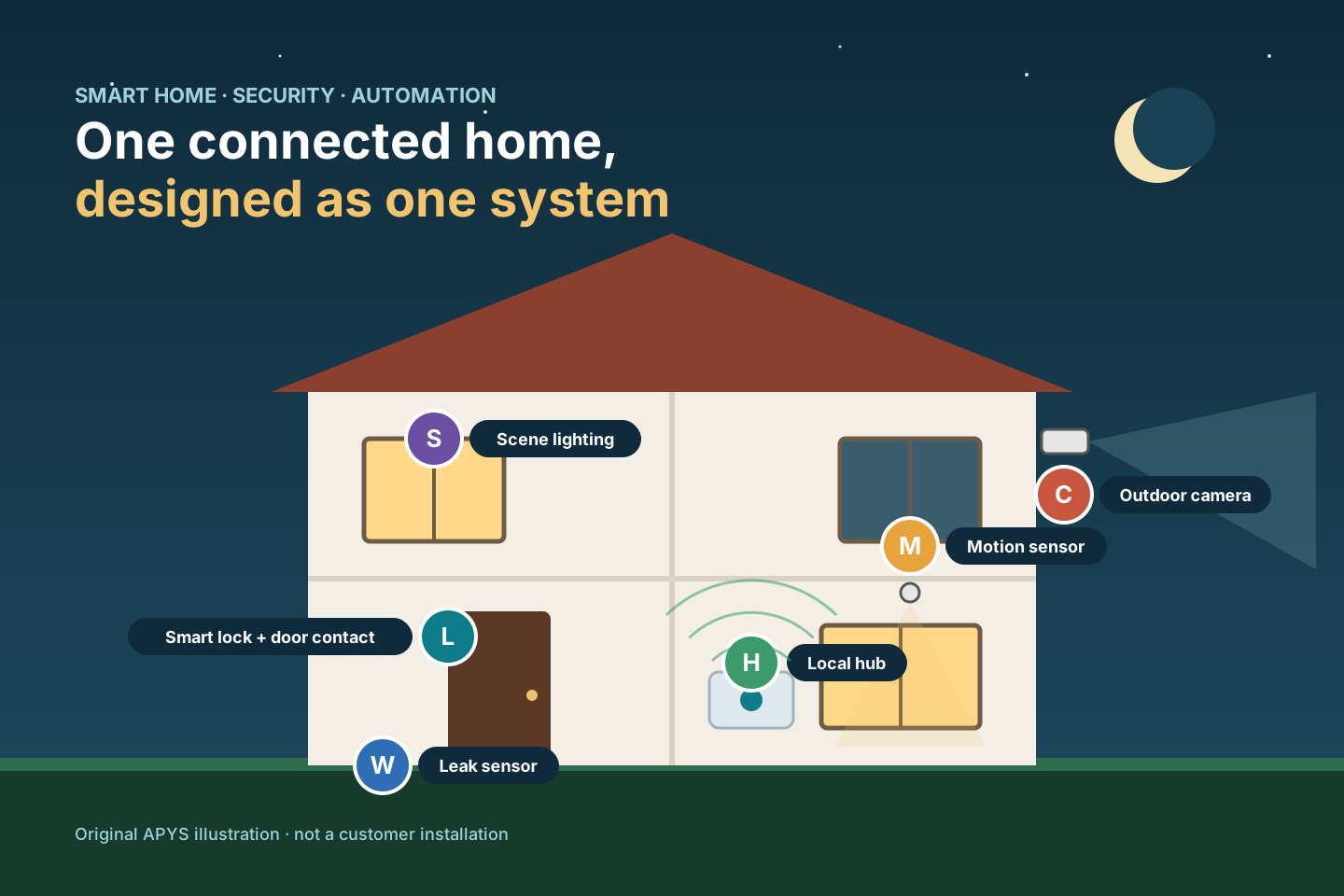
A smart home is not a box of gadgets. Locks, cameras, sensors, lights and voice assistants only become useful — and safe — when they are planned as one system with clear behaviour, a protected network and a sensible answer to the question: what happens when something fails?
This guide walks homeowners, architects and builders through that planning. It covers the layers of a smart home, how to choose the right connection for each device, how to design security in rings, how to harden the network, how to write automations that fail safely, and what to check before accepting the installation.
In this guide
- Start with outcomes, not gadgets
- Understand the five layers of a smart home
- Choose the right connection for each device
- Design security in rings
- Treat cameras as a privacy decision too
- Segment and harden the home network
- Build automations that fail safely
- Plan for power, internet and hub failures
- Commission, test and hand over properly
- Quick reference
- Worked example
- Frequently asked questions
1. Start with outcomes, not gadgets
Write down what the household actually wants in plain language before choosing any brand. Typical outcomes are: know who is at the gate, lock up with one action at night, get alerted to water leaks while travelling, keep elderly parents safe, and reduce electricity bills. Each outcome becomes a requirement that devices must meet.
Separate three categories early. Comfort automation (lighting scenes, curtains, AC schedules) can tolerate occasional hiccups. Security (locks, intrusion alarms, cameras) needs verified behaviour and supervision. Life safety (smoke, gas, water) must work locally, loudly and without depending on an app or the internet. Mixing these without thought is the most common design mistake.
Also decide who will use the system: family members, domestic staff, tenants or guests. Each needs different access, and someone must own administration after handover.
2. Understand the five layers of a smart home
Every smart home, from a single flat to a villa, can be described in five layers: field devices, the radios or wiring they use, the home network, a hub or controller, and the apps and cloud services on top. Events such as a door opening travel upward; commands such as “lock the door” travel downward.
Most real-world problems appear at the boundaries: a sensor that pairs but drops off the mesh, a hub that loses its network address after a router change, or a cloud account that controls everything with one shared password. Designing each layer deliberately makes faults easier to isolate and fix.
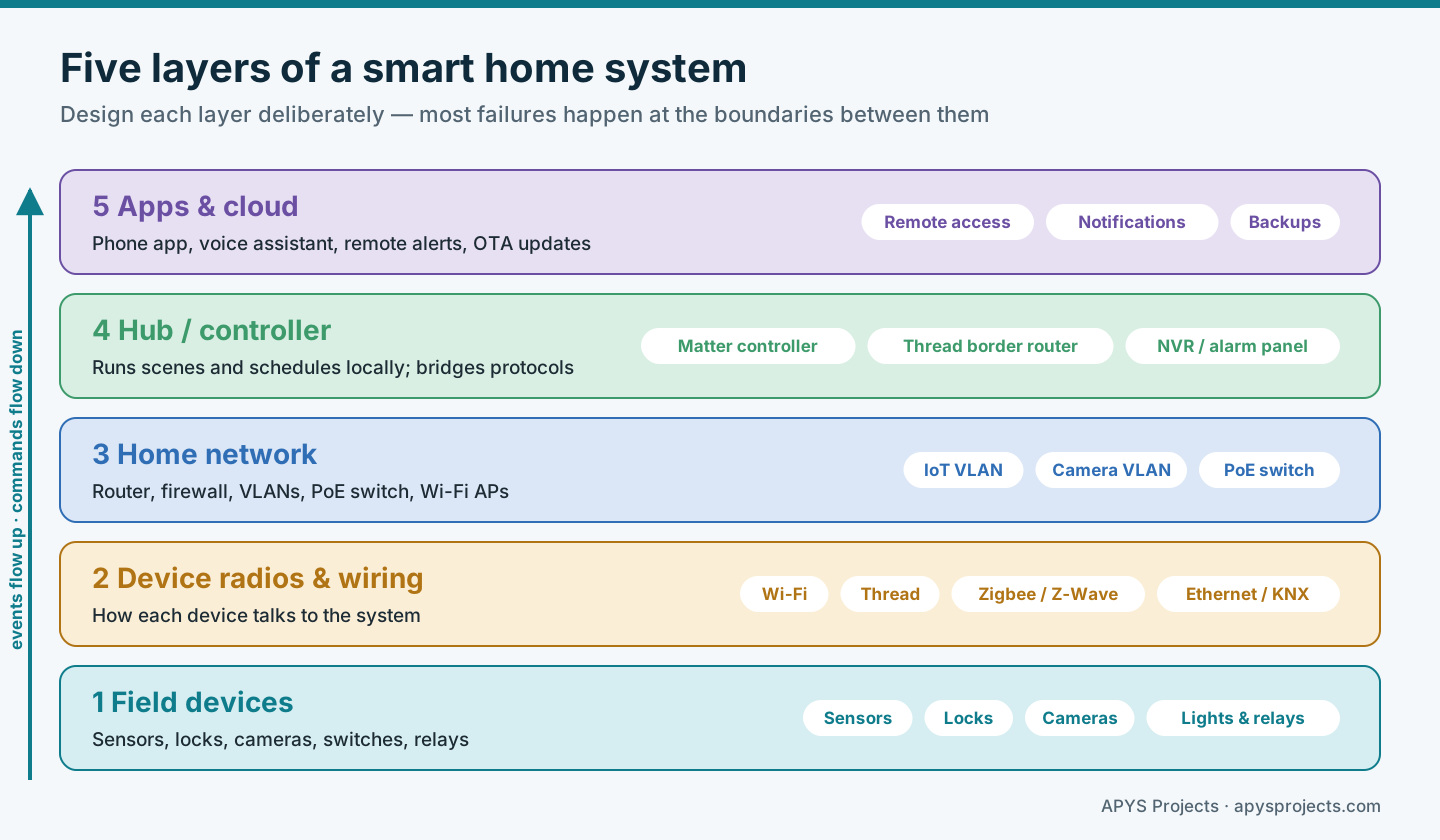
Prefer a hub that can run scenes and schedules locally. Cloud services are useful for remote alerts and updates, but the lights, locks and alarm should keep working inside the home when the internet connection is down.
3. Choose the right connection for each device
No single radio suits every device. Wi-Fi offers bandwidth for cameras and displays but drains batteries. Thread, Zigbee and Z-Wave form low-power mesh networks that suit battery sensors and locks. Ethernet with PoE gives cameras and access points reliable power and data over one cable. Wired systems such as KNX remain a strong choice for lighting, blinds and HVAC in new-build homes where cabling can be planned from the start.
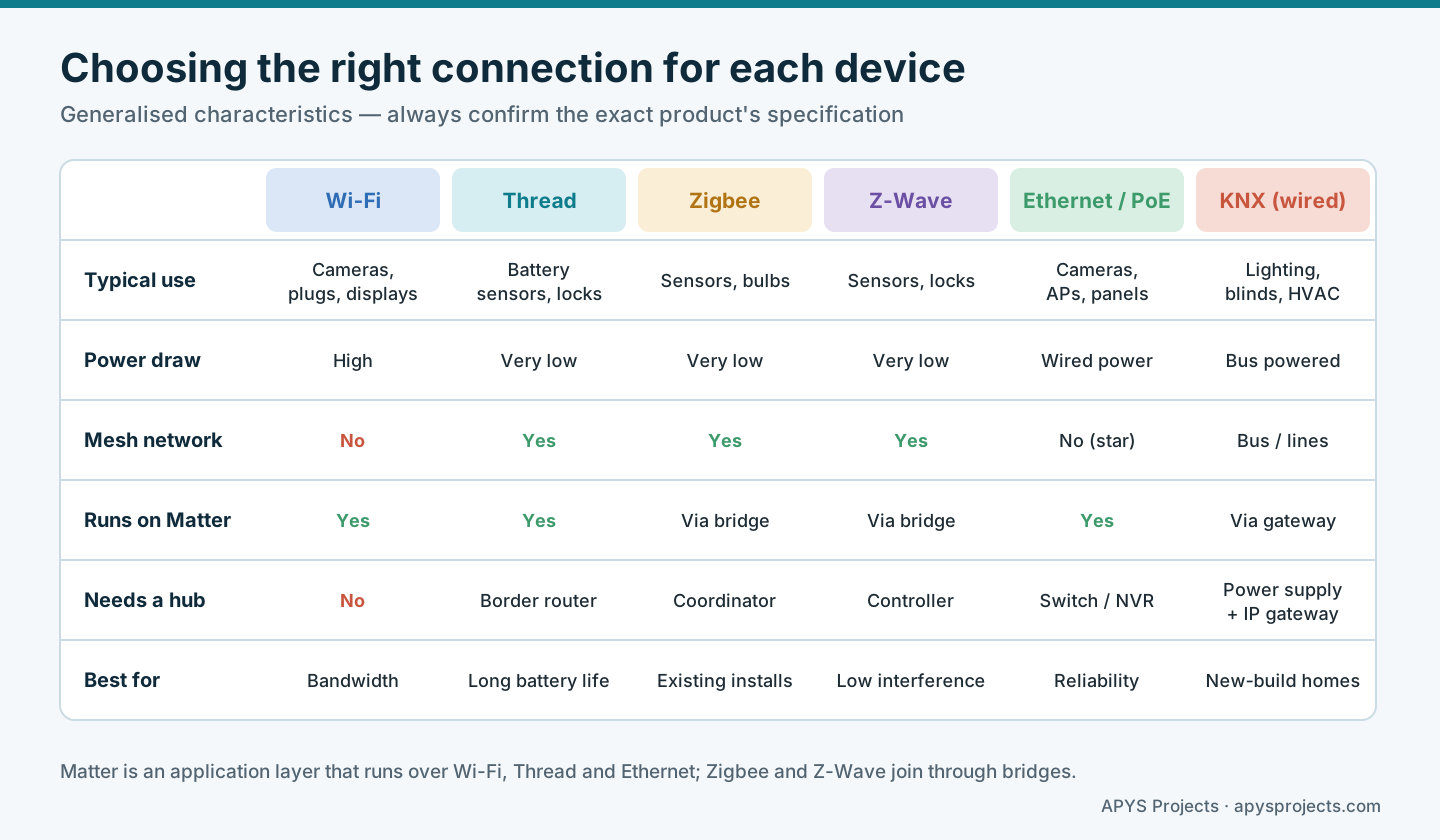
Matter is the interoperability standard from the Connectivity Standards Alliance. It is an application layer that runs over Wi-Fi, Thread and Ethernet, so a certified device can be controlled from different ecosystems. The standard receives regular updates; version 1.6 was released in June 2026, and recent versions have added camera support, closures such as garage doors, and easier setup. Even so, check which Matter version and device types your chosen controller actually supports before buying.
Practical rules of thumb: keep battery sensors off Wi-Fi where possible, wire every fixed camera, place enough mains-powered mesh devices (plugs, switches) to strengthen the mesh, and avoid mixing several hubs that each need their own app unless there is a clear reason.
4. Design security in rings
Good home security detects early, verifies quickly and responds proportionately. Think in four rings, each of which should raise an alert before an intruder reaches the next one.
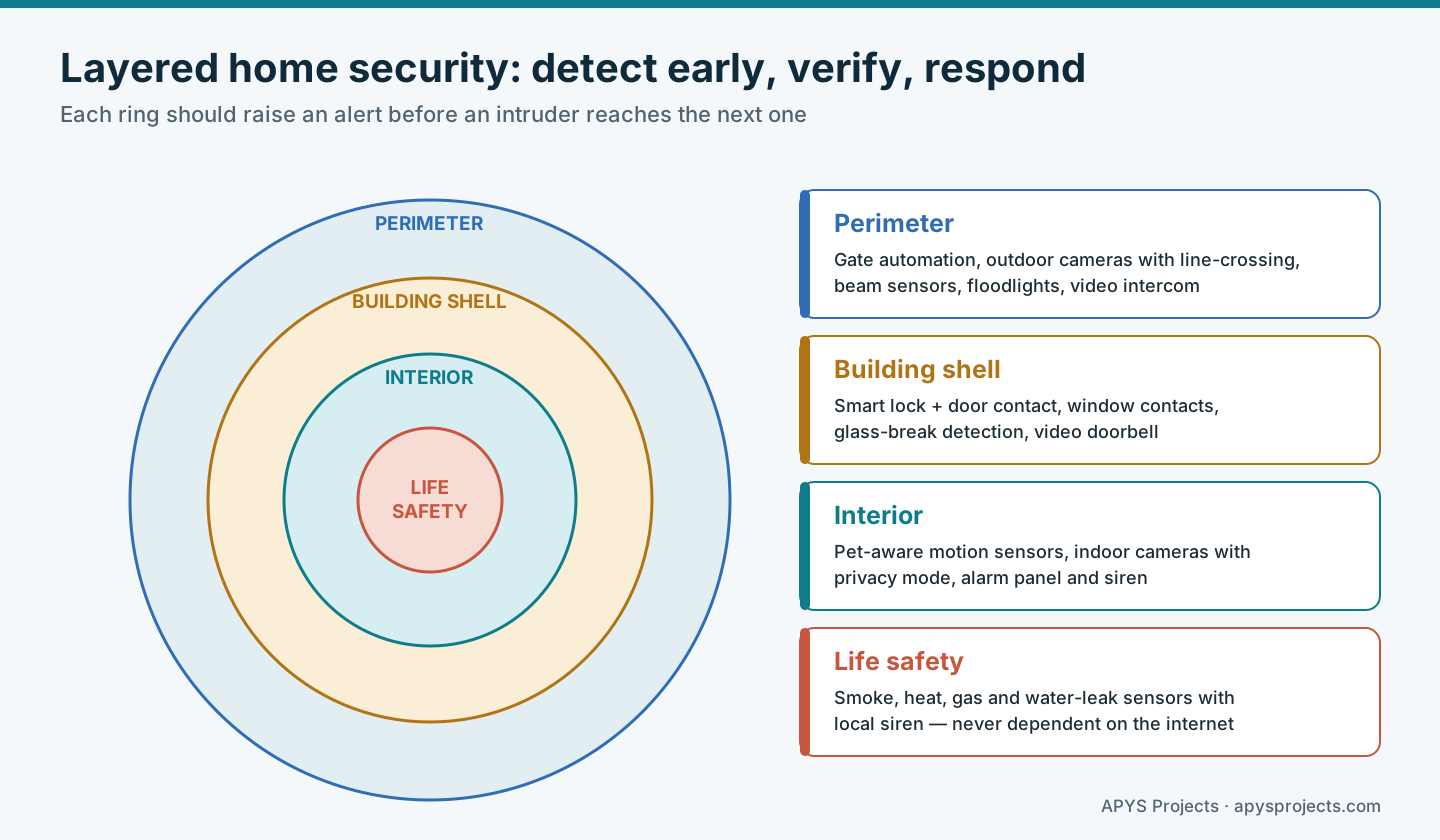
- Perimeter: gate automation, outdoor cameras with line-crossing analytics, beam sensors and lighting. The goal is early warning and deterrence, not every passing cat.
- Building shell: a smart lock paired with a separate door contact (so the system knows the door is actually closed, not just that the bolt moved), window contacts, glass-break detectors and a video doorbell.
- Interior: pet-aware motion sensors in corridors and stairways, an alarm panel with a backup battery, and an internal siren.
- Life safety: smoke, heat, gas and water-leak sensors with local sounders. These must never rely on an app notification as their only warning.
Plan verification to keep false alarms low: a motion trigger plus a camera clip, or two sensors in sequence, is far more trustworthy than a single event. Choose lock hardware with the door and fire-escape behaviour in mind, and keep a mechanical key or PIN fallback.
5. Treat cameras as a privacy decision too
Cameras protect a home, but they also record family members, domestic staff, visitors and neighbours. Point outdoor cameras at your own entrances and boundary, and use privacy masks for neighbouring windows and public areas. Indoor cameras should have a privacy mode or schedule so they are off when the family is home.
Decide where video is stored and for how long. A local NVR keeps footage inside the home and continues recording during internet outages; cloud storage protects against theft of the recorder. Many homes use both. Agree a retention period, limit who can view and export clips, and protect the NVR with a strong, unique password. In India, CCTV products are also subject to government essential requirements introduced in 2024, so ask suppliers about compliance for the models they offer.
6. Segment and harden the home network
Every connected device is a small computer. If one cheap plug is compromised, it should not be able to reach the family laptops or the camera recorder. Network segmentation — separate VLANs or at least separate Wi-Fi networks with isolation — is the single most effective technical control in a smart home.
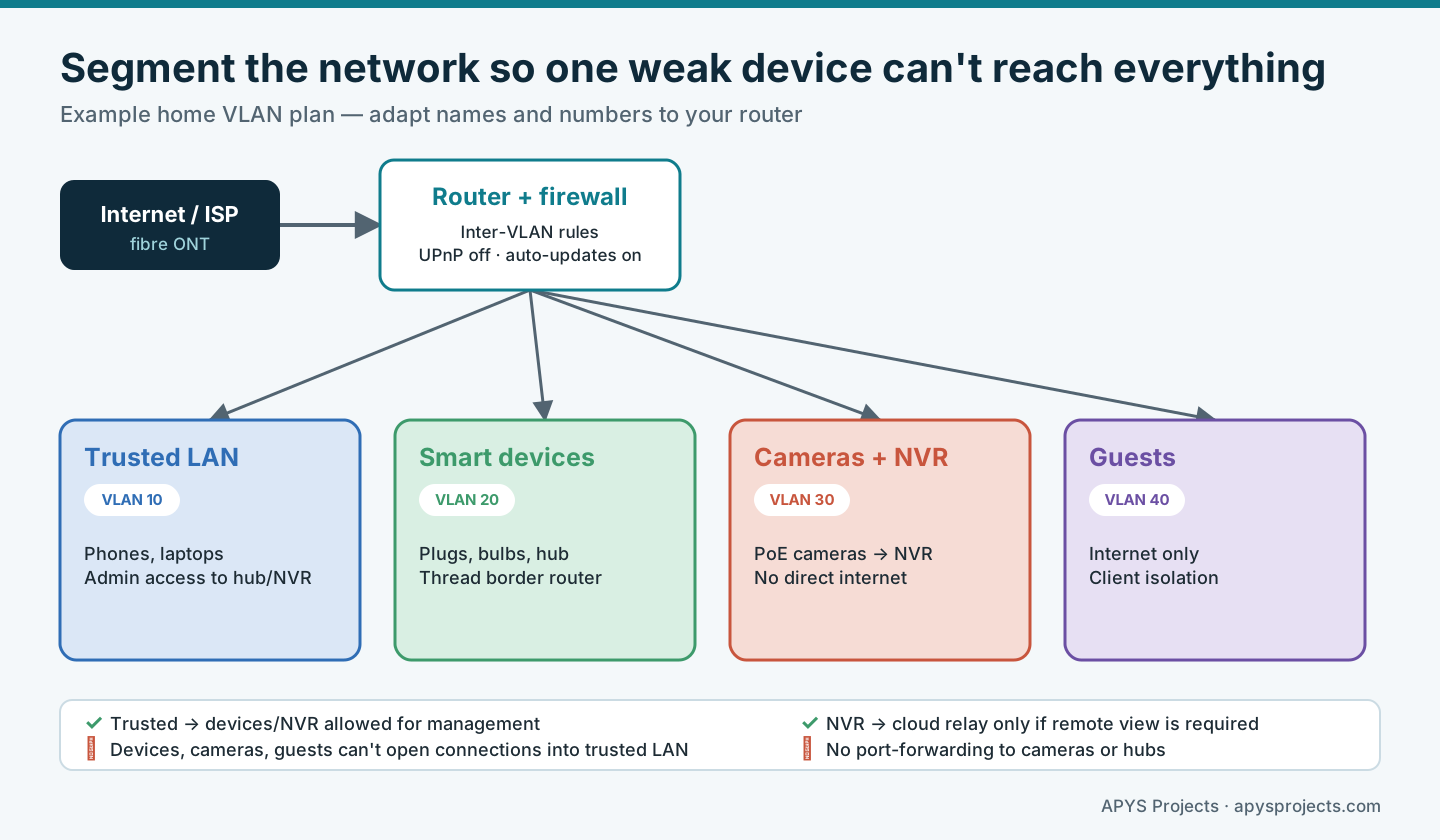
Baseline security expectations for consumer IoT are well established. India’s Telecommunication Engineering Centre published a Code of Practice for Securing Consumer IoT (TEC 31318:2021), which aligns with the European baseline ETSI EN 303 645. Both call for unique per-device passwords instead of universal defaults, secure update mechanisms, secure communication and protection of personal data. Use these as a checklist when choosing products.
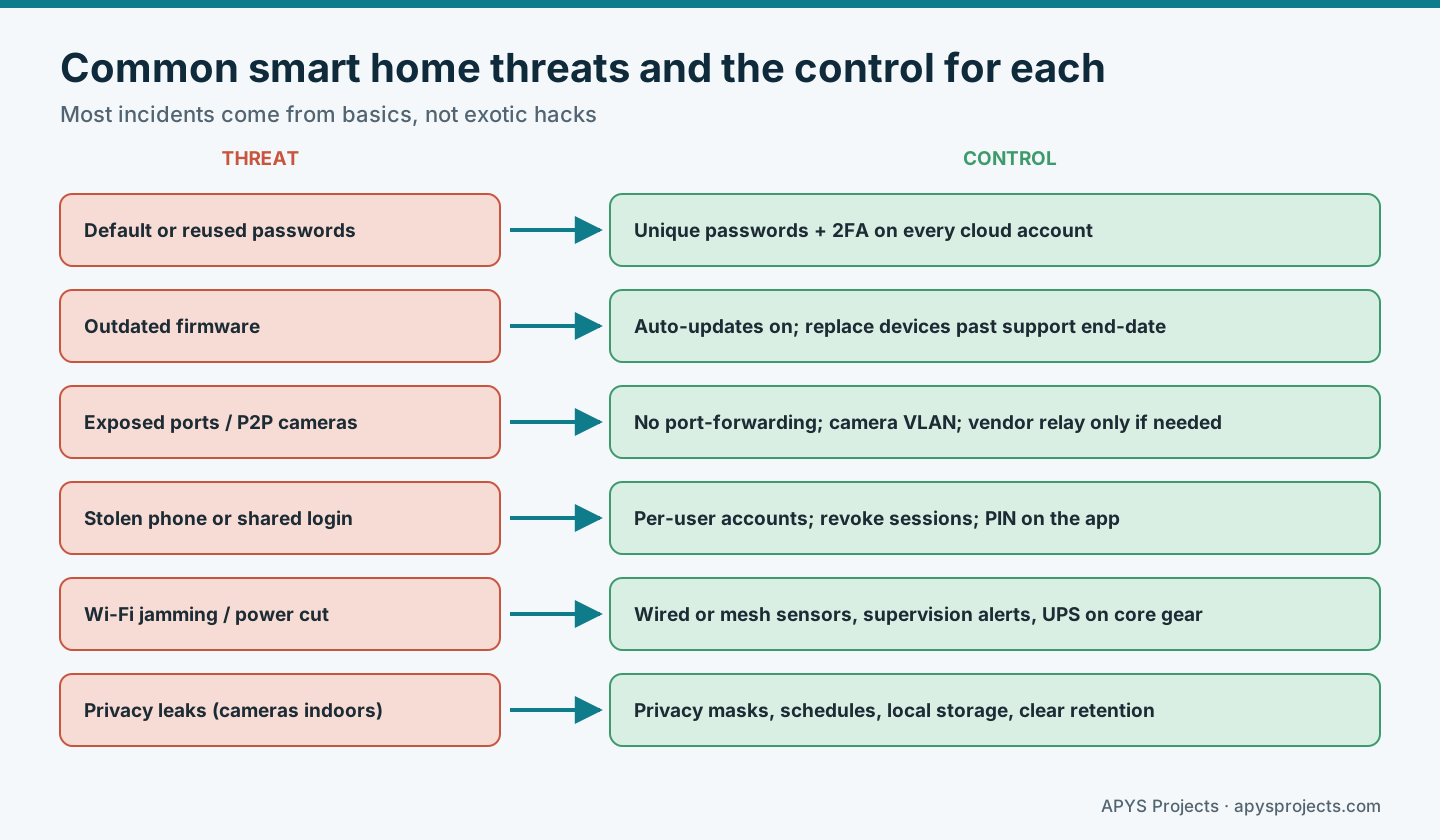
Practical hardening steps: turn off UPnP and never port-forward to cameras or hubs; enable two-factor authentication on every cloud account; give each family member their own login instead of sharing one; keep firmware updates on; and record each device’s support end-date so it can be replaced before updates stop.
7. Build automations that fail safely
Every automation has four parts: a trigger that starts it, conditions that are checked first, actions that the system performs, and feedback that proves the actions worked. Skipping conditions and feedback is what makes automations unreliable or even dangerous.
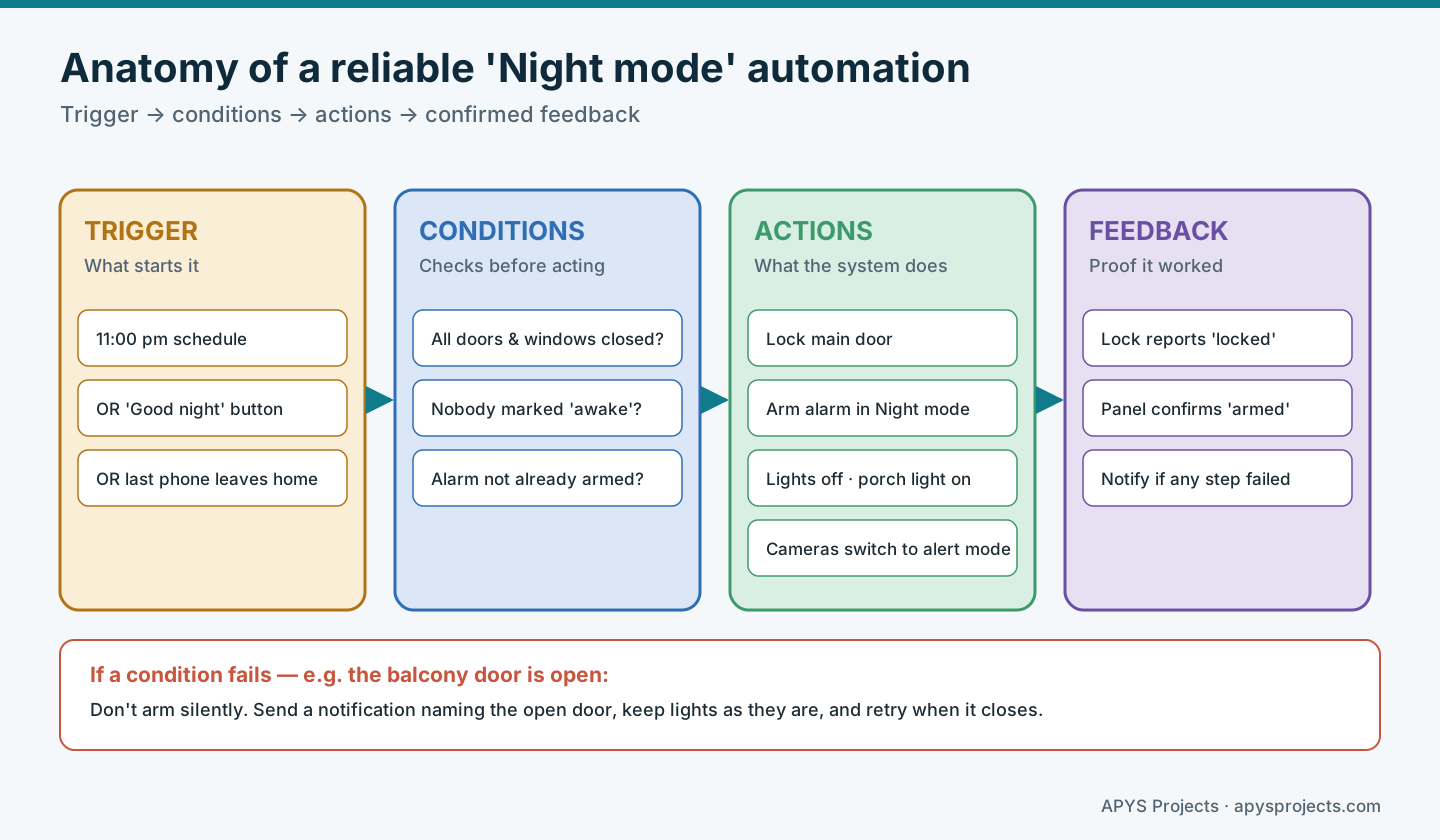
Useful automations for most homes include: Night mode (lock, arm, lights off, porch light on), Away mode (arm fully, simulate occupancy with lights, set AC off), Leak response (close a motorised water valve and sound a local alarm), and Welcome home (disarm on verified entry, turn on entrance lights). Keep a physical switch or button for every important scene so nobody needs a phone to use the house.
Avoid automations that could trap people or hide problems: never auto-lock an exit door in a way that blocks emergency egress, and never silently skip a step — notify the user instead.
8. Plan for power, internet and hub failures
Power cuts, broadband outages and failed hubs are normal events, not edge cases. Decide in advance how each function should behave and test it.
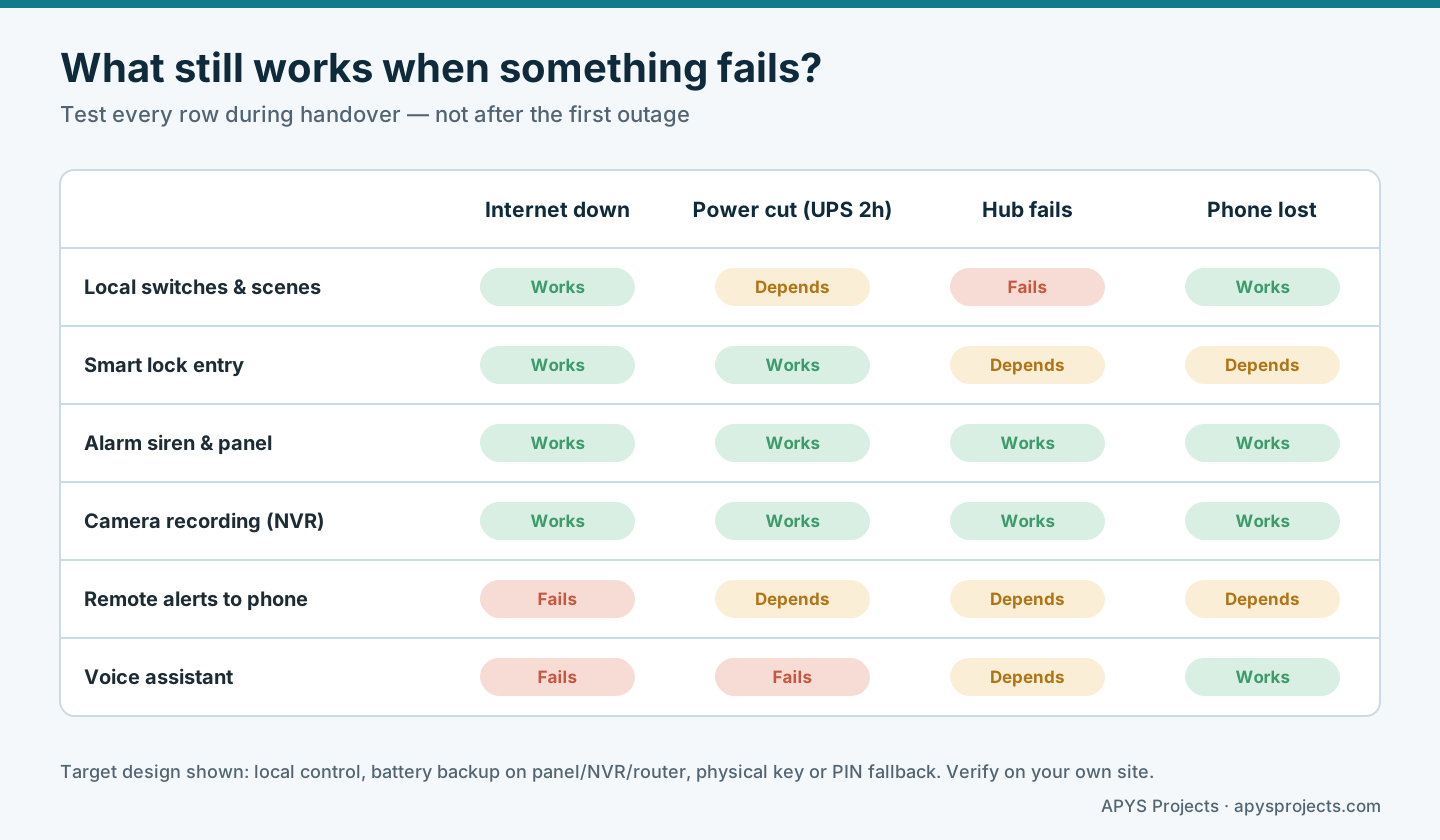
Put the router, PoE switch, NVR, hub and alarm panel on a UPS or inverter-backed circuit. Prefer battery-backed sirens and locks. If remote alerts matter during outages, consider a cellular backup for the router or alarm panel. Keep a printed sheet listing how to unlock doors, silence the alarm and restart the network without the app.
9. Commission, test and hand over properly
A smart home should be accepted against the written outcomes from step 1, not against a demonstration of a few buttons. Test every sensor, every scene and every failure scenario in the matrix above. Walk-test motion sensors, trigger each leak sensor with water, and confirm that alerts reach every intended person.
The handover pack should include: a device schedule with locations and models, network and VLAN details, admin account ownership (in the homeowner’s name, not the installer’s), backup of hub configuration, warranty and support end-dates, and a simple user guide for family members and staff. Change installer passwords and remove temporary accounts before sign-off.
Quick reference
| Area | Good practice | Acceptance check |
|---|---|---|
| Requirements | Outcomes written in plain language | Each outcome demonstrated |
| Connectivity | Right radio per device; cameras wired | No dropouts over a week of logs |
| Security rings | Perimeter, shell, interior, life safety | Walk test of every zone |
| Network | Segmented VLANs; no port-forwarding | IoT device cannot reach trusted LAN |
| Accounts | Owner-held admin; 2FA; per-user logins | Installer access removed |
| Resilience | UPS on core equipment; local control | Failure matrix tested |
Worked example: a hypothetical 3BHK apartment
A family in a 3BHK apartment wants to lock up easily at night, see who is at the door while at work, and protect against water leaks during holidays. The first proposal uses Wi-Fi for everything, including twelve battery sensors, and one shared cloud login.
The revised design moves battery sensors to a Thread mesh through a Matter-capable hub, wires the door camera and two corridor cameras to a PoE switch and local NVR, and places smart devices and cameras on separate VLANs. A Night mode automation checks that the balcony door is closed before arming and notifies the parents if it is not. Leak sensors under the kitchen sink and washing machine close a motorised valve and sound a local alarm. During handover, the team unplugs the broadband for ten minutes and confirms that locks, scenes, the alarm and recording all keep working.
Frequently asked questions
Do I need a hub if my devices are Wi-Fi?
Not always, but a local hub or controller lets scenes run without the internet, combines different brands, and is required for Thread, Zigbee and Z-Wave devices.
Is a smart lock safe?
A good smart lock can be as secure as a mechanical one if it uses encrypted communication, receives updates and has a key or PIN fallback. Pair it with a door contact so the system knows the door is actually shut.
Should cameras record to the cloud or locally?
Local NVR recording keeps working during outages and keeps footage at home; cloud storage protects against theft of the recorder. Many homes combine both with clear retention rules.
What does Matter certification change?
It improves interoperability between ecosystems and standardises secure setup. It does not replace good network design, strong account security or proper testing.
Can smart home devices be retrofitted in an existing flat?
Yes. Wireless sensors, smart plugs, retrofit switches and battery locks suit existing homes. Plan cable routes for cameras and the network rack, as these benefit most from wiring.
Related APYS guides
- Matter Smart Home Compatibility: Thread, Wi-Fi and Buying Guide
- CCTV Network Security: VLANs, Firewall and Remote Access
- Cloud vs NVR vs Edge CCTV: Recording and Recovery Guide
- Smart CCTV: AI Detection, False Alarms & Placement
- ELV System Guide for Societies and Commercial Buildings
- Fail-Safe vs Fail-Secure Locks: Door Behaviour During Power Loss and Emergencies
Discuss your smart home requirement
APYS Projects provides ELV, electrical and networking services across India. Use our contact page to describe your home, the outcomes you want and any existing devices. Share passwords, network configurations and camera access only through an agreed protected channel.