Technical sources reviewed: 18 October 2026 · 10 min read · Original technical illustrations
For owners, facilities teams and project managers. Worked figures are illustrative unless explicitly attributed; they are not APYS client measurements.
In this guide
- Motion detection, object classification and recognition are different
- Start with the purpose and response, not the analytics menu
- Camera placement determines the evidence available to the algorithm
- Define alert rules and exceptions explicitly
- Test missed events as carefully as false alarms
- A practical entrance test matrix
- Camera, NVR and VMS compatibility must include events
- Storage planning still depends on the video workload
- PoE, bandwidth and recovery are part of the CCTV system
- Privacy and cybersecurity need an operating policy
- BOQ and handover checklist
- Frequently asked questions
- Plan a useful CCTV upgrade
Smart CCTV is useful when it turns a defined event into an actionable alert and preserves usable evidence. A camera described as “AI-enabled” does not automatically know whether an incident occurred. Its result depends on the scene, supported analytics, configuration, recording system and the person who responds.
This guide is for offices, housing societies, warehouses and commercial facilities reviewing a CCTV upgrade. It focuses on practical detection and handover decisions, rather than selecting equipment from megapixels or an AI label alone.
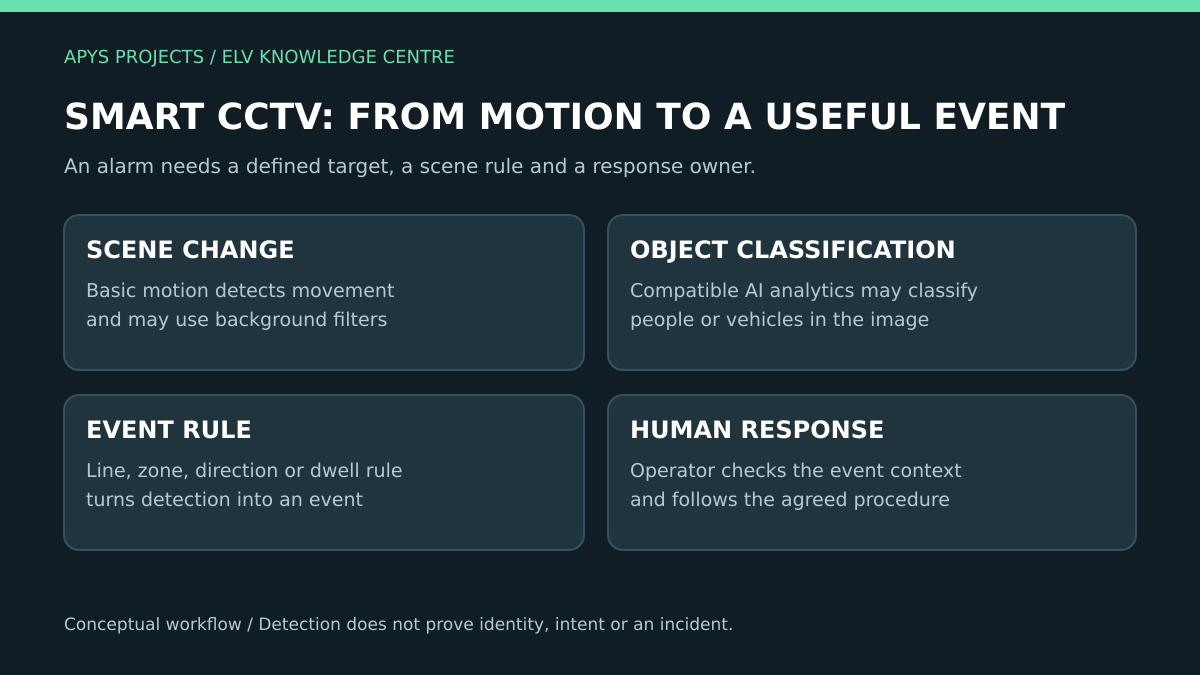
Motion detection, object classification and recognition are different
Basic video motion detection monitors movement in selected image areas. Some implementations include filters for background movement, small objects or passing light. Axis’s motion-detection documentation shows why this should not be reduced to “every changed pixel always causes an alarm”. [1]
AI object analytics can add supported classifications, such as person or vehicle, and rules about a line, zone or duration. The exact capabilities and limits belong to the particular camera, firmware and application. A classification is not proof of a person’s identity or intent. [2]
| Capability | Question it can help answer | What it does not establish by itself |
|---|---|---|
| Motion event | Did relevant movement occur in the configured area? | Whether the moving object is a person or an incident |
| Object classification | Does the object fit a supported category? | Identity, permission or the reason for its presence |
| Line or zone rule | Did a qualifying object meet a configured spatial rule? | Whether a security breach actually occurred |
| Recording and export | Can the operator review the event context? | Accuracy of the original analytic decision |
Write the required event in plain language before asking for a quotation. For example: “Notify the security desk when a qualifying person crosses the loading-bay entrance after the agreed closing time.” That is more testable than “provide smart AI security”.
Start with the purpose and response, not the analytics menu
Identify the area, operating hours, expected targets and the person responsible for a notification. Decide what should happen after the alert: review the live view, contact a supervisor or follow another approved site procedure.
Distinguish a security alarm from a business statistic. Counting vehicles for a utilisation report has a different error tolerance and response process from monitoring a restricted entrance. Avoid adding every available analytic rule; an unowned stream of notifications is difficult to operate.
For an existing system, preserve a baseline of actual complaints: missed events, excessive alerts, unreadable recordings or difficult exports. That baseline gives the upgrade a measurable purpose.
Camera placement determines the evidence available to the algorithm
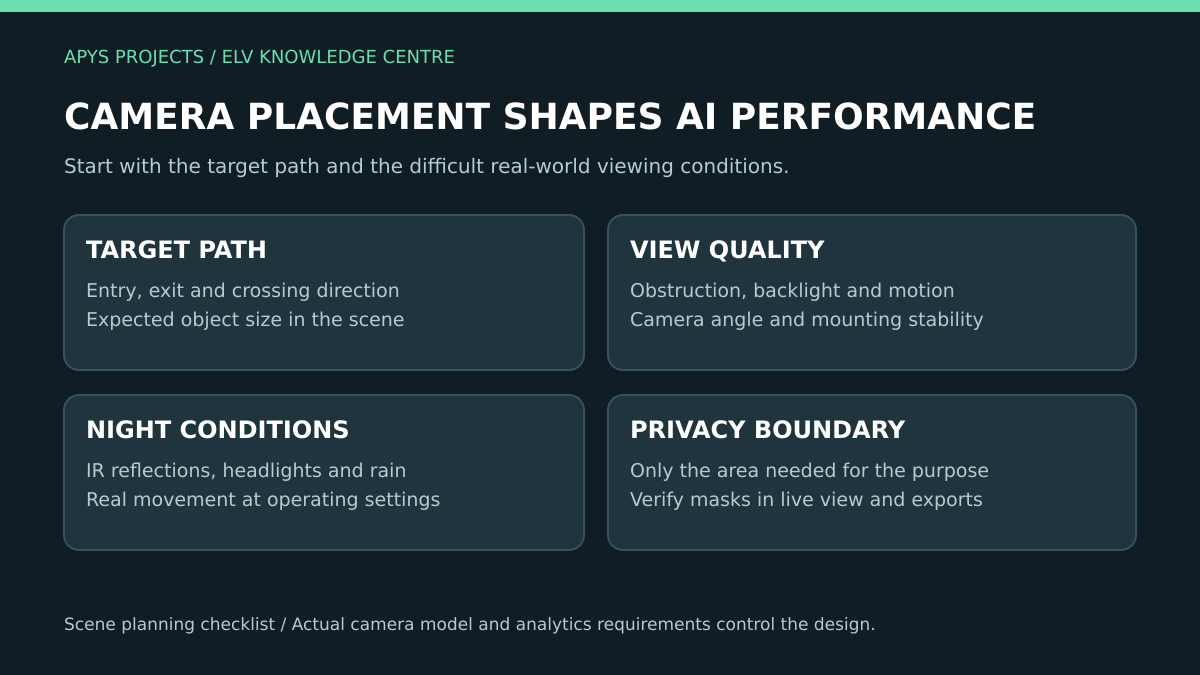
A good scene for an overview is not always a good scene for a particular analytic rule. Consider target size, direction of travel, mounting angle, obstruction, lighting and vibration. Axis documents model-specific placement conditions and notes that small or distant objects can be missed. [2]
Mark the intended target path on the site layout. Test whether a person remains visible long enough to meet the rule, including at the near and far boundaries. A doorway, pillar, parked vehicle or raised shutter may intermittently obscure the path.
Review real evening and night conditions. Headlights, reflections, rain, insects and dirty covers can change the image. Axis describes how a spider web or dirty camera cover can affect analytics differently from a clean daytime scene. [3]
Do not accept digital zoom on a demonstration screen as proof of usable target detail. Confirm the installed view, recording settings and the analytic input actually used by the application. Record those settings in the acceptance evidence.
Define alert rules and exceptions explicitly
For each proposed rule, specify the target, area, direction, active schedule and output. Include normal exceptions: cleaning staff, deliveries, authorised maintenance and movement outside the site boundary.
Use include and exclude areas thoughtfully. Excluding a swaying plant can reduce unwanted alerts, but excluding part of a real approach path can also hide a target. Changes should be followed by the relevant retest.
Agree who can change rules. Keep a dated configuration record so an investigation can distinguish a camera failure from a zone or schedule change. Where the recorder and camera each offer analytics, identify which system owns the rule and which event is actually recorded.
Test missed events as carefully as false alarms
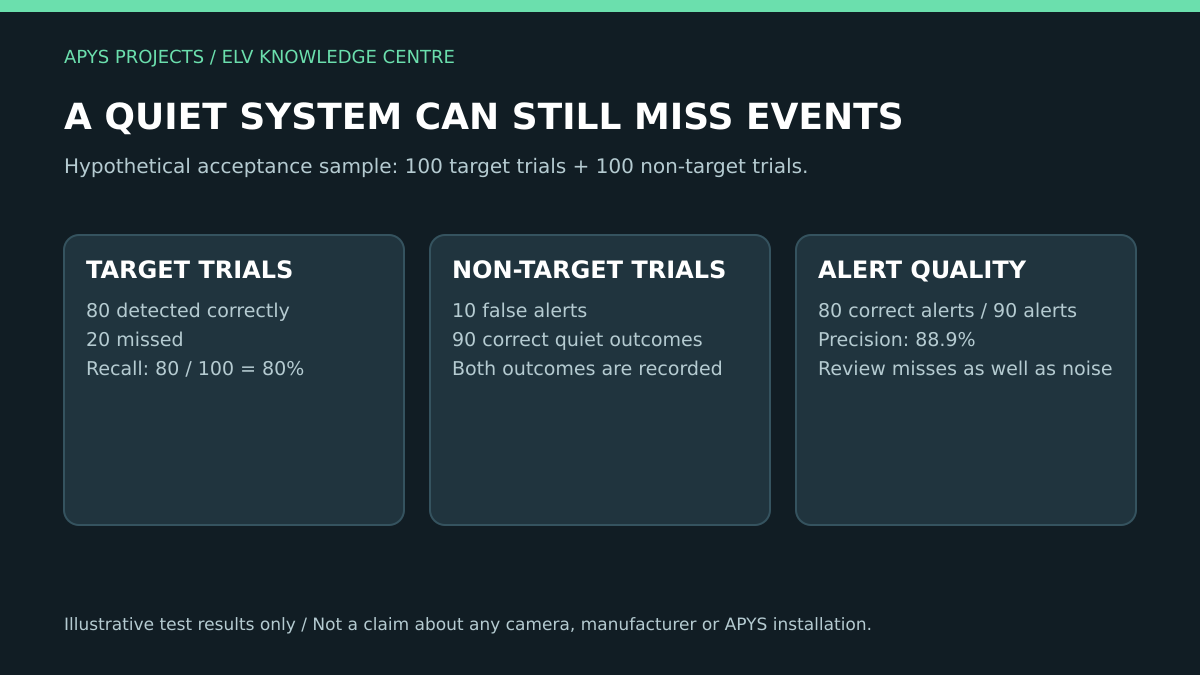
A low alert count is not automatically a success. The system may simply be too restrictive. A useful test includes target trials that should generate events and non-target trials that should not.
Consider a hypothetical acceptance sample with 100 target trials and 100 non-target trials. Suppose the system detects 80 target trials, misses 20, and produces 10 unwanted alerts during the non-target trials:
- Recall: 80 detected target trials ÷ 100 target trials = 80%.
- Precision: 80 correct alerts ÷ 90 total alerts = 88.9%.
- Missed target trials: 20, which must remain visible in the test record.
These are illustrative arithmetic results, not a performance claim. Define how a trial and a duplicate alert are counted before using the metrics. A controlled test also does not guarantee performance during every future weather or crowd condition.
Run labelled scenarios at representative boundaries and times. Preserve the associated video and settings. Human review remains part of a responsible process; over-reliance on analytics can conceal errors or overlooked events. [8]
A practical entrance test matrix
| Scenario | What to observe | Evidence to retain |
|---|---|---|
| Normal target crossing | Event generation, correct rule and detection position | Clip, timestamp, rule name and settings |
| Near and far boundary | Misses, partial visibility and target size | Marked scene image and labelled results |
| Night movement with headlights | Exposure, reflections and classification behaviour | Night recording at the operating configuration |
| Expected non-target movement | Unwanted events from the chosen distractions | Count of trials, alerts and quiet outcomes |
| Temporary obstruction | What is lost and whether health alerts exist | Known limitation and maintenance action |
| Operator workflow | Notification delivery, review and escalation | Delivery time and completed response exercise |
Agree pass criteria with the client before installation. Use requirements tied to the scene and consequence of an error; a vendor’s general accuracy statement is not a substitute for the site’s acceptance plan.
Camera, NVR and VMS compatibility must include events
A video stream displaying successfully does not prove that analytics metadata, event search and recorder actions work across brands. ONVIF Profile M addresses metadata and events for analytics, including relevant configuration and information interfaces. [4]
Check the exact products, supported profiles, firmware and features needed for the workflow. Ask the integrator to demonstrate the event arriving at the recorder or VMS, triggering the expected action, and remaining searchable after recording.
Keep licensing and channel limits visible in the BOQ. Identify whether analytics runs in the camera, recorder or server and whether a subscription or specific hardware is required. Confirm ownership of management accounts and how changes are backed up.
Storage planning still depends on the video workload
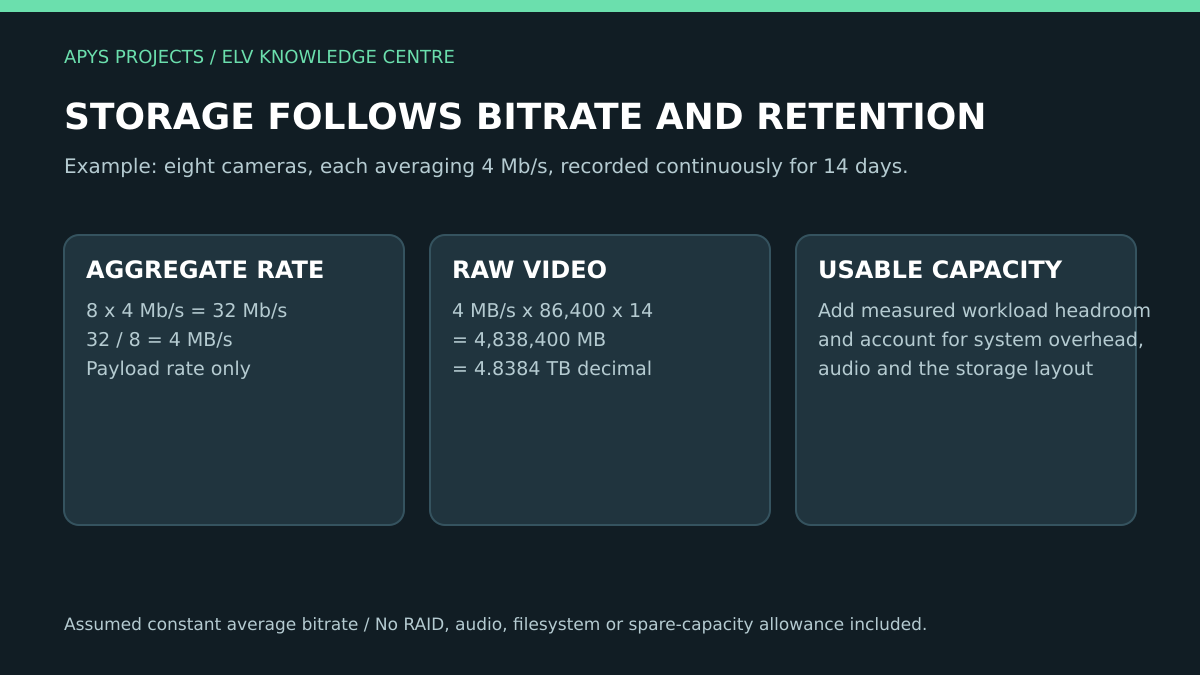
Resolution alone does not determine storage. Bitrate, frame rate, scene activity, compression configuration and retention all matter. Axis explains the relationship between compression, network use and useful recording quality, and notes that storage needs vary by installation. [5][6]
For a simple continuous-recording example, assume eight cameras each average 4 Mb/s for 14 days:
8 × 4 Mb/s ÷ 8 × 86,400 seconds × 14 days = 4,838,400 MB = 4.8384 TB in decimal units.
This is raw video payload under the stated average. It excludes audio, filesystem and recorder overhead, storage-layout effects, replication and spare capacity. A drive’s advertised capacity is not the same as the final usable recording allocation.
If recording is event-based, do not estimate savings from an arbitrary “10% motion” assumption. Measure representative activity and include pre-event and post-event recording. Verify retention by playback dates and recorder records after the real workload has accumulated.
PoE, bandwidth and recovery are part of the CCTV system
Include the selected cameras’ power requirements, the switch’s per-port capability, aggregate PoE budget and the uplink traffic in the design. Account for the normal operating modes, such as night illumination, described by the equipment manufacturer.
Use the APYS PoE budget guide for the power inventory. Keep a separate video bitrate estimate and check any concurrent live-view, recording and export traffic.
Test controlled power or network interruption using approved procedures. Observe recording gaps, time synchronisation, device recovery and any edge-recording reconciliation supported by the exact system. A UPS runtime figure needs the actual connected load, not just the camera count.
Privacy and cybersecurity need an operating policy
Limit the scene to the stated purpose and review unnecessary coverage of neighbouring or sensitive areas. Decide who can view, export, delete or change settings. Set retention through an approved policy and applicable requirements; there is no universal number of days that suits every site.
Static and dynamic masking have different behaviours and compatibility limits. Axis describes these approaches in its privacy guidance. Verify the required mask in live view, recorded playback and exported evidence, including any privileged view. A mask’s appearance in one interface does not establish every data path. [7]
Use supported software, individual or role-based accounts, controlled remote access and a defined update process. Keep administrative credentials out of the printed BOQ and public drawings. Do not expose a recorder directly to the Internet merely to simplify a demonstration.
BOQ and handover checklist
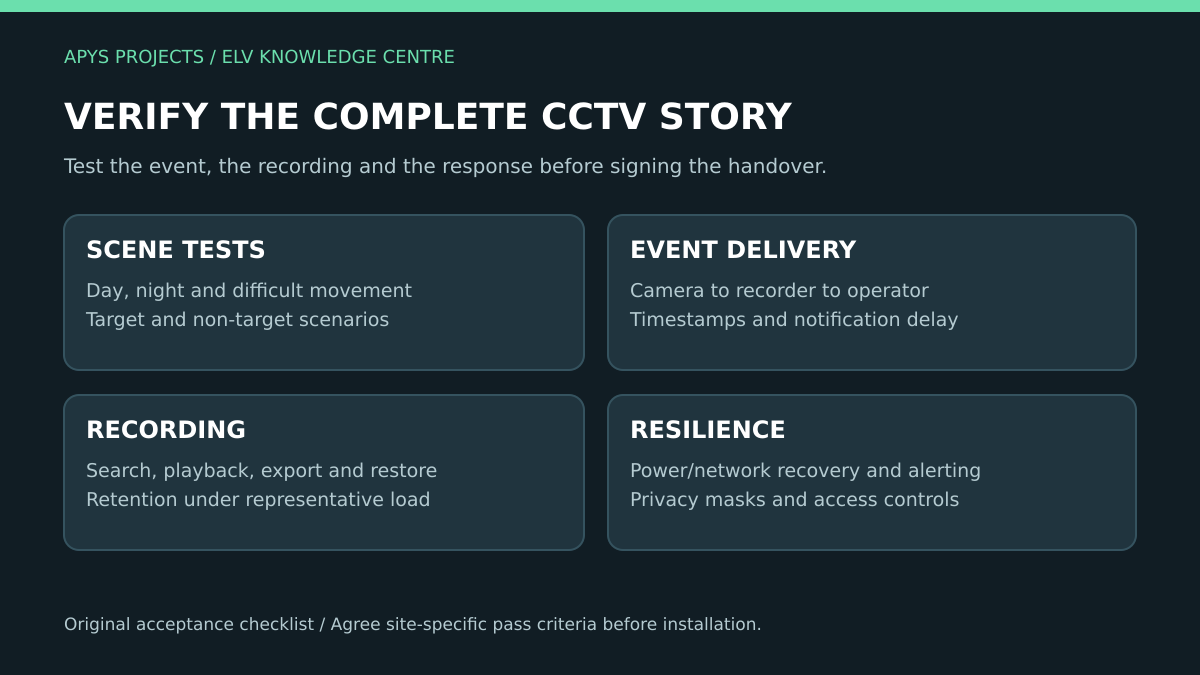
The scope should list camera models and positions, optics where applicable, mounts, cabling, power, network equipment, recording capacity, licences, commissioning and training. Add the defined analytic rules and test scenarios as deliverables.
Request a camera schedule with location IDs, an IP and port plan, configuration backups, source test results and representative exported clips. Record actual limitations rather than replacing them with an unqualified “AI working” statement.
Agree a maintenance plan for lenses, covers, mounting stability and scene changes. A new advertisement board, tree growth or changed parking pattern can alter an accepted scene. Periodic review should revisit the operational purpose as well as device health.
Frequently asked questions
Does AI CCTV guarantee that no event will be missed?
No. Performance depends on equipment, scene and conditions. Agree measurable acceptance criteria and keep human review and a response process.
Can an existing IP camera gain every AI feature through an NVR?
Only the supported camera/recorder/application combination can establish that. Demonstrate the exact event workflow rather than assuming compatibility from video playback.
Will fewer false alarms always mean better security?
No. More restrictive settings can also increase missed events. Review both target and non-target trial outcomes.
Is a larger megapixel number enough to choose a camera?
No. Match the scene, target detail, optics, lighting, supported analytics and recording configuration to the purpose.
Plan a useful CCTV upgrade
Contact APYS Projects with the site layout, current camera list and the events you need to detect. For the broader system choice, read the IP versus analog CCTV guide. A defined purpose and acceptance plan make the resulting quotation much easier to compare.
Sources and technical references
- Axis: Video Motion Detection 4 technical documentation
- Axis: Object Analytics technical documentation
- Axis: factors affecting video analytics performance
- ONVIF: Profile M for metadata and analytics events
- Axis: surveillance video compression
- Axis: video surveillance storage
- Axis: privacy in surveillance
- Axis: responsible and trustworthy AI in security
Product capabilities and project requirements must be checked against the selected model, software and applicable installation conditions. Source review date: 18 October 2026.