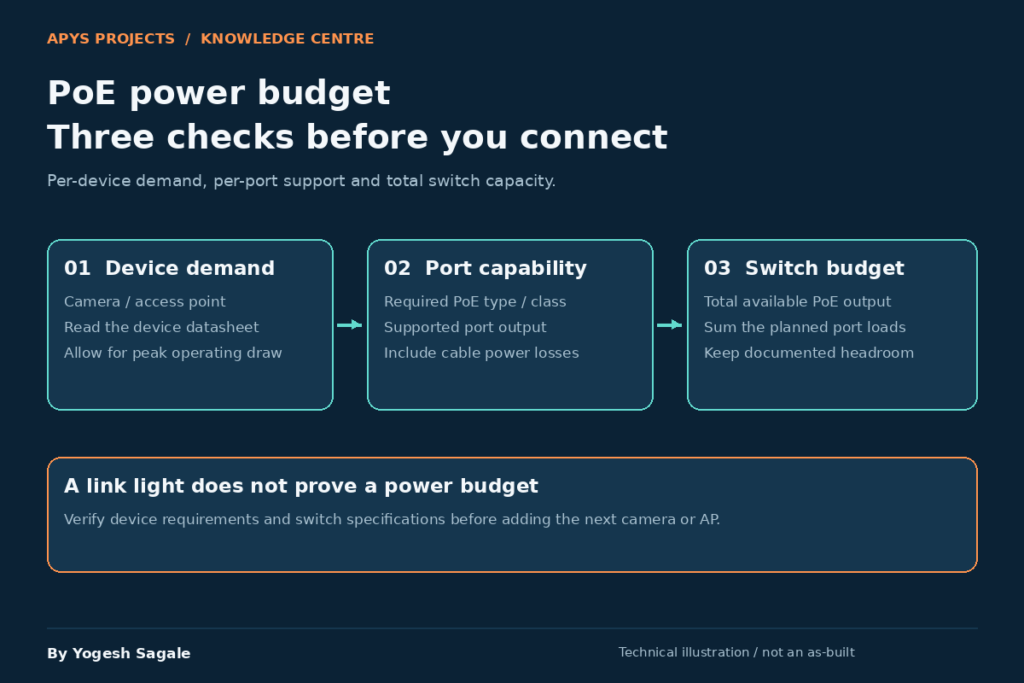
By Yogesh Sagale
You plug in a dozen IP cameras and a few Wi-Fi access points, and halfway through the install some devices reboot, others never power up, and the switch log shows overload warnings. One possible cause is an exhausted PoE power budget. Bad terminations, incompatible power standards, cable resistance and a failing power supply can produce similar symptoms, so confirm the switch logs before diagnosing the fault.
PoE (Power over Ethernet) is convenient, but a switch can only deliver so much power in total. This guide shows how to calculate that budget correctly, size your switch, and avoid the usual traps.
What Is a PoE Power Budget?
A PoE switch has two separate limits:
- Per-port limit: the maximum power a single port can deliver, set by the PoE standard.
- Total PoE budget: the maximum power the whole switch can supply across all ports combined, set by its internal power supply.
A "24-port PoE+ switch" does not mean all 24 ports can deliver 30 W at once. That would need 720 W. Budgets such as 190 W, 370 W or 410 W appear on some models; there is no universal budget for a port count. Read the exact switch and PSU datasheet. If the total demand exceeds the budget, the switch denies power to the last devices or shuts ports down.
PoE Standards at a Glance
| Standard | IEEE | Max power at switch port (PSE) | Guaranteed power at device (PD) | Typical use |
|---|---|---|---|---|
| PoE | 802.3af (Type 1) | 15.4 W | 12.95 W | Basic IP cameras, VoIP phones |
| PoE+ | 802.3at (Type 2) | 30 W | 25.5 W | Wi-Fi 5/6 APs, PTZ cameras |
| PoE++ (4PPoE) | 802.3bt (Type 3) | 60 W | 51 W | Wi-Fi 6E/7 APs, heated PTZ cameras |
| PoE++ (4PPoE) | 802.3bt (Type 4) | 90 W | 71.3 W | Large PTZ, LED lighting, thin clients |
The difference between the PSE figure and the PD figure is cable loss. Power is lost as heat in the copper, so the device receives less than the switch sends. This is why you cannot simply compare the device's rating to the port rating without thinking about the class.
Step-by-Step Calculation
Step 1: List every powered device
Make a table of every camera, access point, phone or other PoE device that will connect to the switch. Include future additions.
Step 2: Find the real power draw of each device
Use the manufacturer's datasheet. Look for these figures:
- Typical power consumption: the average draw in normal use.
- Maximum power consumption: the peak draw, such as when IR LEDs, heaters, motors or all radios are active.
- PoE class or required standard: af, at or bt.
Plan with the maximum figure, not the typical one. A camera that draws 6 W by day may draw 12 W at night with IR on, and a PTZ camera with a heater can double in winter.
Step 3: Account for the PoE class allocation
When a device connects, the switch detects it and negotiates a power level. Many switches initially reserve power using the device class. Some support LLDP or vendor-specific dynamic allocation. Actual measured consumption and reserved power can differ: consult the exact switch documentation rather than assuming a universal allocation policy.
| Class | Power allocated by switch (PSE) | Power available to device |
|---|---|---|
| 0 | 15.4 W | 12.95 W |
| 1 | 4 W | 3.84 W |
| 2 | 7 W | 6.49 W |
| 3 | 15.4 W | 12.95 W |
| 4 | 30 W | 25.5 W |
| 5 | 45 W | 40 W |
| 6 | 60 W | 51 W |
| 7 | 75 W | 62 W |
| 8 | 90 W | 71.3 W |
A camera that really draws 8 W but is classified as Class 3 can have 15.4 W reserved by a basic switch. Ten such cameras reserve 154 W even though they use only 80 W. This is one possible explanation for "the budget is full but the real load is low."
Step 4: Add up source-side allocations
Use one consistent basis: the documented maximum PSE requirement or the reservation that the intended switch actually uses. Multiply each allocation by its quantity and add the rows. Do not apply a fixed cable-loss percentage to a PD rating and treat the result as a procurement guarantee. If only PD consumption is known, obtain the supported type/class and allocation information before ordering.
Baseline PSE allocation = sum(quantity × documented PSE allocation)
PSE/class values already account for their defined delivery conditions: do not add cable loss again. Recorded idle consumption is useful for monitoring and UPS estimates, but does not establish that every port will be admitted at startup.
Step 5: Add a safety margin
For these examples, add a 25% planning allowance to the chosen baseline. This is a project planning choice, not an IEEE requirement. Specify future devices explicitly where known. The allowance helps cover:
- Future devices
- Cold-weather heater loads
- Design uncertainty and planned growth
- Peak draws that happen together (for example, all IR cameras turning on at dusk)
Planning target = Selected PSE demand or reservation baseline × 1.25
Step 6: Compare against the switch budget
Choose a switch whose total PoE budget is at least your required figure, and whose per-port capability meets the highest-power device.
Worked Example 1: Camera Network
A warehouse needs 16 fixed IP cameras and 2 PTZ cameras.
This is an illustrative design, not a measured APYS installation. Assume each fixed camera requires a Class 3 reservation and each PTZ requires Class 4. The source-side schedule is:
| Device | Count | PSE allocation each | Subtotal |
|---|---|---|---|
| Fixed cameras, assumed Class 3 | 16 | 15.4 W | 246.4 W |
| PTZ cameras, assumed Class 4 | 2 | 30 W | 60 W |
Class-reservation result: If all 16 fixed cameras reserve Class 3 and both PTZs reserve Class 4, the baseline is 16 × 15.4 + 2 × 30 = 306.4 W. With the same 25% allowance, the target is 383 W. A 370 W switch could cover the 306.4 W reservation but does not meet this planning target. Select a model offering at least 383 W in the intended PSU configuration, or validate a documented lower negotiated allocation. There are 18 powered endpoints: reserve additional physical ports for growth and check how uplinks are provided.
Worked Example 2: Access Points
An office plans 12 Wi-Fi 6 access points.
Assume all 12 APs require a Class 4 source-side reservation. These are hypothetical devices; the Wi-Fi generation alone does not determine the power class.
Calculation: If all 12 APs reserve Class 4, the reservation baseline is 360 W and the planning target is 450 W. A 370 W budget covers that reservation with little spare power, but falls short of the target. A suitable 480 W or higher model meets this example target. Splitting APs across switches reduces the impact of one switch failure; it does not make each single-connected AP redundant.
Be careful with newer Wi-Fi 6E and Wi-Fi 7 APs. Some require 802.3bt to run all radios and USB ports at full capability. On a PoE+ port, the AP may disable features or run in a reduced mode.
Worked Example 3: Mixed Deployment
For this hypothetical deployment, use 10 fixed cameras, 2 PTZ cameras, 6 APs and 8 phones. Assume the PTZ maximum is 30 W at the powered device; verify the actual manufacturer requirement rather than selecting from its product category.
Port-count check: This example has 10 + 2 + 6 + 8 = 26 powered endpoints. A single 24-port switch cannot connect them all, regardless of its power budget. Use a suitable 48-port switch or multiple switches; account for uplink ports as well.
Power-standard correction: A PTZ requiring 30 W at the device exceeds the 25.5 W available under Type 2. Specify the camera manufacturer's required Type 3/class or approved injector. Do not confuse a 30 W PSE rating with 30 W delivered to the camera.
For an illustrative reservation baseline, assume fixed cameras Class 3, PTZs Class 5, APs Class 4 and phones Class 2: 154 + 90 + 180 + 56 = 480 W. The 25% planning target becomes 600 W. These classes are assumptions, not declarations about unspecified products. Confirm each datasheet and negotiation behaviour. With multiple switches, calculate each switch budget separately: unused watts on an independent switch A cannot feed a port on switch B. A documented power-sharing system is a separate design: verify its cables, topology, supported models and failure-mode budget; ordinary data stacking alone does not establish shared PoE power.
Things That Change the Result
1. Cable length and quality
PoE loses power as current travels through cable resistance. Longer, thinner or hotter conductors increase loss; there is no sudden universal threshold at 80 m.
- Use solid copper cable (pure copper), not CCA (copper-clad aluminum). CCA has higher resistance, runs hotter and often fails PoE at length.
- Cable category alone does not guarantee conductor size or lower loss. Check conductor gauge, DC resistance, resistance unbalance and the cable manufacturer's PoE suitability. Standards-compliant Cat5e can support PoE; choose the category for data rate, installation conditions and future use.
- Avoid bundling large numbers of high-power cables tightly together, as heat builds up. This matters most with 802.3bt.
2. Class-based vs. actual-use allocation
Allocation is model- and configuration-dependent. Supported LLDP power negotiation can refine a reservation, but is not a promise that measured watts will equal reserved watts. Inspect both values. The design must allow startup and negotiated maximum demand, not only a quiet daytime reading.
3. Power priority
Most managed switches let you set port priority (critical, high, low). If the budget runs out, low-priority ports are shut off first. Assign:
- Critical: core access points and key cameras
- Low: non-essential devices such as test gear; a phone used for emergency calls may deserve high priority
4. Environmental load
Outdoor cameras with heaters, blowers or IR illuminators draw much more in cold weather and at night. Use the heated or night-mode maximum in your calculation, not the daytime typical.
5. Midspans and injectors
If your switch has no PoE or too little, a PoE injector or midspan adds power to a single link, and each has its own power supply. These do not draw from the switch budget, but they add equipment, cabling and points of failure.
6. UPS runtime
Power budget also affects battery backup. A 400 W PoE load on a UPS drains it quickly. Size the UPS for measured or manufacturer-specified AC input consumption, including the switch, powered endpoints and other backed-up equipment. If estimating from DC outputs, AC input is approximately (PSE output + switch internal load) ÷ PSU efficiency. Do not divide an already measured AC-input value again. Check both UPS watts and VA, and use the manufacturer's runtime curve at the expected load. A PoE budget is an output ceiling, not the switch's continuous AC consumption.
Quick Formula Summary
1. Preferred baseline: documented PSE requirement or class reservation
2. Total PoE load            = Σ (power at switch × quantity)
3. Planning target           = Selected baseline × 1.25
4. Check: Planning target ≤ usable budget in intended PSU/failover mode
5. Check: PD maximum ≤ delivered power for the negotiated type/class
6. Check: Device and port support the required type/class and power mode
Common Mistakes
- Counting ports instead of watts. Whether a 48-port switch can power 48 high-draw devices depends on the installed PSU and usable budget.
- Using typical power instead of maximum. Night-time IR and heaters push draw higher.
- Ignoring class allocation. The switch may reserve far more than the device uses.
- Forgetting cable loss. Longer runs need more power at the source.
- Using CCA cable. Cheap cable causes overheating and drops.
- No headroom. A fully loaded switch fails the moment you add one more device.
- Mismatched standards. An 802.3bt AP on an 802.3at port may boot with limited features, or not at all.
- Skipping the UPS calculation. The switch may last far less on battery than expected.
- Mixing vendor "passive PoE" with standard PoE. Passive 24 V injectors can damage standard devices.
- No monitoring. Check actual consumption in the switch interface, as it often shows a gap between allocated and used power.
Selection decisions: check the schedule, not a camera-count label
- Eight devices reserving Class 3 require 8 × 15.4 = 123.2 W before any project allowance. A 120 W budget does not cover that reservation.
- Twelve Class 4 devices require 360 W before the example allowance, or 450 W with 25% added.
- For mixed deployments, calculate each port and each independent switch separately. A high total watt rating cannot repair an incompatible port or too few ports.
Pre-Purchase Checklist
- [ ] List of all devices and their maximum power
- [ ] PoE standard required by each device
- [ ] Documented channel length including patch leads, within the supported Ethernet/application limits
- [ ] Standards-compliant copper channel selected for data rate, PoE type, resistance, temperature and installation conditions
- [ ] Source-side baseline plus an explicitly agreed project allowance; 25% is used only in these examples
- [ ] Switch total PoE budget exceeds the requirement
- [ ] Per-port capability matches the highest-power device
- [ ] Switch supports LLDP / dynamic power allocation (preferred)
- [ ] Power priority configured for critical devices
- [ ] UPS sized for total switch load
- [ ] Spare ports and spare budget for growth
Conclusion
Calculating a PoE budget is simple arithmetic, but it has to be done with the right numbers: maximum draw, class allocation, cable loss and headroom. Choose a documented PSE demand or reservation baseline, apply the agreed growth allowance, and select a switch whose usable total budget, delivered per-port power, and physical port count all cover the deployment. Validate it at commissioning.
Save the calculation with the bill of materials, then compare it against the installed system during commissioning. A correct budget does not replace cable testing or device compatibility checks.
Commissioning: Prove the Budget on Site
- Save a per-port schedule with device model, class, maximum PD demand, expected PSE allocation, cable ID and priority.
- Confirm usable power with the installed PSU, ambient temperature and redundancy setting. Some redundant configurations reduce usable budget; read the model documentation.
- Reboot all endpoints together in a controlled maintenance window. Confirm every required device is admitted.
- Test night IR, heaters where applicable and full AP operating mode. Check allocated and measured power, overload events and cable faults.
- Test UPS runtime with the real load. Test a PSU failure only if the installation is designed for it and a maintenance window is agreed.
- Record the measured results and approved growth capacity in the handover pack.
Worked failover decision: normal operation can pass while resilience fails
Suppose a documented switch configuration provides 480 W in normal operation but only 240 W in the selected single-PSU failure mode. These are invented planning values, not specifications for a named switch. The 306.4 W camera reservation above fits 480 W, but exceeds 240 W by 66.4 W. The system therefore cannot be accepted as keeping every camera powered after that failure merely because it passes in normal operation.
If the approved degraded-service plan keeps all 16 fixed cameras and sheds both PTZs, the remaining reservation is still 246.4 W: it exceeds 240 W by 6.4 W. Recalculate the actual retained endpoints, priorities and required allowance, or change the power design. Confirm the precise vendor failure behavior; do not pull a live PSU merely to experiment.
Fault isolation and evidence
- Power denied, little measured load: compare allocated versus consumed watts, per-port caps, class and logs. A low idle reading does not prove free allocatable budget.
- Reboots at night: correlate IR/heater events with port logs and PSU alarms. Test the endpoint with a known compatible source and known-good short cable in an agreed maintenance window to separate channel and power-source causes.
- AP boots with fewer radios: check its required full-feature power mode, negotiated class/LLDP state and firmware documentation before changing power settings.
- Only a long run fails: inspect terminations and test the channel, including DC resistance and resistance unbalance where the tester supports them. A basic wire-map pass is insufficient evidence of PoE performance.
Copyable handover record
For each port record: switch/PSU model and firmware; normal and failure-mode usable budget; port and cable IDs; endpoint model and enabled features; required type/class; maximum PD specification; documented PSE reservation; allocated and measured watts; priority; test conditions and timestamp; fault logs; pass/fail result; approved remaining growth. Attach datasheets and test results so another technician can reproduce the decision.
Editorial review: 28 October 2026. All numerical deployments in this guide are illustrative. No site measurement, product certification or customer outcome is implied.
For the difference between powered Ethernet, direct video extenders and network audio, read Ethernet, PoE, video and audio explained.
Sources and Further Reading
- Ethernet Alliance: IEEE 802.3bt overview and power classes.
- Cisco: PoE detection, allocation and negotiation.
Related APYS Guides
- PoE Switch and Network Switch Guide.
- Structured Cabling for Offices.
- Office WiFi Access Point Placement.
Need a PoE Schedule for Your Office or Society?
APYS Projects handles network planning, structured cabling, PoE switching, CCTV and WiFi installation, testing and documented handover. Share your camera and AP models, counts and cable routes so the switch can be selected against the actual deployment.
Email: Purchase@apysprojects.com Phone: +91 9921490342 Request a project quote