Editorial review: 3 November 2026. Original APYS illustration and technical visuals. Terminal names are typical examples; always follow the exact controller and device manuals. Examples are hypothetical, not APYS customer measurements.
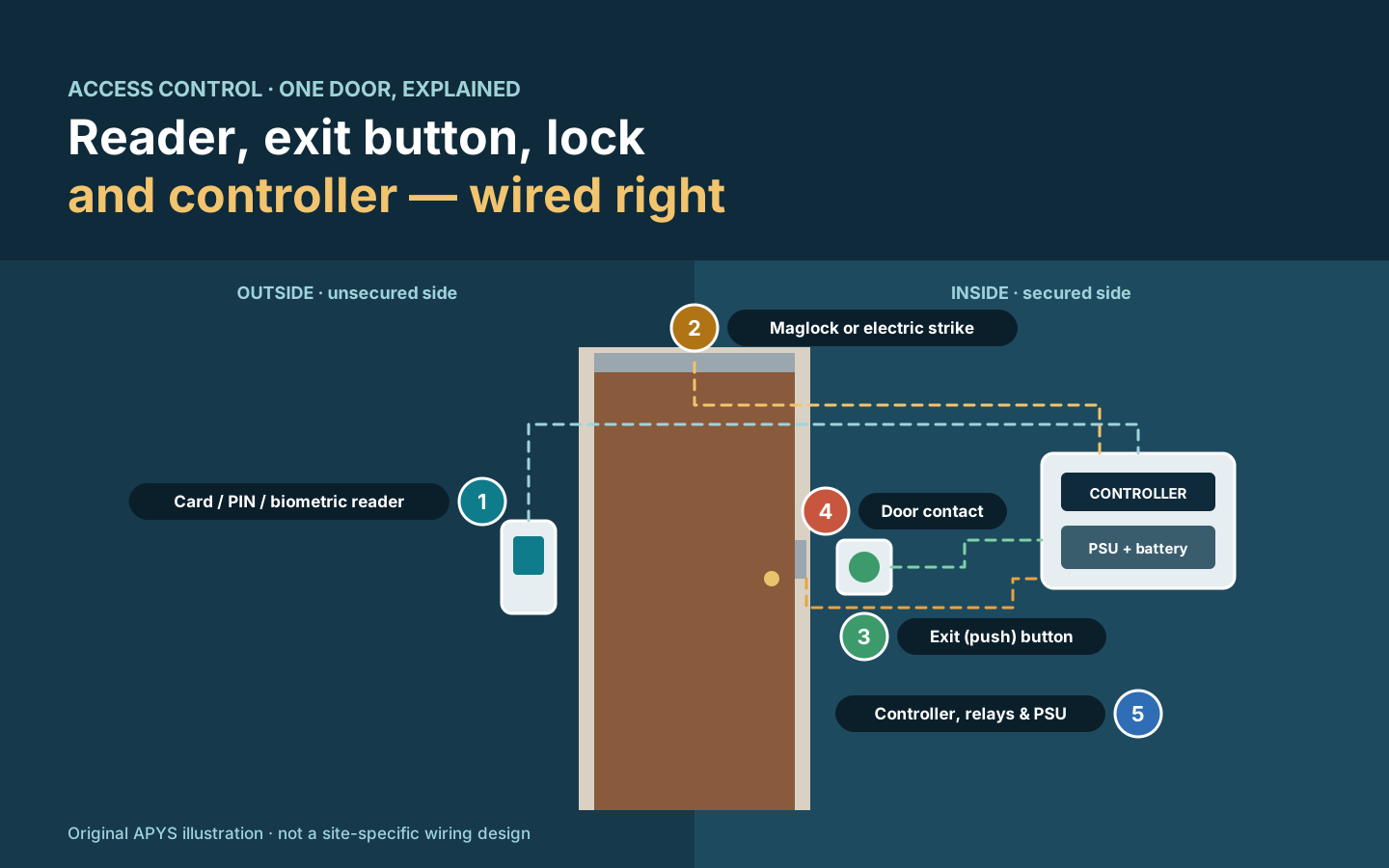
Most access control problems on site are not software problems. They come from how the reader, exit button, door contact and lock are connected to the controller: a reader on the wrong protocol, an exit button wired to the wrong contact, a maglock on the wrong relay terminal, or a standalone unit that exposes the door-release relay on the outside wall.
This guide explains each connection in plain language: how readers talk to controllers (Wiegand and OSDP), what an exit or push button actually does, what NO, NC and COM mean, how locks are wired to the relay, and the difference between a reader with an in-built controller and a separate controller. It ends with the access control brands commonly specified in India and a commissioning checklist.
In this guide
- The parts of one controlled door
- How the reader connects: Wiegand and OSDP
- Exit (push) buttons and other exit devices
- NO, NC and COM explained
- Wiring the lock to the controller relay
- In-built controller vs separate controller
- Power, fire alarm interface and safety
- Access control brands in India
- Commissioning and handover checklist
- Quick reference
- Worked example
- Frequently asked questions
1. The parts of one controlled door
A single access-controlled door normally has six parts. Understanding what each one does makes the wiring logical rather than a list of colours to copy.
- Reader — card, PIN, mobile or biometric. It identifies the person and sends the credential to the controller. It sits on the unsecured side.
- Controller — the decision maker. It checks the credential against its user database and schedules, then operates a relay to release the lock. It also logs events.
- Lock — usually an electromagnetic lock (maglock) or an electric strike. The relay switches its power.
- Exit device — a push button, no-touch sensor or motion detector on the secured side that lets people leave.
- Door contact — a magnetic reed switch that tells the controller whether the door is actually closed, so it can detect forced or held-open doors.
- Power supply and interfaces — a correctly sized supply with battery backup, plus an interface to the fire alarm system where required.
2. How the reader connects: Wiegand and OSDP
The reader-to-controller link is where most security weaknesses hide. Two interfaces dominate in India today.
Wiegand
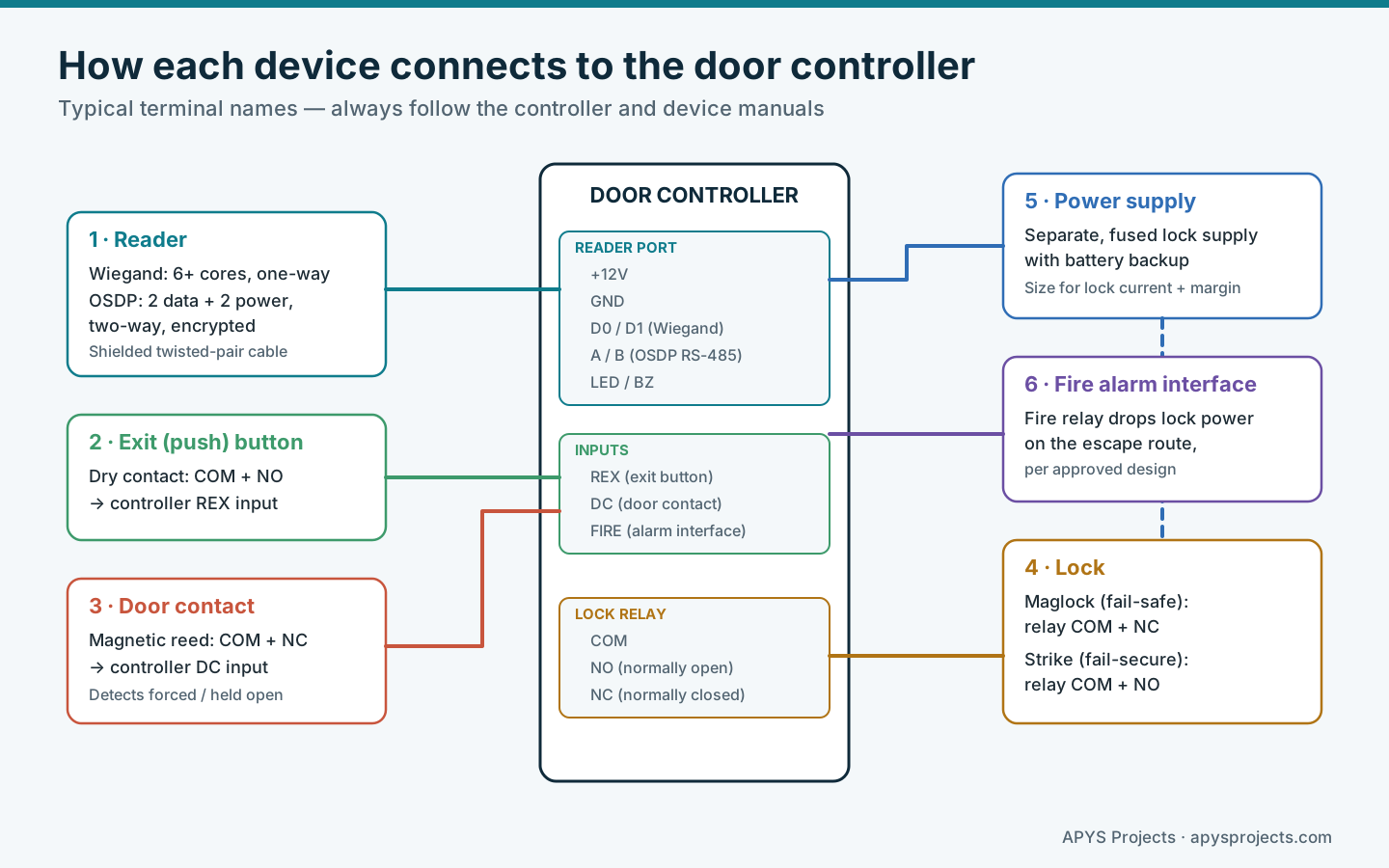
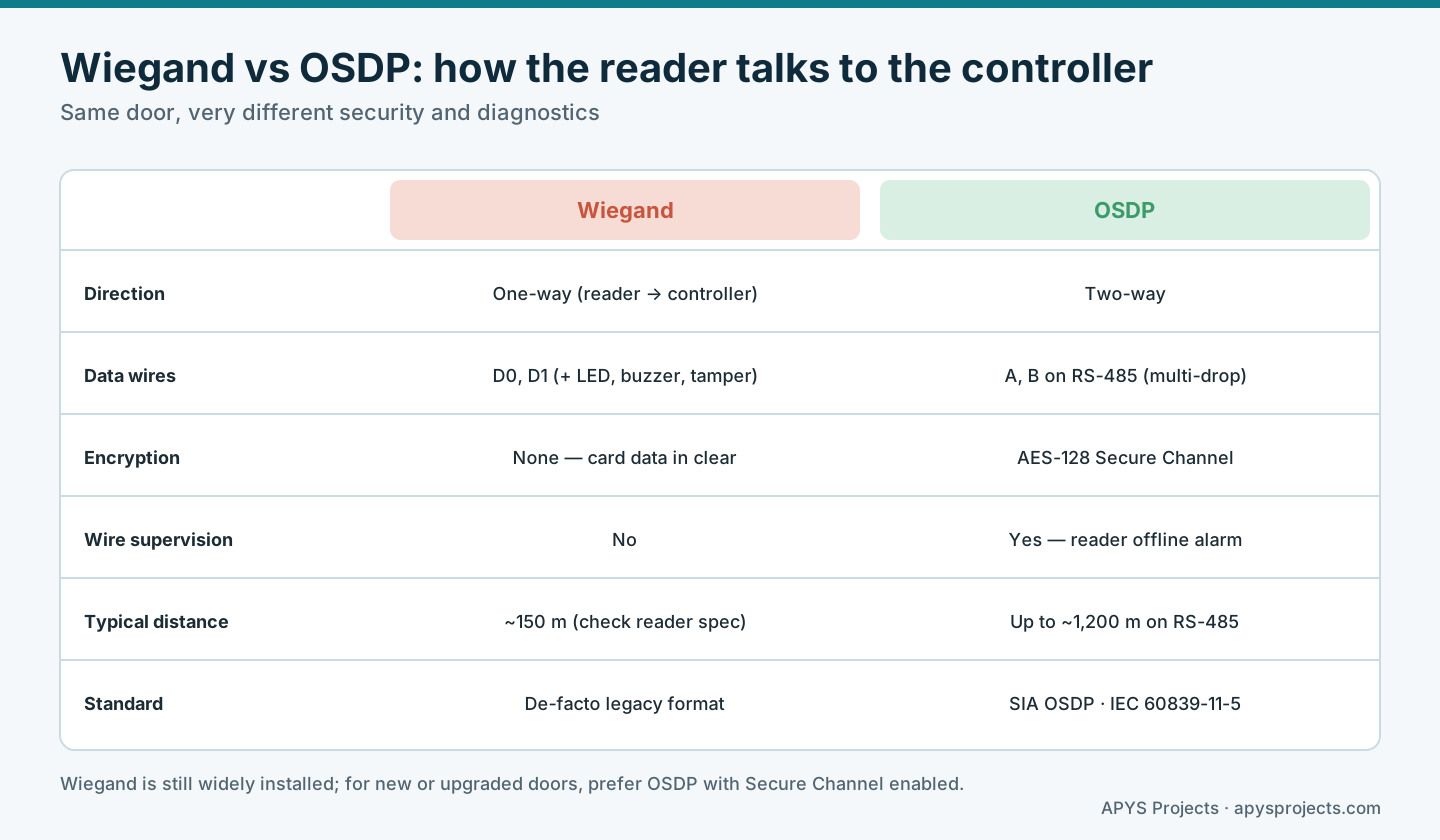
Wiegand is the long-established reader interface. The reader sends the card number to the controller on two data lines, D0 and D1, with extra cores for power, ground, LED, buzzer and sometimes tamper — typically six or more cores in total. A common format is 26-bit, although many other bit lengths exist, so the reader and controller must be set to the same format.
Wiegand is simple and almost universally supported, but it is one-way and unencrypted. The controller cannot supervise the reader, and card data travels in clear text, which makes it vulnerable to interception and replay with a device hidden behind the reader. Cable length is limited; many manufacturers quote around 150 m with suitable cable, so check the exact reader and controller specification.
OSDP
OSDP (Open Supervised Device Protocol) is the modern replacement, developed and maintained by the Security Industry Association (SIA) and published internationally as IEC 60839-11-5. It runs on RS-485: two data wires (A and B) plus power, with several readers able to share one bus. Runs of up to about 1,200 m are possible when installers follow good RS-485 practice — twisted-pair cable and 120 Ω termination at the bus ends.
OSDP is two-way and supervised, so the controller knows immediately if a reader goes offline or its cover is removed. With Secure Channel enabled, communication is encrypted with AES-128. The controller can also change reader LEDs, buzzers and settings centrally. When OSDP is specified, make sure Secure Channel is actually turned on — OSDP without it loses much of the benefit.
Other connections you will meet: some readers and biometric terminals connect over TCP/IP directly to software, and some RS-485 readers use proprietary protocols that only work with one brand of controller. Record which protocol each reader uses in the door schedule.
3. Exit (push) buttons and other exit devices
The exit button on the inside of the door is usually a request-to-exit (REX) device. Pressing it does not release the lock directly; it closes a dry contact connected to the controller’s REX input, and the controller then operates the lock relay for the configured release time and logs an exit event. Because the controller knows the exit was legitimate, it does not raise a forced-door alarm when the door opens.
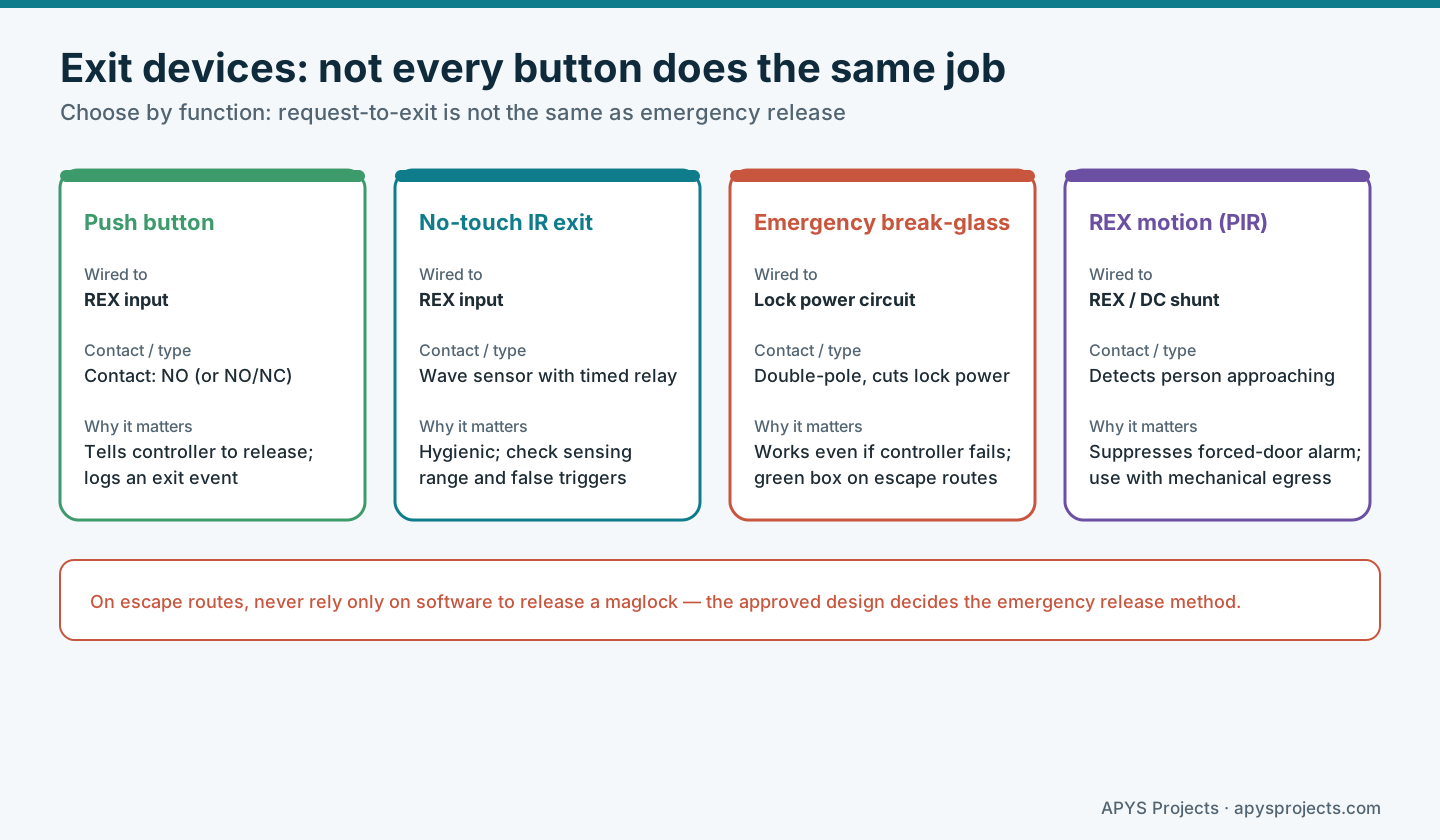
- Push button: the most common REX device, usually with an NO contact (some offer NO and NC).
- No-touch IR exit: a wave sensor with an adjustable timed relay. Check sensing range so people walking past do not trigger it.
- Emergency break-glass (green box): a different job entirely. It is normally wired directly into the lock power circuit so that operating it cuts power to a maglock even if the controller has failed. It is a safety device, not a convenience exit.
- REX motion sensor (PIR): detects a person approaching from inside and tells the controller to expect the door to open. It is commonly used with doors that have mechanical free exit, such as a lever handle with an electric strike.
For a maglock on an escape route, the exit method must be part of an approved design. An exit button that only signals the controller depends on the controller and software working; that is why emergency release devices and fire alarm interfaces are wired to remove lock power independently.
4. NO, NC and COM explained
Every switch contact and relay in an access control system is described by what it does at rest — when nothing is pressed and the relay coil is not energised.
- COM (common) is the moving contact that connects to either NO or NC.
- NO (normally open) is disconnected from COM at rest and closes when the button is pressed or the relay activates.
- NC (normally closed) is connected to COM at rest and opens when the button is pressed or the relay activates.
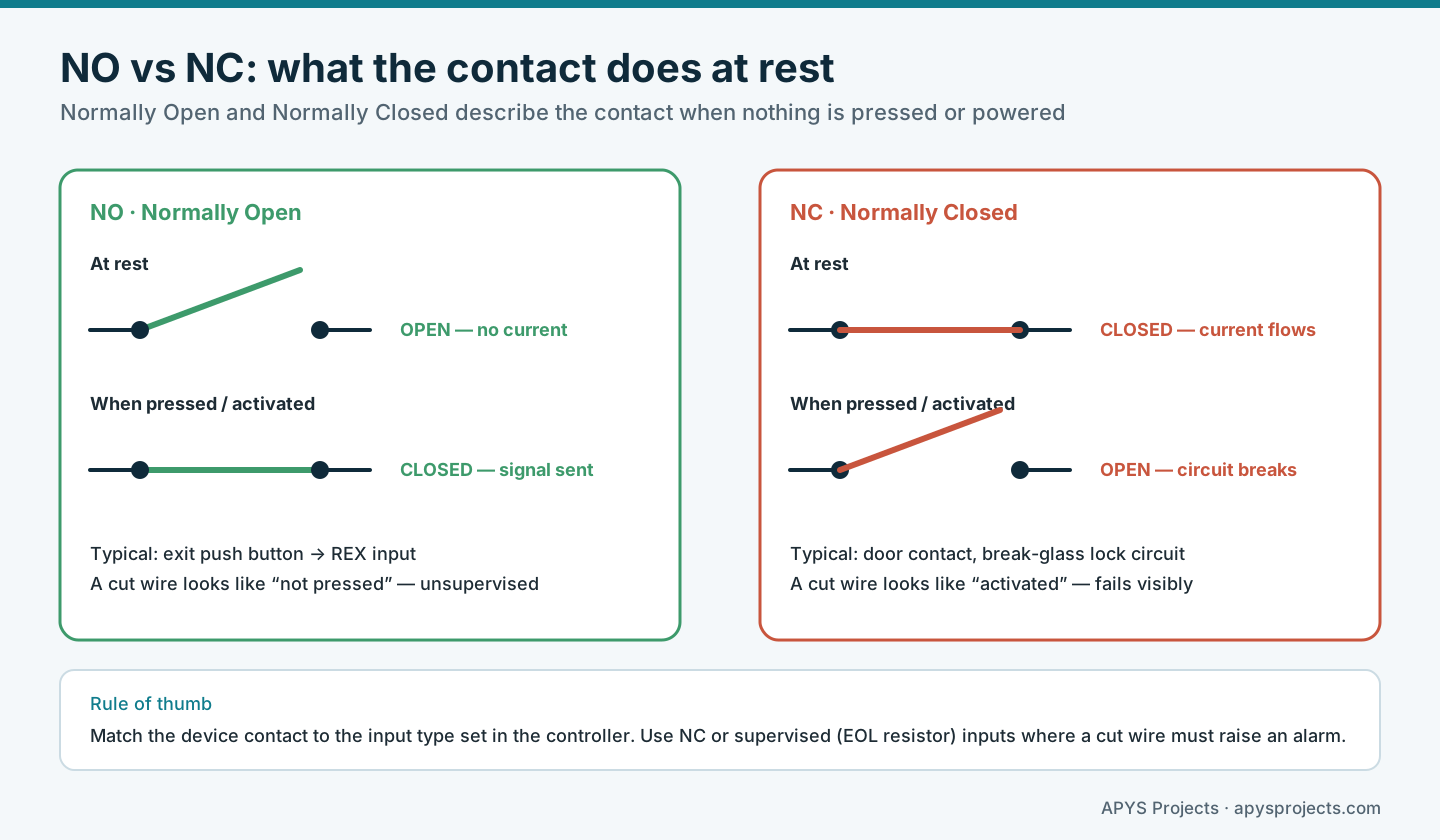
The practical difference shows up when a wire is cut. On an NO exit button, a cut wire looks exactly like a button that is not pressed, so nobody notices until someone cannot get out. On an NC door contact, a cut wire looks like the door opening, so the fault raises an alarm. Where an input matters for security, use NC devices or supervised inputs with end-of-line (EOL) resistors, which let the controller tell the difference between normal, active, cut and shorted wiring.
Always set the controller input type (NO, NC or supervised) to match the device. A mismatch is one of the most common commissioning faults: the door appears permanently “open” or the exit button appears permanently pressed.
5. Wiring the lock to the controller relay
The controller’s lock relay has COM, NO and NC terminals. Which pair you use depends on the lock type:
- Maglock (fail-safe): it holds the door while powered and releases when power is removed. It is wired through COM and NC, so the lock is powered at rest and the relay breaks the circuit to release the door.
- Electric strike (usually fail-secure): it stays locked without power and releases when powered. It is wired through COM and NO, so the relay supplies power only during the release time. Fail-safe strikes also exist; check the model.
Further points that cause real faults: power the lock from a dedicated, fused supply sized for the lock current plus margin; check voltage drop on long runs; fit the back-EMF suppression diode or varistor the lock or controller manufacturer requires, because inductive kick from a lock coil can damage relay contacts and controller electronics; and keep lock power and reader data cables separated where practical. Our fail-safe vs fail-secure guide explains why the choice of lock is a door-level safety decision, not just a wiring choice.
6. In-built controller vs separate controller
Many readers and biometric terminals sold in India have an in-built controller: the user database, the decision logic and the lock relay are all inside the unit on the wall. Others are only readers and connect to a separate controller installed on the secure side, often in a ceiling void, riser or rack.
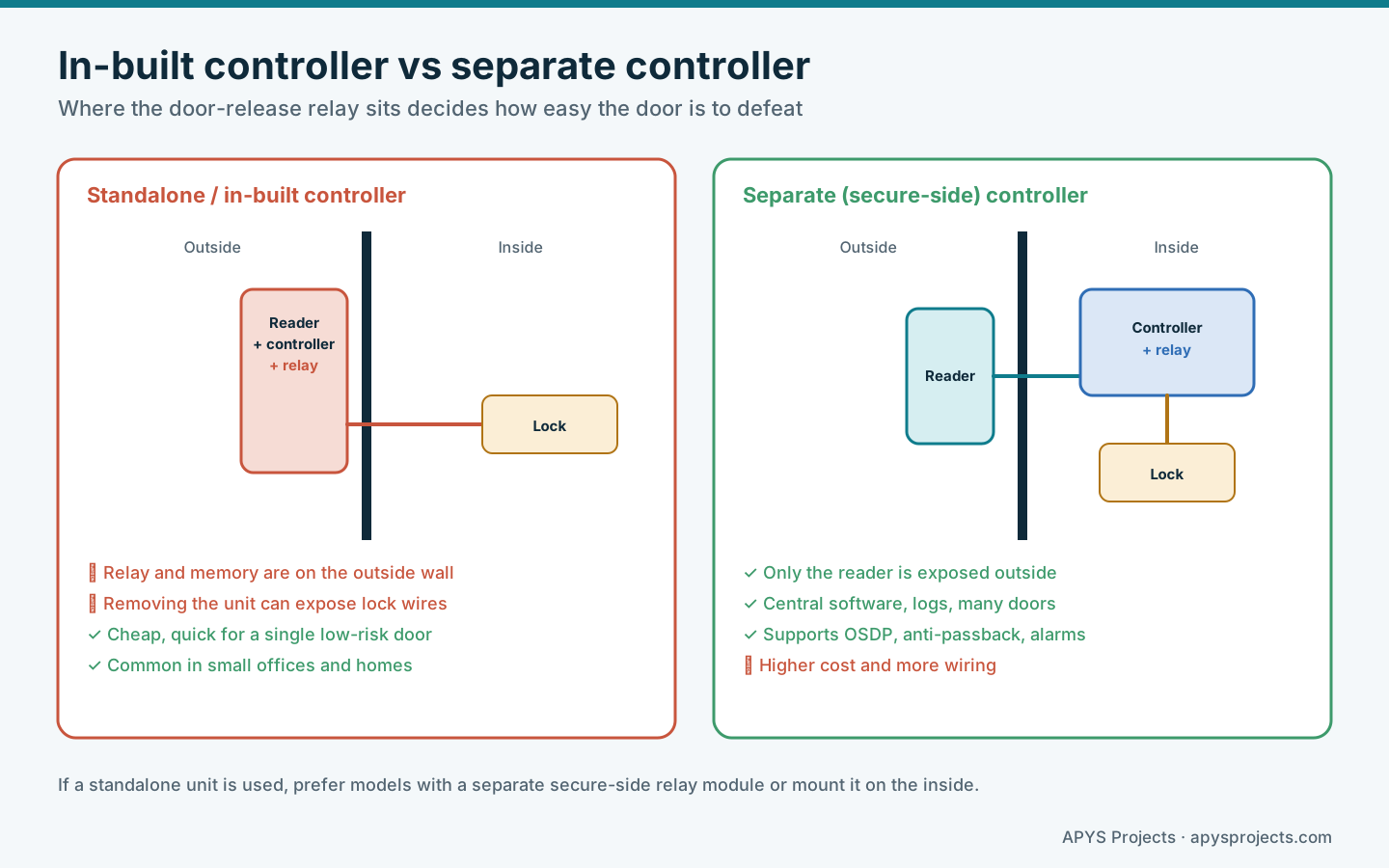
The key issue is where the door-release relay sits. If a standalone unit with its relay is mounted on the unsecured side, someone who removes it from the wall may reach the lock wiring and release the door without a credential. Better standalone designs offer a separate secure-side relay or “access control module” that sits inside the protected area, or the unit itself is mounted inside with only a remote reader outside.
| Factor | In-built / standalone | Separate controller |
|---|---|---|
| Typical use | One to a few doors, small office, home, attendance | Multi-door offices, societies, campuses |
| Relay location | Inside the wall unit unless a secure module is used | On the secure side |
| Cost and wiring | Lower | Higher |
| Features | Basic schedules, local logs | Central software, anti-passback, interlocks, alarms, OSDP |
| If the network fails | Usually keeps working locally | Good controllers keep working with stored data |
A middle option is the IP or “edge” door controller: a small networked controller per door, mounted on the secure side, with a simple reader outside. It suits buildings that want central management without a large panel.
7. Power, fire alarm interface and safety
Access control touches life safety. On escape routes, the approved design decides how the door releases in an emergency — commonly a fire alarm relay that drops maglock power and an emergency break-glass that does the same independently. Do not depend on software alone to release a maglock in a fire.
Battery backup keeps the controller and locks working through short outages, but the design must also define what happens when the battery runs out. Record the supply source, battery capacity and expected backup time for each door, and test the fire interface during commissioning with the fire alarm contractor present.
8. Access control brands in India
India’s access control market includes both Indian manufacturers and global brands. Below are brands frequently specified in Indian projects, with the kind of site each is commonly chosen for. The order is not a ranking, and “best for” is general guidance; the right choice depends on your doors, users, integrations and local support.
1. Matrix Comsec (COSEC)
Best for: large enterprises, industrial sites and manufacturing plants.
A major Indian brand based in Vadodara. Its COSEC range covers door controllers, fingerprint and face recognition readers, and software modules for attendance, visitor and cafeteria management.
2. eSSL
Best for: small and medium businesses and budget-conscious offices.
Based in Bengaluru, eSSL is one of the most widely recognised brands in India for cost-effective fingerprint, face recognition and RFID card access and attendance systems.
3. ZKTeco
Best for: warehouses, commercial buildings and projects needing broad compatibility.
A large global manufacturer with a strong Indian subsidiary. Its range includes palm, face and fingerprint terminals, turnstiles and walk-through metal detectors at competitive prices.
4. Mantra Softech
Best for: government projects, citizen identity and large-scale workforce tracking.
An Ahmedabad-based manufacturer of biometric identity and security products. Its fingerprint and iris scanners are widely used for Aadhaar-based authentication.
5. HID Global
Best for: high-security corporate offices, banks and IT campuses.
A premium global brand known for secure, encrypted RFID and mobile credentials and readers, such as its iCLASS SE range, and widely specified for enterprise physical security.
6. Suprema
Best for: data centres, research labs and high-security zones.
A South Korean brand known for advanced fingerprint and face recognition, managed through its BioStar platform.
7. Honeywell
Best for: airports, large campuses and integrated enterprise security.
A global brand offering enterprise-grade access control that integrates with fire safety, CCTV and building management systems.
8. Godrej Security Solutions
Best for: banks, institutions and commercial real estate.
A long-established Indian brand that combines physical security products with electronic access control, biometric and mobile-credential systems.
9. Spectra Technovision
Best for: mid-size offices, factories and institutions that need attendance, canteen and visitor management alongside access control.
An Ahmedabad-based Indian company offering time attendance, access control, canteen management and visitor management products.
Other names you will meet in Indian tenders include Bosch, Dahua, Gallagher, Hikvision, IDCUBE, IDEMIA, Johnson Controls (including Tyco), Paxton and Realtime Biometrics.
How to choose between them
Choosing a brand is less about the name and more about fit:
- Local support: availability of trained partners, spares and firmware updates in your city.
- Reader security: support for OSDP with Secure Channel and secure credential technologies, not only legacy proximity cards.
- Controller placement: availability of secure-side relay modules or separate controllers.
- Integration: links with attendance, visitor management, CCTV, lifts and fire alarm.
- Data protection: biometric and attendance data are personal data, so check where data is stored, who can access it and how retention is controlled under India’s data protection rules.
- Scalability: licensing and software limits as doors and users grow.
9. Commissioning and handover checklist
- Every reader reads valid credentials and rejects invalid ones; OSDP Secure Channel is confirmed active where specified.
- Exit buttons release the door for the configured time and log an exit event without raising a forced-door alarm.
- Door contacts report correctly; forced-open and held-open alarms work.
- Inputs are set to the right type (NO, NC or supervised) and a cut wire is detected where it should be.
- Lock relay wiring matches the lock type; suppression devices are fitted as required.
- Power failure, battery backup and fire alarm release are tested and witnessed.
- Admin passwords are changed, installer accounts are removed, and the database is backed up.
- The door schedule records reader protocol, controller, lock type, power source and exit method for every door.
Quick reference
| Device | Typical connection | Common mistake |
|---|---|---|
| Reader | Wiegand D0/D1 or OSDP A/B | Format mismatch; OSDP without Secure Channel |
| Exit button | COM + NO to REX input | Wired to lock power instead of REX, so no log |
| Door contact | COM + NC to DC input | Not installed, so no forced-door alarm |
| Maglock | Relay COM + NC | No independent emergency release |
| Electric strike | Relay COM + NO | Latch and keeper not aligned |
Worked example: upgrading a hypothetical office entrance
A hypothetical 40-person office uses a biometric terminal with an in-built controller mounted outside the main glass door, a maglock and an NO push button wired straight into the maglock power. Exits are not logged, and removing the terminal from the wall exposes the lock wiring.
The revised design keeps the biometric terminal for enrolment and attendance but connects a reader outside to a separate controller on the secure side over OSDP with Secure Channel. The push button is rewired to the REX input, a door contact is added, and an emergency break-glass and fire alarm relay remove maglock power independently. Commissioning tests a cut exit-button wire, a forced door, a power failure and a fire alarm signal before handover.
Frequently asked questions
Should the exit button be NO or NC?
Most exit buttons connect NO to the controller’s REX input. Some designs use NC or supervised inputs so that a cut wire is detected. Follow the controller manual and set the input type to match.
Can I connect the exit button directly to the maglock?
It may release the door, but the controller will not log the exit and may raise forced-door alarms. Emergency release devices are a separate safety function and should follow the approved design.
Is Wiegand still acceptable?
It is still widely used and works, but it is unencrypted and unsupervised. For new installations or upgrades, OSDP with Secure Channel is the better choice where readers and controllers support it.
Are biometric terminals with in-built controllers unsafe?
Not by default, but mounting one with its relay on the outside of the door creates a weakness. Use a secure-side relay module or a separate controller for doors that matter.
Which access control brand is best in India?
There is no single best brand. Compare local support, reader security, controller options, integration and data protection for your specific site.
Related APYS guides
- Fail-Safe vs Fail-Secure Locks: Door Behaviour During Power Loss and Emergencies
- Smart Home Security and Automation: A Complete Planning Guide
- ELV System Guide for Societies and Commercial Buildings
- How to Calculate PoE Power Budget for Cameras and Access Points
Discuss your access control requirement
APYS Projects provides ELV, electrical and networking services across India. Use our contact page to describe your doors, existing hardware and the outcome you need. Share admin credentials and user data only through an agreed protected channel.
Sources and technical references
- Honeywell: What is OSDP?
- Schlage: Reader controllers explained
- Altium: Why a single-PCB standalone door access controller is not a secure design
- Allegion: FAQs about fail-safe and fail-secure
- Mordor Intelligence: India access control hardware market companies
- Biometric Update: Spectra Technovision company profile