By Yogesh Sagale | APYS Projects
Practical guidance for office LAN, CCTV, ELV and small server-room installations in Pune and beyond.
Open the door of a neglected server rack and you’ll know within seconds. Cables hang in loops, patch cords of six different colors cross like spaghetti, and nobody can say which port feeds which switch. Rack organisation should make connections traceable and keep equipment access and ventilation clear. Its appearance alone does not prove network performance or cooling.
This guide covers the three pillars of rack dressing: rack layout, patch panels and cable management. It also covers the habits that keep a rack clean after day one.
What the APYS Group Surya rack record shows
The existing Group Surya, Indapur project record documents rack dressing and electrical work by APYS Projects. The photographs below are reused from that record. They show physical cable routes, not certification results or measured performance improvements.
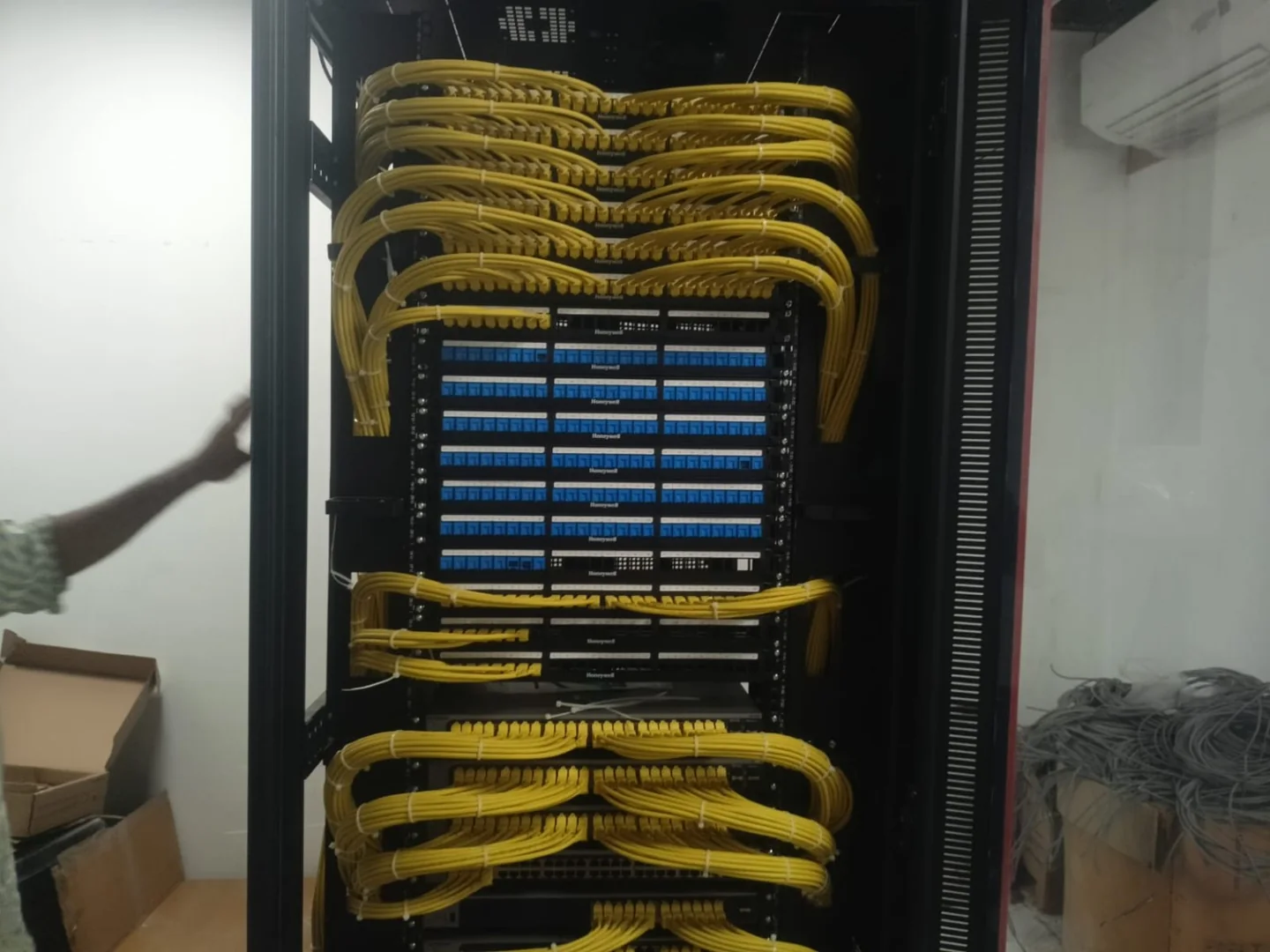
Front-view check: Trace the cord route from panel to switch, then check that the actual labels, connector releases and equipment indicators remain readable. A photograph cannot establish the port configuration or the performance of a hidden termination.
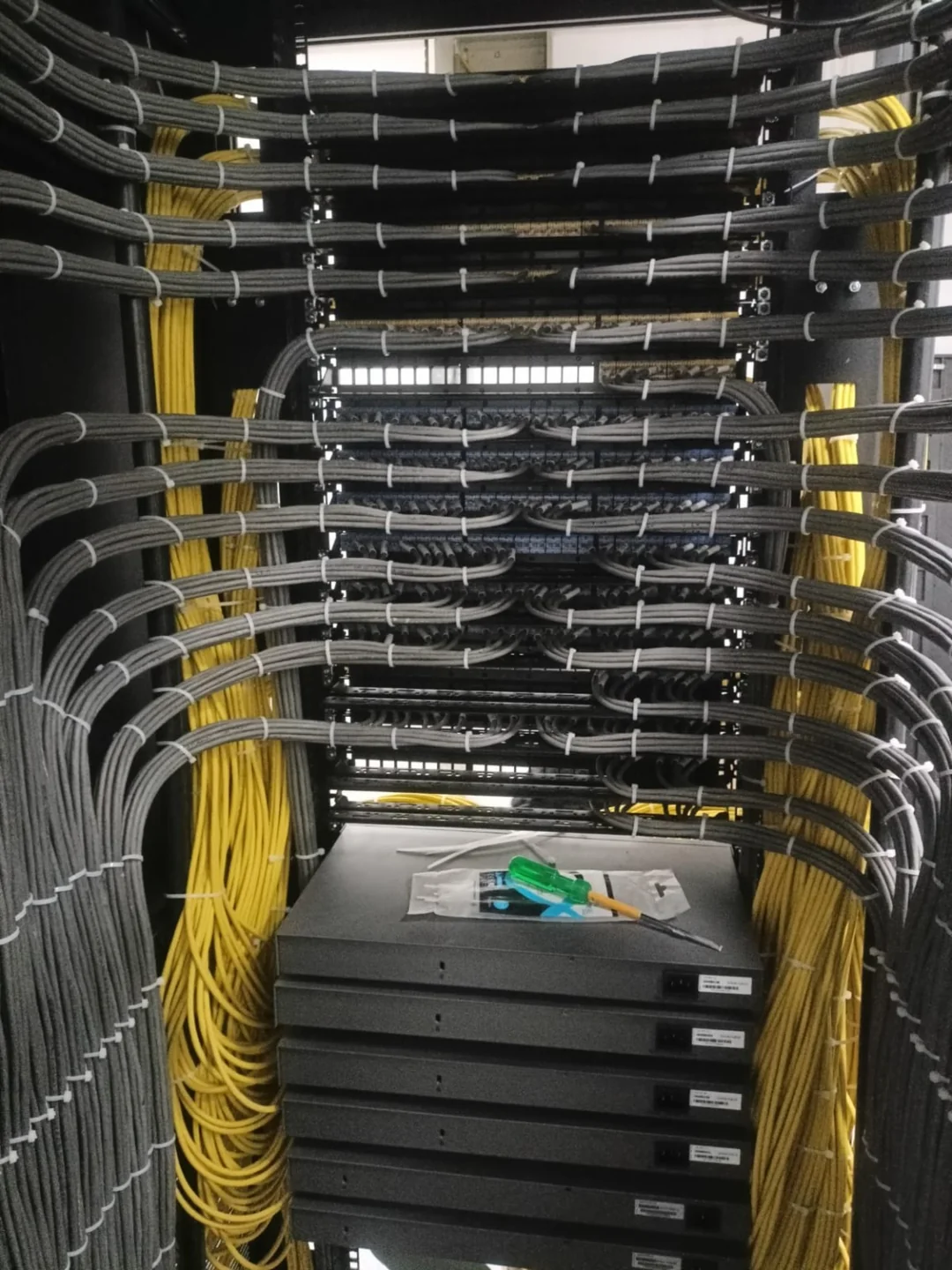
Rear-view check: Inspect the support and the final turn into each panel. On site, check jacket deformation, connector strain, permitted bend radius and access for maintenance. Do not infer tie tension, bonding continuity or a passed cable test from this view.
Why Rack Dressing Matters
“Dressing” a rack means arranging, routing, securing and labeling everything in it. The benefits are practical:
- Airflow and cooling: Bundled cables behind a server’s exhaust can block hot air, causing hotspots, throttling and shorter hardware life.
- Faster troubleshooting: A labeled, logically routed rack lets you trace a link in seconds instead of pulling cables to find the other end.
- Fewer outages: Crowded, poorly identified cabling increases the risk of accidental disconnection during maintenance.
- Easier scaling: Planning reduces installation time and mistakes; actual work duration depends on the equipment, change approvals and testing.
- Signal integrity: Tight bends and over-tightened ties can degrade copper performance and damage fiber.
- Safety and compliance: Clear paths to power, grounding and egress matter in audits and for anyone working in the room.
Rack Layout Planning
Good dressing starts before any cable is run. Layout decisions determine how easy everything else will be.
Know your rack
The common equipment mounting standard is 19 inches (482.6 mm); cabinet external width is a separate dimension. Height is measured in rack units (U), where 1U = 1.75 inches (44.45 mm). Common heights are 42U (the data center standard), 24U–27U (small server rooms) and 6U–12U wall-mount cabinets for branch offices.
Before buying anything, check:
- Depth: Check the actual chassis depth, rail adjustment range and usable mounting depth; a cabinet’s external depth is not its usable equipment depth. Deep servers may not fit a shallow rack, and you need room behind them for cables and PDUs.
- Weight capacity: Check the selected rack’s static and rolling load ratings, anchoring requirements and the building floor capacity; small wall cabinets have much lower capacities.
- Vertical cable space: Racks with 100–300 mm of side space make vertical cable managers easy. Narrow racks do not.
- Door type: Choose ventilation and door open area to suit the equipment and cooling design; no single door percentage guarantees adequate cooling.
Layout principles
1. Heavy at the bottom. UPS units, large storage arrays and heavy servers go low. This keeps the center of gravity down and reduces tipping risk.
2. Group by function. Keep related gear together, such as compute, storage, networking and power. It shortens cable runs and makes the rack easier to read.
3. Place network gear deliberately. A common approach is a top-of-rack (ToR) switch near the top, with short patch cords down to servers. Another is middle-of-rack placement, which minimizes the longest cable run. For small rooms, a patch panel and switch pair at the top is often easiest.
4. Leave breathing room. Don’t pack every U. Use blanking panels in empty slots to stop hot exhaust air from recirculating to the intake side. Do not insert open gaps as a generic cooling fix: follow the device’s clearance instructions and blank unused positions where front-to-rear airflow must be controlled.
5. Respect airflow direction. Most servers pull cool air from the front and exhaust at the rear. Switches vary: some are front-to-back, others back-to-front, and some are side-to-side. Check each model and use the correct airflow orientation so you don’t mix it up across devices.
6. Separate power and data. Run power cables on one side of the rack and data on the other (for example, power on the left, data on the right when viewed from behind). This can improve identification and maintenance access. Required separation, shielding and bonding still depend on the electrical and cabling design.
7. Reserve growth space. Reserve capacity against the planned equipment schedule and agreed expansion needs. Record spare U positions, panel ports, switch ports, PoE power and pathway capacity separately.
Patch Panels
A patch panel is a bank of ports that terminates permanent cabling on one side and offers short, replaceable patch cords on the other.
Why use patch panels at all?
Without a patch panel, long cables run directly from the switch to a wall jack or another room, so every move or change means touching the permanent cable. With one, the permanent link is terminated once and left alone, and all changes happen with short patch cords at the front. This protects the installed cabling from repeated plugging and unplugging and makes changes quick and reversible.
Types of patch panels
Copper (Cat5e / Cat6 / Cat6A):
- Punch-down (110-style): Solid cable is punched onto IDC contacts at the rear. This is the most common type for permanent links.
- Modular keystone: The panel holds replaceable jacks, commonly with rear IDC termination. A feed-through coupler is a different component with connectors on both sides; check category, shielding and approved link design before substituting it.
- Shielded (STP/FTP) vs. unshielded (UTP): Use shielded panels with shielded cabling and bond them to ground. Mixing shielded and unshielded components defeats the purpose.
Fiber:
- Fiber patch panels / ODFs: These use adapters (LC, SC, MPO/MTP) and often include splice trays or cassettes.
- Cassette-based high-density systems: Common in data centers where thousands of fibers are involved.
Angled vs. flat:
- Angled patch panels route patch cords sideways toward the vertical managers. They save space because they don’t need horizontal managers between every panel.
- Flat panels are cheaper but need horizontal cable managers for neat routing.
Choosing the right category
- Cat5e: Supports 1 Gbps over a compliant 100 m channel. Suitability for a new installation depends on requirements; do not choose solely by price.
- Cat6: Supports 1 Gbps over a compliant 100 m channel. 10GBASE-T support depends on length and alien crosstalk; 55 m is not an unconditional guarantee. Qualify the installed channel for the required application.
- Cat6A: Designed for 10GBASE-T over a compliant 100 m channel. It is often appropriate for new 10G or demanding AP projects, but allow for larger cable bundles, termination space and cost.
- Cat8: Intended for short data-center links (up to 30 m) at 25/40 Gbps.
Match the panel’s category to your cabling. A higher-category cable cannot upgrade a lower-rated connector. Specify compatible components and certify the complete installed link against the target category; component labels alone do not prove channel performance.
Punch-down best practices
- Untwist as little as possible. Keep the pair twist right up to the termination point, following the jack manufacturer’s strip-length, untwist and termination instructions. Do not apply a single untwist distance to every connector design.
- Follow a single wiring standard (T568A or T568B) everywhere. Consistency is more important than which one you choose.
- Keep bend radius in check: Use the exact cable or cord manufacturer’s minimum bend radius, noting whether it applies under installation tension or after installation. Fiber trunk cables and patch cords have different limits; there is no universal 8× rule.
- Support cables at the rear. Use a rear bar or support ring so the weight of the cable doesn’t pull on the termination.
- Test every port. Use a certifier, not just a continuity tester, for new installs. Save the reports.
Patch panel port numbering and labeling
Number ports consistently, left to right, top to bottom, and match your labeling to the faceplate or outlet at the other end. A common scheme is:
[Rack]-[Panel]-[Port] e.g., R03-PP2-17
Both ends of every cable should carry the same ID, so one label tells you where the cable goes.
Permanent link versus replaceable patching
↓
↓
↓
↓
Permanent-link testing: fixed cable and its terminating connecting hardware. Channel: includes the intended patching within the selected test model. Direct plug-ended AP/camera links may require an MPTL design and the appropriate certification adapters.
Cable Managers
Cable managers are the hardware that gives cables a route. They come in a few basic types, and a good rack usually uses several.
Horizontal cable managers
These are 1U or 2U panels mounted between patch panels and switches. They guide patch cords sideways to the vertical managers.
- Finger-duct / slotted type: Plastic or metal fingers let you route cords in individually. Good for medium density.
- Brush panels: Used where you need to pass cables through the panel while blocking airflow. Common at the rear or in hot/cold aisle containment.
- D-ring / rings type: Metal rings hold cables in place. They’re flexible but less tidy for high-density work.
- Cover-equipped panels: Hinged covers hide the cords for a cleaner look but make changes slower.
Choose horizontal managers from the actual cord count, diameter, bend requirements and routing path. Angled panels and short panel-to-switch patching can use different arrangements; there is no fixed one-manager-per-panel requirement.
Vertical cable managers
These run down the sides of the rack and carry the bulk of the cabling between rack levels.
- Finger-type vertical managers hold cables behind plastic fingers, with a door or cover.
- Double-sided vertical managers have channels on both the front and back, ideal for high-density deployments.
- Width matters: 4-inch and 6-inch managers are standard for moderate density, while 10-inch and wider suit heavy fiber or Cat6A.
The most common mistake is buying managers that are too narrow. Cat6A cable is thick, and a bundle of 48 fills a narrow duct fast. Size the channel for what you’ll add, not just what you have now.
Overhead and under-floor routing
For inter-rack runs:
- Overhead ladder rack or wire basket tray: Keeps cables off the floor and out of cold-air paths. Separate power and data trays.
- Under-floor trays: Used in raised-floor rooms, but they can block cold-air delivery, so keep them low and leave room for airflow.
- Fiber raceway (duct): A separate, protected channel (often yellow) for fiber jumpers, which are far more fragile than copper.
Secure cables without deforming them
Use restraints approved for the cable and support system:
- Use hook-and-loop (Velcro) straps. They are reusable and adjustable. Leave them loose enough to avoid deforming the cable jacket; hook-and-loop can also damage cables when over-tightened.
- Avoid tight restraints. An over-tightened tie can deform copper cable geometry. Use the cable manufacturer’s permitted support method; cutting a tie off later also risks nicking the jacket.
- Use fiber-approved supports and loose restraints. Avoid hard or tight ties that introduce local pressure and microbends. Hook-and-loop can also cause damage if over-tightened.
- Don’t over-tighten. The strap should hold, not pinch. You should be able to slide the bundle gently.
Cable length and color strategy
Length: Use the shortest cable that allows slack for service. A 0.5 m, 1 m or 2 m cord in each case avoids the big loops from “one length fits all” cabling. Store unavoidable excess in supported, broad loops or a designated slack area within bend-radius limits. The practical risks are crowding, snagging, airflow obstruction and tight bends; a loose coil of balanced network cable does not automatically cause interference.
Colour coding: Document any local copper patch-cord convention in the port schedule. Do not infer a service or VLAN from jacket colour. Fibre jacket colours may identify fibre type, so check the cable specification before assigning a service meaning to a colour. The link ID and actual configuration remain authoritative.
Front and rear cable routes
| Area | Data path | Power / service path |
|---|---|---|
| Front | Panel → horizontal manager → vertical manager → switch | Keep ports, LEDs and release tabs accessible |
| Rear | Permanent cables → strain-relief bar → panel terminations | PDU A and PDU B → device inputs; route without blocking fans |
| Moving equipment | Approved flexible slack or compatible cable arm | Confirm rail travel and manufacturer’s service procedure |
| Fiber enclosure | Entry strain relief → managed slack → adapter | Keep fibers away from hinges and sharp edges |
Separate routing reduces maintenance confusion. Shielding, separation distance and containment still follow the cabling and electrical design; putting power on one side is not a substitute for those requirements.
Step-by-Step Rack Dressing Workflow
Here’s a process you can follow for a new build or a rack cleanup.
1. Plan on paper first. Draw the rack elevation, mark equipment positions, port allocations and cable paths. Tools like diagrams.net or a spreadsheet work well for small racks.
2. Mount hardware. Install rails, then equipment from heavy-bottom to light-top. Add vertical managers, PDUs and blanking panels.
3. Install patch panels and horizontal managers. Terminate permanent cabling at the rear and test each link.
4. Route power first. Plug in redundant power feeds (A and B), keep them on opposite sides, and label each PDU outlet.
5. Route data cables. Work from the farthest or lowest device up. Run each bundle through the vertical manager, then drop into the horizontal manager and out to the port.
6. Leave service loops. Follow the server and rail manufacturer’s service procedure. Where powered slide-out servicing is permitted, use a compatible management arm or a verified slack route. Otherwise shut down and disconnect as instructed; never test this by pulling a live server against taut cables. Check that the selected cable-management arm and slack route leave the exhaust clear.
7. Label everything. Label both ends of every cable, every patch panel port, every device and every PDU outlet.
8. Test and document. Verify links, update the port map and take photos. Photos of the finished rack are valuable later.
9. Final walkthrough. Check for sharp bends, strained connectors, blocked vents and loose bundles.
Labeling and Documentation
Labels are cheap, and their absence is expensive.
What to label
- Cable ends: Put durable identifiers where they remain readable without pulling the bundle or obscuring connector release tabs. Use labels suited to the cable diameter and environment.
- Patch panel ports: Both on the front faceplate and in your documentation.
- Devices: Front and back, with hostname and U position.
- PDU outlets and circuits: Include the circuit breaker ID.
- Racks: Rack ID on the front and rear.
Labeling standards
The ANSI/TIA-606 standard defines identifiers and administration for telecommunications infrastructure. Even if you don’t follow it fully, borrow its principle of unique, hierarchical IDs.
Use a label printer with self-laminating or heat-shrink labels rather than handwriting. They last longer and stay readable.
Documentation
Keep a living record:
- Rack elevation diagrams
- Port maps (device port ↔ patch panel port ↔ switch port)
- Power maps (device ↔ PDU outlet ↔ circuit)
- IP and VLAN assignments
- Change log
For larger environments, DCIM (data center infrastructure management) software centralizes all of this. For small shops, a well-kept spreadsheet is a big step up from nothing.
Record the actual port map
| Field | Record from the installation |
|---|---|
| Physical cable and outlet ID | The identifier printed at both ends and on the outlet schedule |
| Patch panel | Rack ID, panel ID and actual port number |
| Switch connection | Device name and actual interface |
| Service configuration | Approved VLAN or trunk configuration, checked against the switch |
| Test and change records | Corresponding report filename and latest approved change |
Airflow and Cooling Considerations
Dressing and cooling are linked. A few specific points:
- Control recirculation. In a front-to-rear airflow design, blank unused openings as the equipment and cooling plan require. Keep side-vented equipment clear at its specified intake and exhaust.
- Seal gaps around the rack sides and at the bottom, especially in aisle containment setups.
- Keep the rear clear. Bundled cables right behind server exhaust fans can raise temperatures noticeably.
- Hot-aisle/cold-aisle layout: Racks face front-to-front and back-to-back so cold air supplies intakes and hot exhaust is collected separately.
- Brush grommets let cables pass through floor tiles or panels without leaking cold air.
- Monitor temperatures. Rack-level temperature sensors at the top, middle and bottom of the intake side catch problems early.
Cooling path and recirculation control
↓
↓
Match each device’s actual airflow. A side-vented switch or wall cabinet needs its specified side clearance. Measure intake temperatures under load; a neat front face cannot prove cooling performance.
Power Cable Management
Power deserves its own care.
- Use rack PDUs mounted vertically (0U) at the rear so they don’t consume rack space. Choose metered or switched PDUs if you need monitoring or remote control.
- A/B redundancy: For a properly designed redundant installation, connect each supply to its assigned independent A or B feed. Two PDUs on the same upstream circuit are not independent. Verify each surviving path can support the transferred load.
- Use correct-length power cords. Short IEC C13–C14 cords in various lengths and colors (for example, red for A feed and blue for B feed) make the setup obvious.
- Locking power cords (such as IEC Lock) stop accidental pulls.
- Don’t overload circuits. Check the circuit, PDU, UPS, connectors, conductors, protective devices and applicable local electrical requirements. An 80% figure is not a universal rule for every installation in India. Have the electrical designer establish the allowable continuous load.
- Keep power away from data where possible, and cross at 90° if they must meet.
- Grounding and bonding: Bond metallic racks and shielded systems using the project’s protective earthing and telecommunications bonding design and the component manufacturer’s instructions. Do not create an isolated earth or assume rack mounting screws provide verified bonding.
A/B power dependency map
| Dependency | Feed A | Feed B |
|---|---|---|
| Upstream | Circuit / UPS A | Independent circuit / UPS B as designed |
| Rack distribution | PDU A | PDU B |
| Dual-input equipment | PSU 1 | PSU 2 |
| Failure test | B must carry the required load if A fails | A must carry the required load if B fails |
Two PDU labels do not prove redundancy. Trace the upstream supplies and common points of failure. A single-input firewall or switch needs a separately engineered continuity plan; never parallel power feeds informally.
Common Mistakes to Avoid
1. Too-short cables that strain connectors, or too-long cables that create bird’s nests.
2. Over-tightened cable restraints, which can deform cable jackets and pairs.
3. Skipping labels “for now.” Temporary becomes permanent.
4. Narrow vertical managers that fill up after a few expansions.
5. Mixing airflow directions between switches and servers.
6. Forgetting blanking panels, which allows hot-air recirculation.
7. Over-bending fiber, which causes loss or breakage.
8. Hanging weight on connectors with no rear support.
9. Undocumented changes that make the documentation lie.
10. Running power and data together in tight parallel bundles.
Maintenance: Keeping the Rack Clean
Dressing isn’t a one-time job. To keep a rack in shape:
- Treat every change as a mini project. Update labels and documentation before you leave.
- Remove dead cables. Abandoned cables clog pathways and confuse everyone. Trace, verify and remove them.
- Audit quarterly. Check labels, bend radii, strain, dust and temperature.
- Standardize. Use the same cable types, lengths and colors across all racks.
- Train the team. One person who ignores the rules can undo months of tidy work.
- Clean regularly. Dust affects cooling and fiber connectors. Clean fiber ends with proper tools before connecting.
Quick Checklist
- ☐ Heavy equipment at the bottom
- ☐ Equipment grouped logically, with growth space reserved
- ☐ Unused openings managed to suit the actual airflow design
- ☐ Airflow orientation consistent and correct
- ☐ Power and data separated
- ☐ Patch panels terminated, tested and labeled
- ☐ Horizontal and vertical managers sized for current and future density
- ☐ Velcro straps used, no over-tightened zip ties
- ☐ Bend radius respected for copper and fiber
- ☐ Both ends of every cable labeled
- ☐ Color scheme documented
- ☐ Rack elevation and port maps up to date
- ☐ Rack and panels grounded/bonded
Cleaning up a live rack without creating an outage
Photograph the rack, inventory active links and obtain an agreed maintenance window. Back up switch and firewall configuration. Confirm which links carry uplinks, voice, AP trunks, cameras, storage and management access. A link LED alone does not identify the business service or prove an unused cable is safe to remove.
Work on one verified link at a time, label it before disconnection, move or replace it, and validate the affected service before continuing. Avoid replacing every cord simultaneously. Keep a rollback map and the original cords until tests pass. Do not introduce loops by adding parallel switch connections without the approved topology and loop prevention design.
Acceptance tests that prove the rack is ready
- All fixed links have matching certification reports against the specified category and test model.
- Ports and cable IDs match the outlet schedule and actual switch configuration.
- Required services work: client addressing, internet, AP operation, camera recording and playback, management access and relevant VLAN isolation.
- PoE devices remain stable at expected load; interface error counters and negotiated speeds are checked.
- Intake temperatures remain within device specifications at normal working load, with doors in their intended operating position.
- Approved power and UPS tests confirm expected behavior and recovery. Runtime is assessed at the actual load, not inferred from VA alone.
- Doors close freely, rail service access is verified using the manufacturer’s procedure, and no connectors carry unsupported cable weight.
Frequently asked questions
Does a patch panel improve internet speed?
It is a passive termination and administration component. It does not add bandwidth. Correct installation helps preserve cable performance and makes faults easier to manage; poorly matched or terminated components can reduce performance.
Must every patch panel have a 1U manager?
No. Angled panels, short panel-to-switch patching and properly sized vertical managers may use different layouts. Select managers from cord count, cable diameter, routing capacity and access requirements rather than a fixed one-per-panel rule.
Can I use the cable jacket color as the VLAN identifier?
No. Copper patch-cord colors can follow a documented local convention, but they do not enforce VLAN membership. Fiber jacket colors may identify fiber type and must not be confused with that local convention. Labels and configuration records remain authoritative.
Is a pretty rack a certified rack?
No. Appearance, electrical safety, cabling certification and service verification are separate acceptance checks. Require evidence for all items included in the project scope.
Technical references
- Fluke Networks: 10GBASE-T field testing requirements
- APC: rack cable management accessories
- Schneider Electric: airflow management blanking panels
- Corning product example: different installation and operating bend-radius limits
Product examples explain the decision process; they are not specifications for every rack or cable. Use the selected equipment’s current manuals and project requirements.
Need rack dressing or network handover support?
APYS Projects supports structured LAN cabling, rack installation and dressing, Cat6/Cat6A certification, WiFi, firewall and ELV integration. Share your outlet count, equipment list, rack dimensions and current rack photographs for a scoped assessment.
Request a rack audit or quotation from APYS Projects →
Related guides: cable certification, structured cabling and network and PoE switches.
Related APYS services and tools: Rack and structured cabling service scope · UPS and battery backup planning calculator