Technical review: 29 October 2026 · Path MTU troubleshooting · Original diagrams and AI-generated photographic concepts
A path MTU problem can let small packets pass while larger application transfers stall. VPN encapsulation, a smaller link along the route or missing size-error feedback can expose it. The useful approach is to establish a repeatable packet-size pattern, inspect the actual path and feedback, and test the affected application after a scoped correction.

This guide is for office IT teams and network engineers investigating websites that partly load, VPN sessions that connect but cannot transfer files, or applications that behave differently across networks. These symptoms have several possible causes. Do not change every device’s MTU merely because one large ping times out.
In this guide
1. Separate interface MTU, path MTU and TCP MSS
An IP interface MTU describes the packet-size limit at that interface. The path MTU is constrained by the smallest relevant link MTU along a selected route to a destination. Your laptop can show 1500 while a tunnel or another link further along the path accepts less.
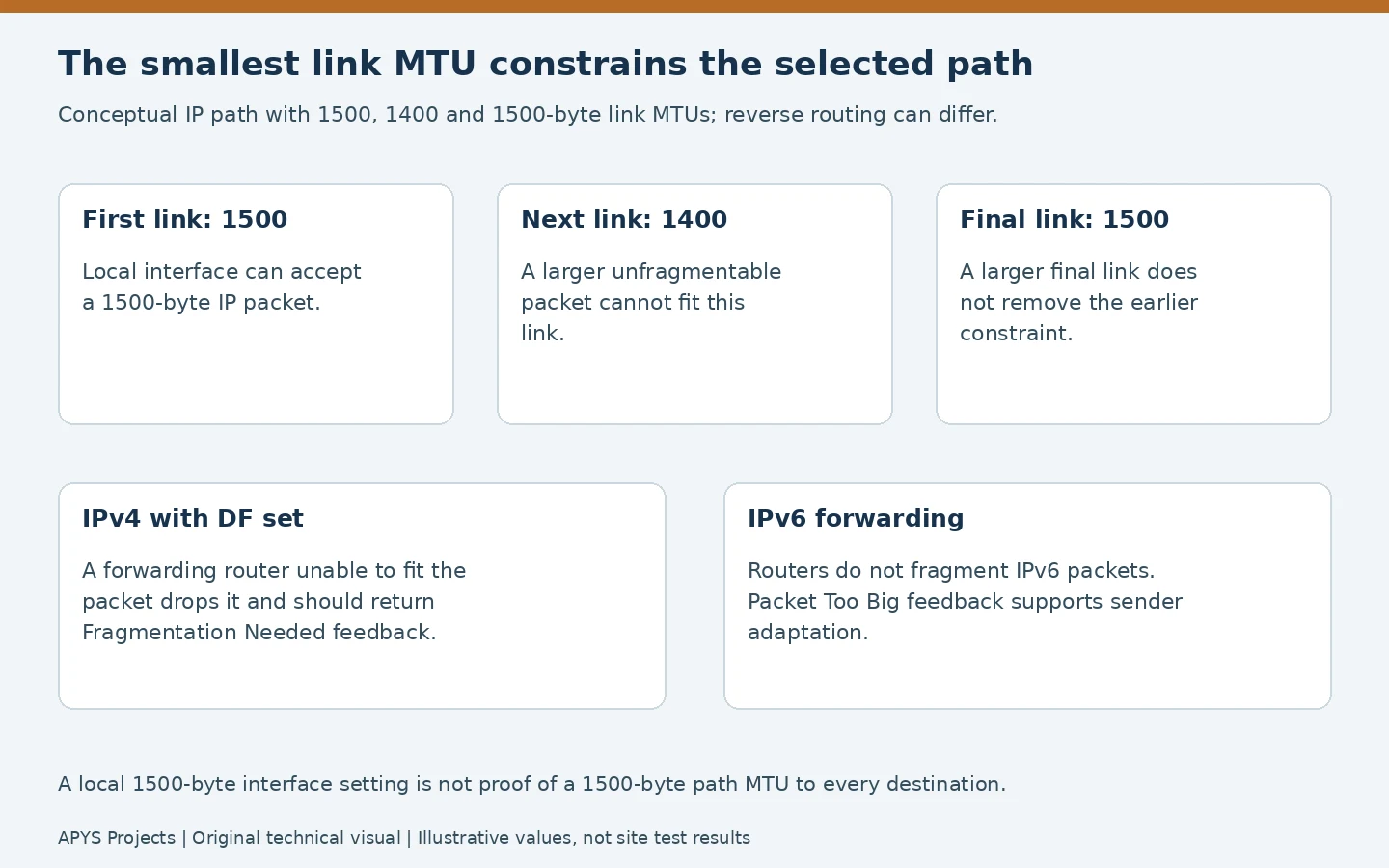
Path information is specific to routing conditions. The return direction can differ, a failover ISP can introduce another path, and IPv4 and IPv6 need not follow the same route. A result measured yesterday on one destination should not be treated as the permanent size limit for the entire office.
TCP Maximum Segment Size is a different quantity: it describes TCP data capacity advertised by an endpoint, excluding the IP and TCP headers. For a simple 1500-byte IPv4 packet with 20-byte IP and 20-byte TCP headers and no options, 1460 bytes remain for TCP data. That is a header-budget example, not a universal packet size.
RFC 6691 explains the treatment of fixed headers and options: the MSS option calculation uses fixed headers, while the sender must account for options in the data it actually puts into a packet. Avoid subtracting arbitrary overhead twice or confusing an MSS setting with an interface MTU.
2. Why missing feedback can create a black hole
IPv4: the Don’t Fragment flag changes forwarding behaviour
In classical IPv4 path MTU discovery, a packet with DF set cannot be fragmented by an intermediate router. If it is too large for the outgoing link, the router drops it and should send the appropriate ICMP Fragmentation Needed feedback. The sender can then adapt. IPv4 packets without that restriction can be fragmented where supported; fragmentation is not a general cure for incompatible middleboxes or missing fragments.
The mechanism is defined by RFC 1191. RFC 2923 describes the TCP black-hole pattern: a connection can begin successfully with small exchanges, then stop progressing when larger packets disappear without useful feedback.
IPv6: routers do not fragment the packet
IPv6 uses ICMPv6 Packet Too Big messages to support path MTU discovery; intermediate routers do not fragment IPv6 packets. Sender behaviour and source fragmentation follow IPv6 rules. An IPv4 DF-ping procedure should not be presented as an IPv6 procedure with the same header arithmetic.
RFC 8201 explains the IPv6 discovery process and the connectivity problems that can occur when required feedback is blocked. Diagnose the address family used by the failing application before interpreting a successful test over the other family.
Not every application reacts in the same way
Packetization-layer discovery can use transport-level probing and confirmations rather than relying solely on classical ICMP feedback. RFC 8899 covers this approach for datagram transports. Its existence does not mean that every application, client version or VPN implementation has the same discovery and fallback behaviour.
A browser using a UDP-based transport and another application using TCP can therefore expose different symptoms. Record the actual transport instead of treating “HTTPS works” as evidence that every service on that destination has an identical path or packet strategy.
3. VPN encapsulation reduces the available inner budget
A tunnel carries an inner packet inside additional encapsulation. The complete outer packet must be handled within the outer path’s constraints. The overhead depends on the protocol, tunnel mode, outer address family, encryption, padding and other encapsulation. A copied number such as 1400 or 1420 is not automatically correct for another VPN.
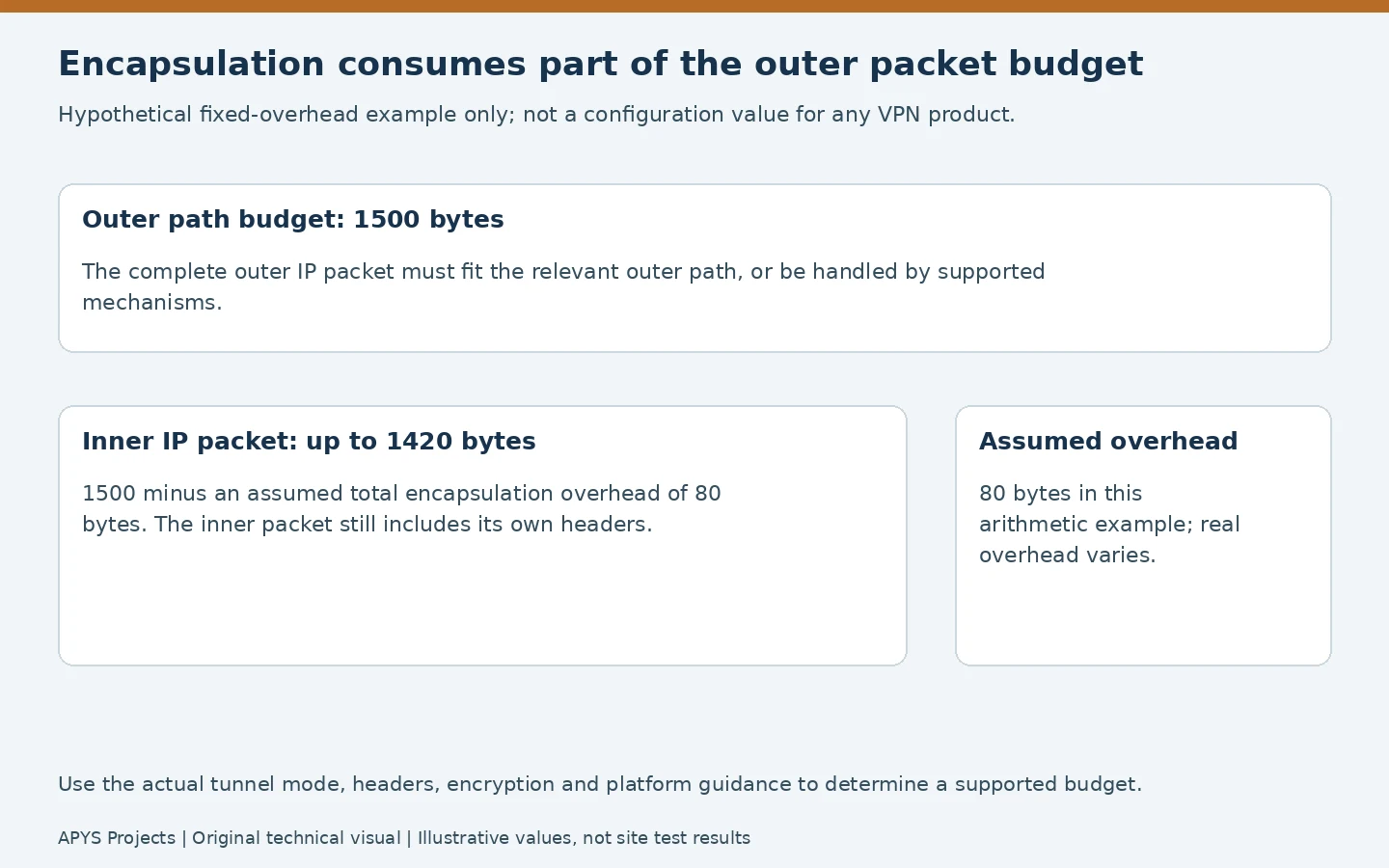
For arithmetic only, assume an outer budget of 1500 bytes and a fixed total encapsulation overhead of 80 bytes. That leaves 1420 bytes for the complete inner IP packet. These values are hypothetical, not an IPsec, WireGuard or OpenVPN default. The real implementation may also have supported fragmentation or segmentation mechanisms that affect what is observed.
Cisco’s GRE and IPsec troubleshooting guide shows why encapsulation, DF handling and TCP MSS must be considered together. Apply its reasoning to the actual platform documentation rather than copying an example’s overhead or configuration commands to every firewall.
Start with the tunnel’s negotiated mode, interface settings, endpoint logs and outer route. Identify whether the size error occurs before encapsulation, at the tunnel egress or elsewhere on the underlay. A local “packet too large” response and an error returned by a remote router are different evidence.
4. Run controlled packet-size tests
Choose an authorised test destination that is expected to answer ICMP on the path being investigated. Record the source interface, VPN state, destination address, address family, time and route. The documentation address 192.0.2.10 below is a placeholder; replace it with your approved reachable endpoint.
First establish that a normal small echo exchange works. Then use a small count of larger probes and compare explicit error messages, replies and timeouts. Testing a public resolver elsewhere on the internet may be convenient, but it does not reproduce the route to a private VPN application.
Windows IPv4 examples
ping /4 /n 4 /f /l 1472 192.0.2.10
ping /4 /n 4 /f /l 1372 192.0.2.10
Microsoft’s ping command reference documents the IPv4 selection, count, data-size and DF options. Here, 1472 and 1372 are ICMP echo-data lengths, not complete IP packet sizes. The second command is a smaller comparison probe, not a recommended office MTU setting.
Linux iputils example
ping -4 -c 4 -M do -s 1472 192.0.2.10This is an iputils ping example. Repeat with a smaller data length as appropriate. The discovery option can also be constrained by local interface or cached path information, so inspect the full error rather than assuming every failure came from a remote hop. Other ping implementations and operating systems have different options; Linux -f is not the Windows DF option.
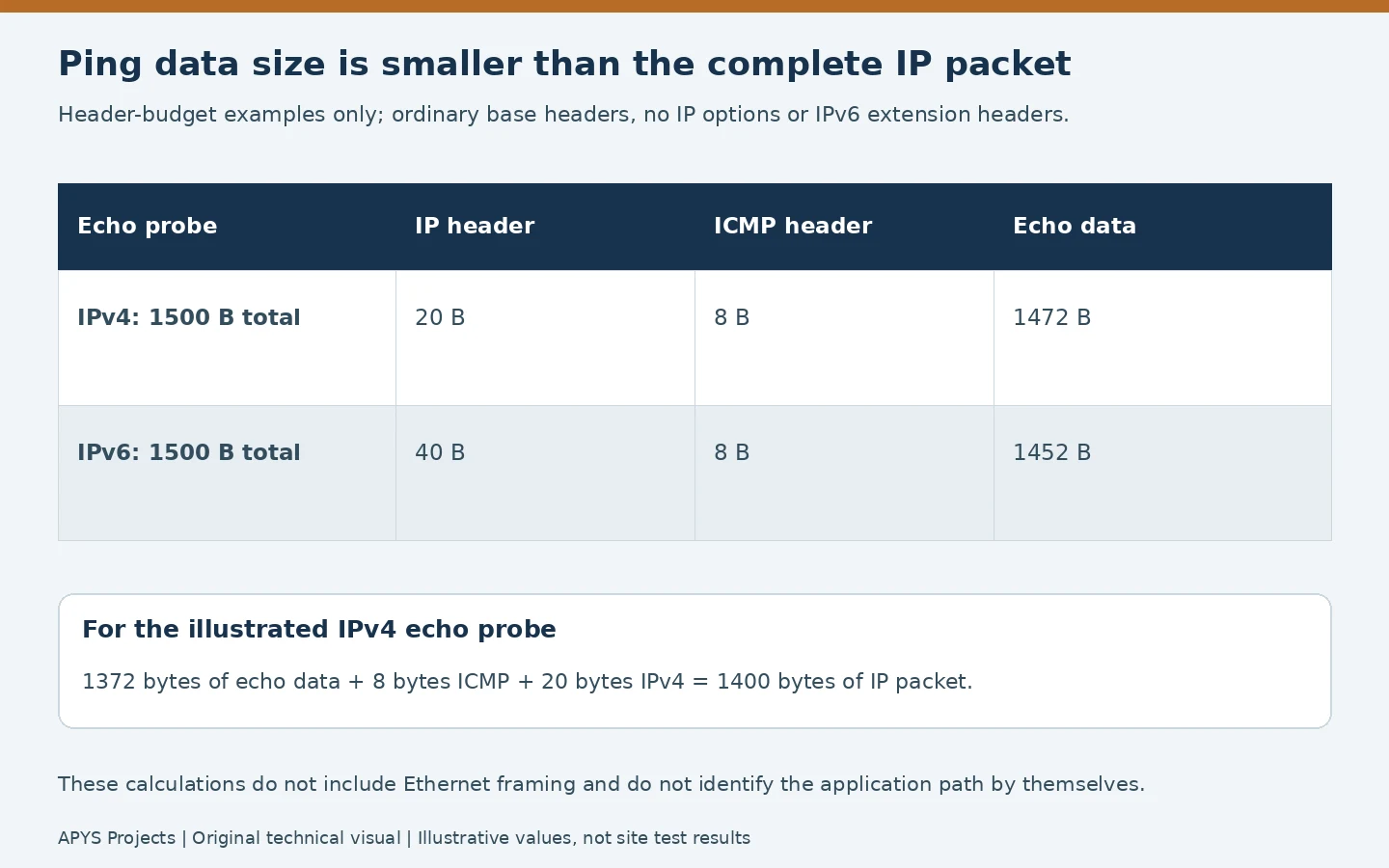
For an ordinary IPv4 echo packet with no IP options, add 20 bytes of IPv4 header and 8 bytes of ICMP header. A 1472-byte echo payload therefore produces a 1500-byte IP packet; 1372 produces 1400. For an ordinary IPv6 echo packet without extension headers, the corresponding header allowance is 40 plus 8 bytes. Ethernet framing is a separate budget.
If a larger probe fails and a smaller one succeeds, narrow the boundary using controlled intermediate sizes. Repeat results to distinguish stable size behaviour from intermittent loss. A single successful 1400-byte IP packet establishes that the tested exchange worked at that size; it does not establish that 1400 is the maximum.
5. Interpret timeouts, size errors and application evidence separately
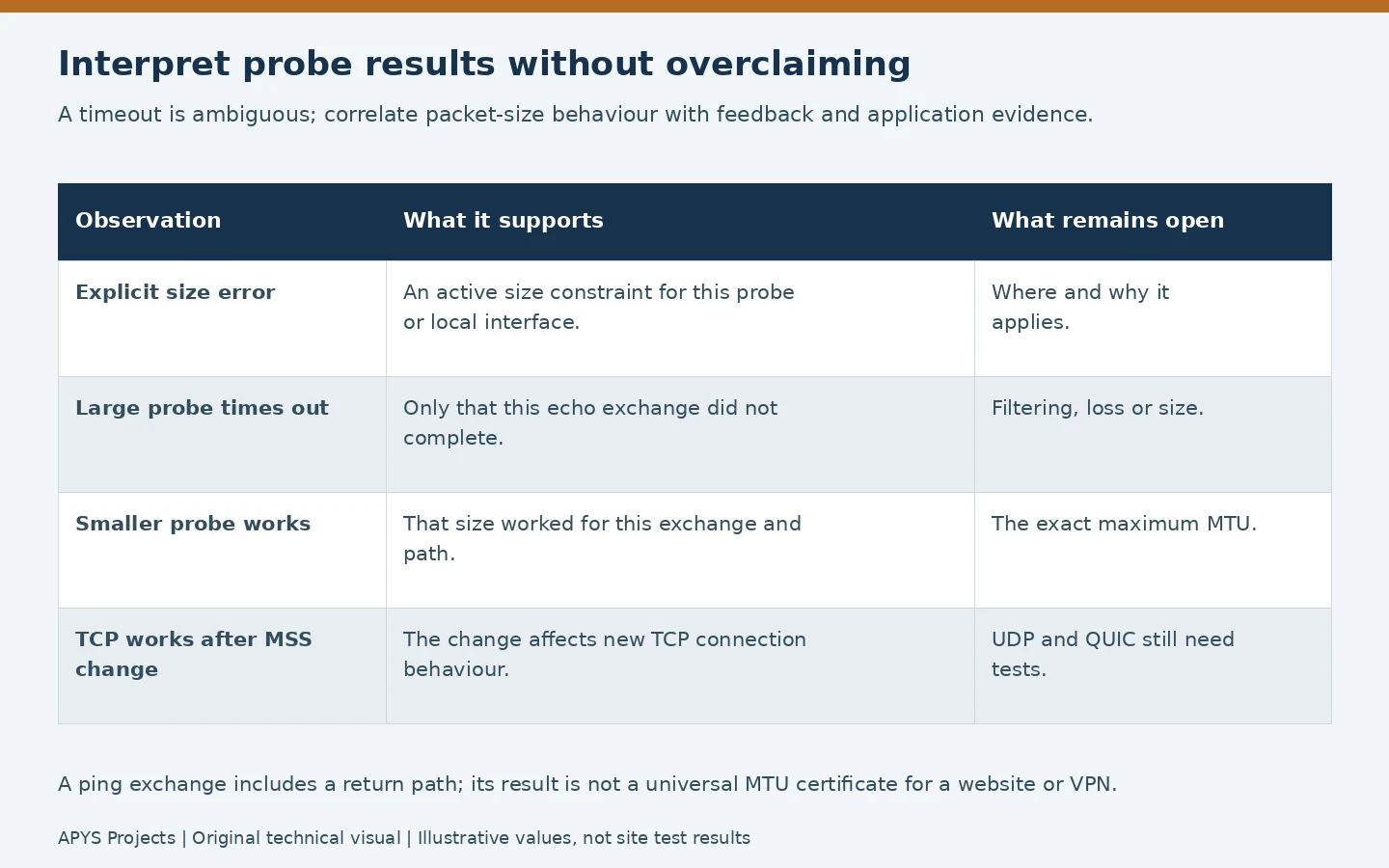
An explicit size error is stronger evidence of a size constraint than silence, but its source still matters. A timeout can also mean echo filtering, rate limiting, congestion, a different route or a destination that does not answer. The echo reply traverses a return path too, so even successful ping testing is not a certificate of every application’s forward and reverse behaviour.
Correlate the probe sequence with the failing application’s timing. Look for a successful connection setup followed by stalled larger exchanges, appropriate ICMP feedback, repeated transmissions and tunnel/firewall logs. Retransmission alone is not proof of an MTU problem; ordinary packet loss can cause it as well.
Capture size can be affected by offloading
A host-side capture may show large buffers before segmentation, or receive traffic after aggregation. That does not necessarily mean an oversized packet appeared on the physical link. Wireshark’s offloading guidance explains these effects. Choose an appropriate observation point and account for capture limitations before declaring a wire-size violation.
Scope captures to the authorised incident and protect application content and identifiers. Prefer relevant headers, counters and timestamps when they answer the question. Do not disable offload or security functions across the fleet simply to simplify a capture.
Keep competing explanations in the investigation
If name resolution fails, first use our office DNS troubleshooting guide. If many applications degrade only under load, compare queues and loss using the office QoS guide. Proxy policy, TLS inspection, server faults and endpoint software can also explain partial website or VPN failures.
6. Correct the evidenced gap with the smallest useful change
| Evidence | Correction to evaluate | Validation |
|---|---|---|
| Required size feedback is blocked | Supported, scoped handling of the necessary ICMP/ICMPv6 errors | The originator receives relevant feedback and adapts |
| Tunnel budget is incompatible with the outer path | Supported tunnel/interface sizing or encapsulation correction | Inner and outer behaviour plus real application transfers |
| New TCP sessions exceed the usable path budget | A properly scoped, supported MSS adjustment where appropriate | New connection advertisements and bidirectional transfers |
| A required jumbo path has an inconsistent component | Consistent supported MTUs across the intended path | Every relevant segment and actual workload |
Required size feedback should be handled through the platform’s supported security policy, with validation of relevant errors. This is not a reason to permit every ICMP message indiscriminately or disable the firewall. Preserve the intended zones, inspection and management access described in our office firewall guide.
MSS adjustment is specific to TCP
A supported MSS adjustment can constrain the value advertised in relevant TCP connection setup packets. Inspect policy attachment, traffic direction and the actual new connection. An old established session is not a reliable test of a change applied to SYN handling.
MSS does not size UDP datagrams or repair every QUIC, media or tunnel-control flow. It can mitigate one symptom while another transport still fails. Keep the underlying path and feedback investigation open where necessary, and test both sending and receiving data rather than declaring success after one page opens.
Do not enable jumbo frames across an office to fix an internet PMTU black hole. A larger local interface value cannot enlarge a smaller provider or tunnel path. Conversely, lowering every endpoint’s MTU without a reason can reduce efficiency and create an undocumented dependency.
7. Retest the workload and document the boundary
- Save the baseline. Keep the original settings, probe sizes, exact responses, route/VPN conditions and application failure example.
- Apply one scoped change. Use the approved window and supported platform process, with a management path and rollback available.
- Repeat the same probe set. Compare explicit feedback, successful sizes and repeated results under the same conditions.
- Create fresh application sessions. Test the previously failing website, file upload/download and actual VPN application in both directions.
- Cover the deployed variants. Test IPv4/IPv6 where used, relevant TCP and UDP applications, and the intended failover path if it is in scope.
- Monitor after restoration. Confirm stability beyond the quick test and retain evidence for the network owner.
A useful illustrative outcome might be: “The approved VPN test endpoint consistently returned a size constraint, the configured tunnel budget was corrected using vendor guidance, and the previously failing bidirectional file transfer then completed in fresh sessions.” That is an example of evidence to collect, not an APYS customer case or a claim that such a test was performed here.
The handover record should name the affected path, measured conditions, corrected setting, its scope and remaining limitations. A dual-ISP design should also document whether failover changes the tunnel or usable packet budget. Review the record when VPN software, encapsulation or provider routing changes.
Worked packet-size boundary and error-evidence ledger
Packet-size tests are useful only when the same approved endpoint, route, IP family, VPN state and ICMP responder are recorded for every comparison. The values below are fabricated to explain interpretation, not measured APYS or customer data.
Hypothetical IPv4 no-options echo comparison
With the 20-byte IPv4 header and 8-byte ICMP header assumed in the example above, the IPv4 packet size equals echo data length + 28 bytes. A Windows ping /4 /f /l test uses the data-size operand, not the complete IPv4 packet size. Check the actual platform documentation because command flags differ across operating systems.
| Echo data | Calculated IPv4 packet | Hypothetical reply | Valid inference |
|---|---|---|---|
| 1472 bytes | 1500 bytes | Explicit fragmentation-needed / packet-too-big indication | Selected path rejected this size with DF set |
| 1432 bytes | 1460 bytes | Explicit size error | Size boundary is below 1460 for this test |
| 1412 bytes | 1440 bytes | Repeated echo replies | This exact exchange worked at 1440; not proof of the maximum |
If these responses are genuine and repeatable on the same path, the successful and rejected probes bracket the size boundary at or above 1440 and below 1460 bytes for that test, not an automatically measured 1440-byte MTU. Refine between sizes if required, and check reported next-hop MTU information and tunnel encapsulation. A timeout without an explicit size error does not establish this bound: filtering, loss, ICMP rate limits or asymmetric replies remain possible.
Separate IPv6 evidence from IPv4 DF testing
For IPv6, transit routers do not perform ordinary fragmentation; path MTU adaptation depends on appropriate ICMPv6 Packet Too Big feedback and/or supported packetization-layer discovery. RFC 8201 describes how IPv6 endpoints react to Packet Too Big messages and the IPv6 minimum-link-MTU boundary. Do not use the Windows IPv4 DF option as an IPv6 recipe. Use documented IPv6-aware probes and record exactly which ICMPv6 message, source and reported size arrived; validate against the actual route and application. RFC 8899 describes datagram packetization-layer discovery approaches.
Acceptance after a supported fix
- Archive tunnel mode, effective interface MTUs, routes, ICMP/ICMPv6 feedback and firewall rule scope; retain rollback settings.
- Repeat small and large probes with exact output; report size constraints separately from unexplained timeouts.
- Test fresh TCP sessions plus the original UDP/QUIC/VPN workload in both directions. An MSS change cannot itself resize UDP.
- Repeat after intended ISP failover if that path is in scope; document any changed ceiling.
Stop condition: a single recovered website does not prove all transports or routes are repaired. Escalate if required control feedback cannot be verified without weakening the approved security policy.
Frequently asked questions
Can a small ping succeed while websites fail because of MTU?
Yes. Small exchanges may fit while larger traffic cannot be delivered or adapted correctly. The pattern is a clue that needs corroboration, because other faults can produce similar symptoms.
Is 1472 the correct MTU for Ethernet?
No. In the illustrated ordinary IPv4 echo test, 1472 is the data length. Adding the 20-byte IPv4 and 8-byte ICMP headers gives a 1500-byte IP packet.
Should every VPN use MTU 1400?
No. Determine a supported budget from the actual outer path, encapsulation and implementation, then verify the relevant applications.
Will TCP MSS clamping fix UDP applications?
No. MSS is a TCP mechanism. UDP-based applications need their own supported packet sizing and discovery behaviour.
Need help investigating an office VPN or partial-connectivity fault?
APYS Projects provides networking services across India. Use our contact page to share the affected application, VPN/firewall model, address family, incident timing and repeatable test results. That context supports a focused investigation and an improvement plan that can be verified.
Sources and technical references
- IETF RFC 1191: IPv4 Path MTU Discovery
- IETF RFC 2923: TCP problems with PMTUD
- IETF RFC 8201: IPv6 Path MTU Discovery
- IETF RFC 6691: TCP options and MSS
- IETF RFC 8899: Datagram packetization-layer PMTUD
- Microsoft: Windows ping command
- iputils: ping documentation
- Cisco: IPv4 fragmentation, MTU, MSS and VPN considerations
- Wireshark: Capture and offloading considerations