Technical review: 29 October 2026 · Office uplinks and shared-storage networks · Original diagrams and AI-generated photographic concepts
LACP link aggregation can increase the combined capacity available to multiple conversations and preserve connectivity after some member-link failures. It does not normally turn two 1 Gbps links into a 2 Gbps path for one ordinary flow. Whether it helps an office depends on the traffic mix, hashing, compatible equipment, failure policy and bottlenecks beyond the bundle.
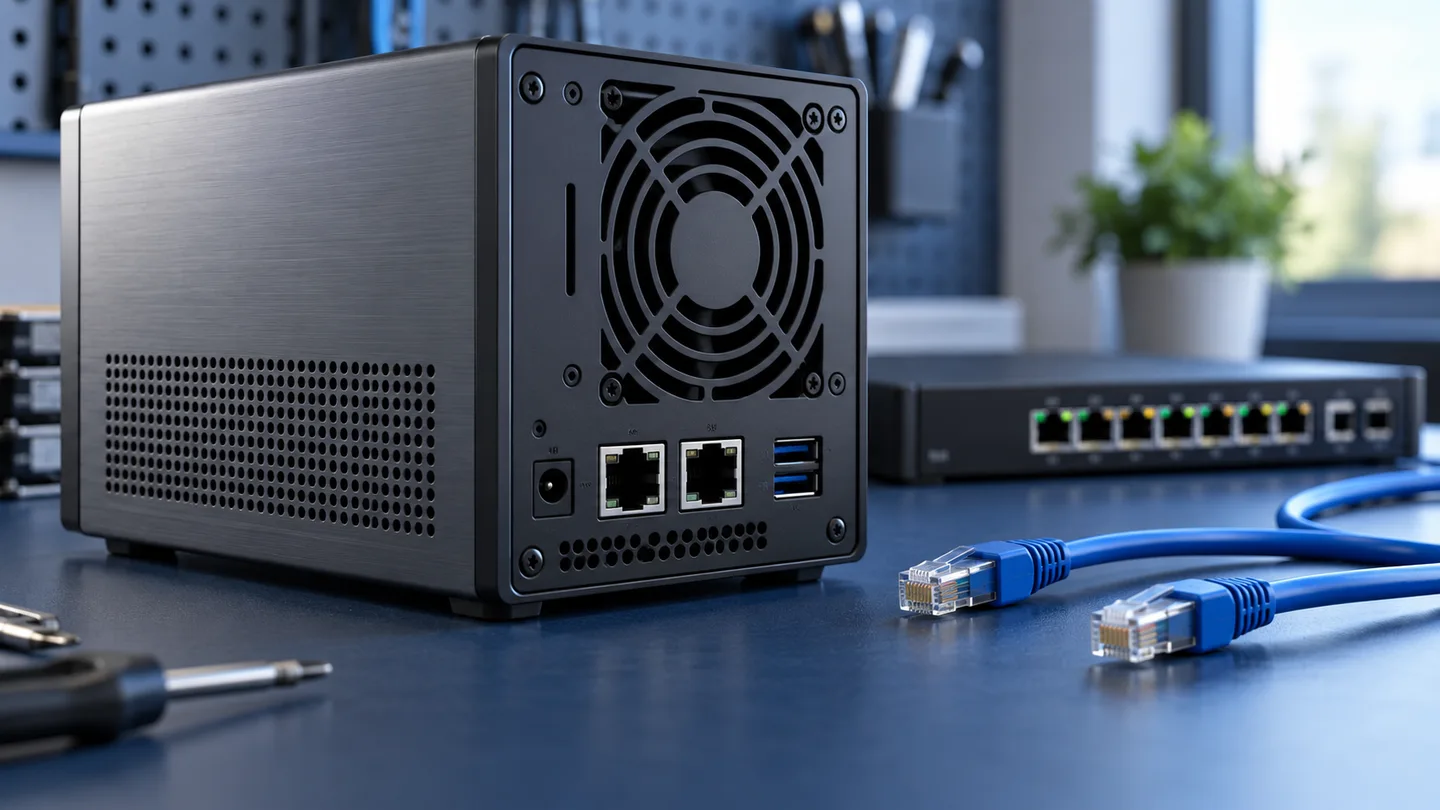
This guide is for office network engineers, IT teams planning a NAS connection and project owners comparing uplink options. It examines the aggregate itself. For a wider equipment overview, see our office network switch guide; for uncontrolled parallel connections, read our network loop and STP guide.
In this guide
1. LAG, LACP, EtherChannel and port-channel are related terms
A link aggregation group (LAG) combines eligible physical interfaces into a logical connection. Vendors may call the logical interface a port-channel, aggregated Ethernet interface, bond or another product-specific name. LACP is the control protocol used to negotiate and maintain eligible aggregate membership; it is not a separate Ethernet speed.
IEEE 802.1AX covers link aggregation. Product interfaces and older documents often still use “802.3ad” when naming their LACP mode. Verify what that selection actually enables on the switch and endpoint. A vendor’s “adaptive load balancing,” static XOR bond or active-backup mode is not automatically the same as an LACP aggregate.
With a correctly formed Layer 2 channel, spanning tree handles the logical connection rather than treating its forwarding members as unrelated parallel paths. This does not remove the need for a valid overall STP design. A misconfigured member outside the intended group can create a different topology.
Active and passive describe negotiation—not traffic direction
In normal LACP operation, active initiates control exchanges and passive responds. Active/active and active/passive can negotiate; passive/passive normally does not initiate the exchange needed to form the group. These labels do not mean that one member carries user traffic while another waits as a backup. Separate platform features can implement active/standby arrangements.
Cisco’s EtherChannel guide explains the supported modes. Do not pair a static forced-on configuration at one end with LACP at the other and assume the result is equivalent.
2. Why two 1 Gbps members do not double one ordinary flow
Typical aggregation distributes conversations using a hash of supported packet fields. Keeping a conversation on a consistent member helps preserve ordering. A single ordinary TCP flow therefore usually follows one member and remains limited by that member’s rate before Ethernet and higher-layer overheads.
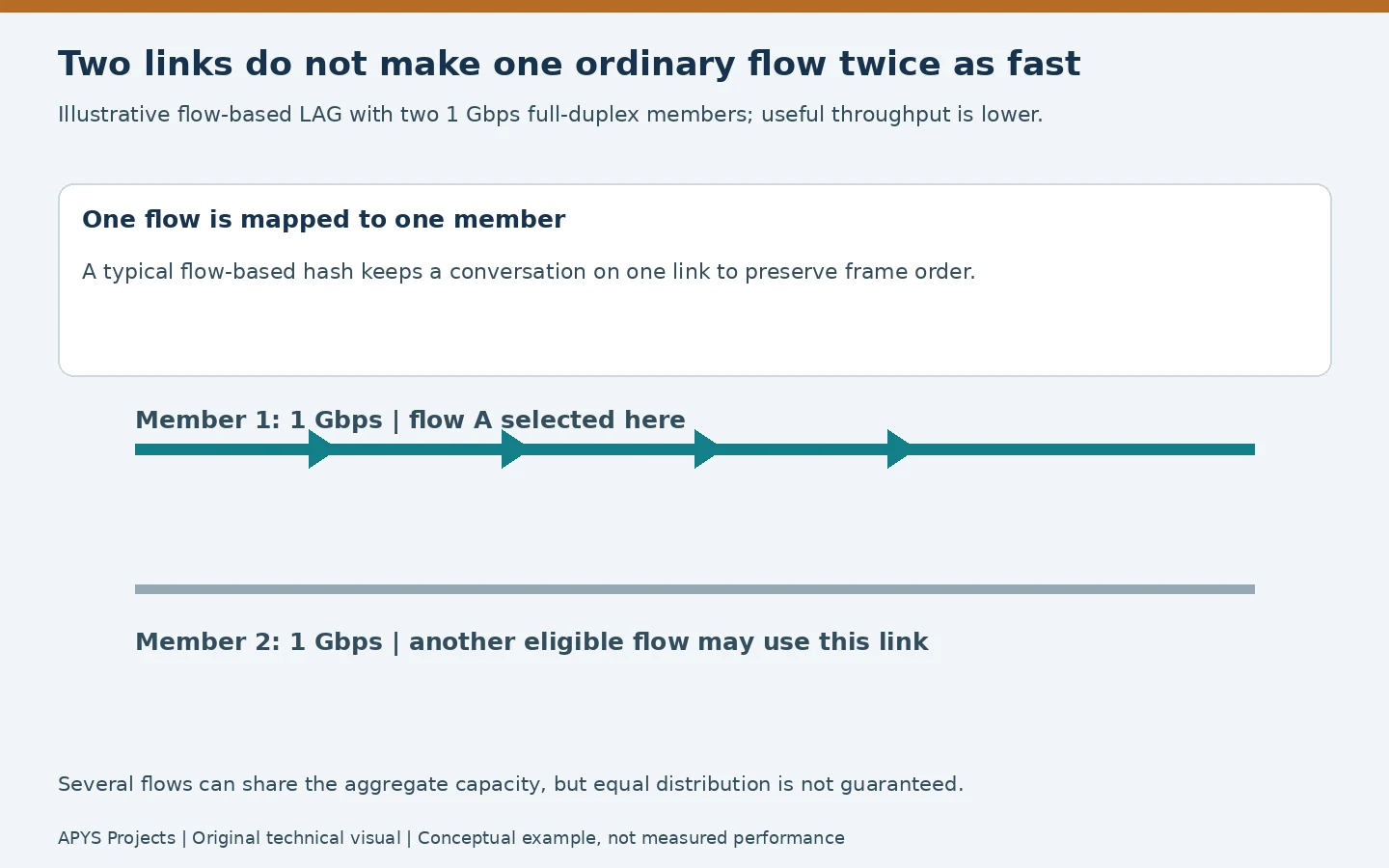
Two active 1 Gbps full-duplex members provide a nominal sum of 2 Gbps in each direction across eligible traffic, subject to the implementation and remaining network. That is a capacity description, not a measured application result. Storage, CPU, client NICs, protocol overheads, congestion and hash distribution can all reduce usable throughput.
Several flows may use different members, but they can also land on the same one. Adding a third or fourth link does not guarantee perfectly equal loading. Cisco’s load-balancing explanation illustrates why the chosen fields and actual traffic pattern matter. Its hardware examples are platform-specific; do not transfer old member limits or defaults to every modern switch.
The hash fields and traffic direction matter
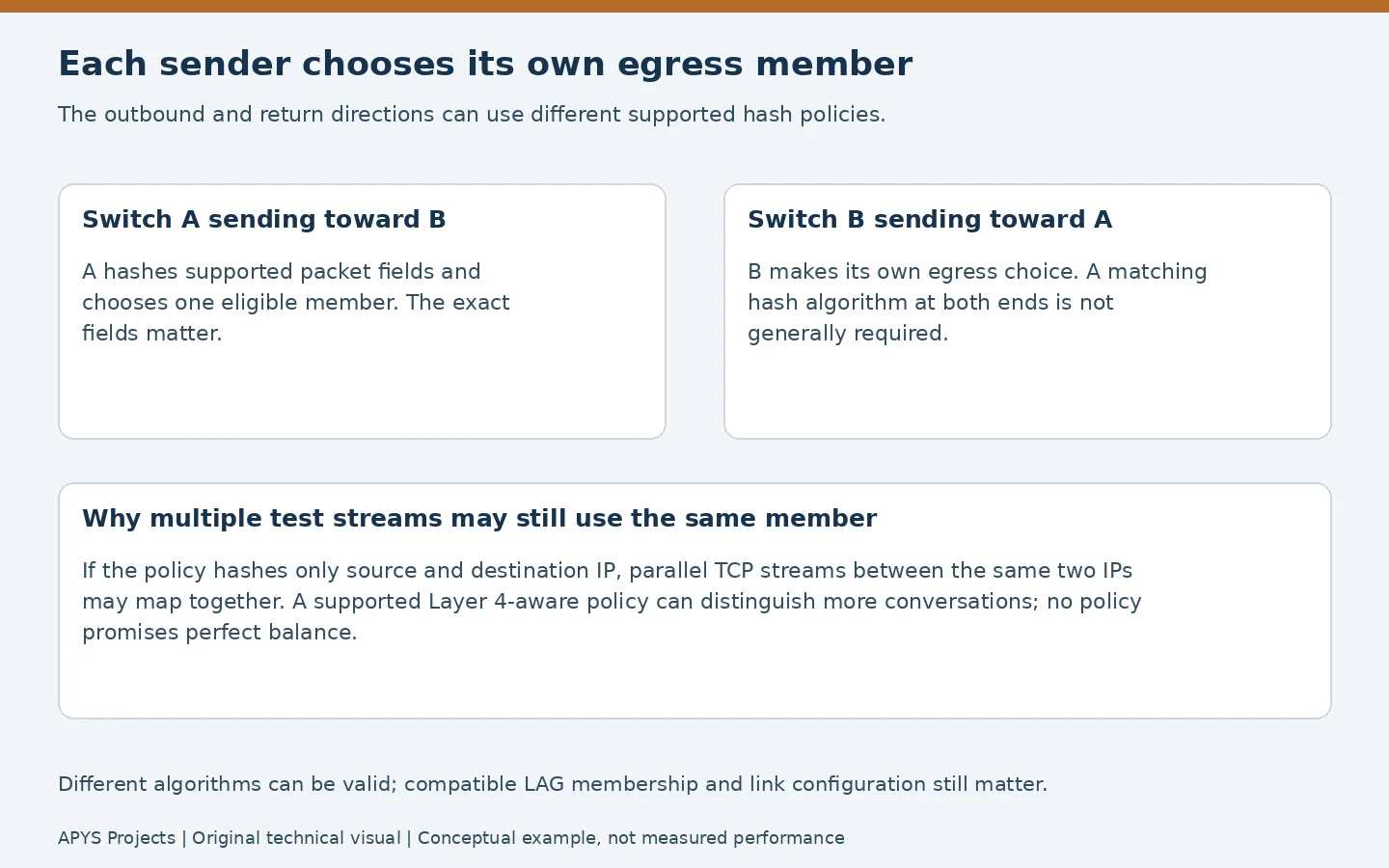
A policy based only on source and destination IP may map many TCP connections between one client and one NAS together. A supported policy using transport ports can distinguish more conversations. Conversely, a MAC-based policy can show little diversity on a routed path where many packets share the same next-hop MAC. Inspect what the device actually hashes.
Each sender chooses the member for its own outgoing traffic. The peer can make a different choice for the return direction; identical algorithms at both ends are not generally a membership requirement. A hash change can redistribute live traffic and may have a device-wide scope, so review impact before changing it during business hours.
3. Where LACP helps—and where a faster physical link may fit better
| Requirement | Aggregation can help when | Check first |
|---|---|---|
| Many users accessing a NAS | Independent flows can share multiple eligible members | Storage, NAS CPU and client traffic diversity |
| A floor switch uplink | Concurrent traffic exceeds one member and the topology supports a bundle | Existing utilisation and the upstream path |
| Continuity after one cable or optic fails | The remaining members satisfy the up-state policy | Minimum links, detection and application recovery |
| One high-speed transfer | The application creates multiple usable channels and the design supports them | A faster NIC/link or a supported application feature may be more direct |
LACP does not combine separate ISP subscriptions into one ordinary download path, pool PoE power or cure slow disks. It also does not remove shared failure points. Two cables in the same damaged route, two ports on one failed switch and one NAS power supply remain related risks.
For a single flow that needs more than a 1 Gbps member can provide, assess an end-to-end faster link. Check the client, server, switch, optics or copper channel and storage together. Our backbone media guide covers the physical-path questions.

SMB Multichannel is a separate application capability
A file operation is not always one network flow. Supported applications can create multiple connections. Microsoft’s SMB Multichannel documentation explains how SMB can use multiple connections where the server, client and network support it.
That feature is different from negotiating an LACP group. Check the NAS vendor’s exact model, firmware and permitted combinations before enabling both. Synology’s comparison of SMB3 Multichannel and aggregation is one vendor-specific reference, not a universal promise for every NAS. Do not disable a working production bond just to experiment with a performance checkbox.
4. Compatibility is more than having spare sockets
Verify the supported member type, speed, duplex, maximum active membership and any media restrictions for the exact equipment. Many ordinary bundles require matching member speeds; mixed-rate support is a specific capability rather than a default assumption. Confirm compatible VLAN/trunk settings, native or untagged behaviour, MTU and logical-interface configuration at the appropriate level.
Identify the intended partner system and which physical cables lead to it. A local group number does not generally have to equal the peer’s local group number, but the participating interfaces must form the intended compatible aggregate. Check partner identity and eligibility instead of judging the result from labels alone.
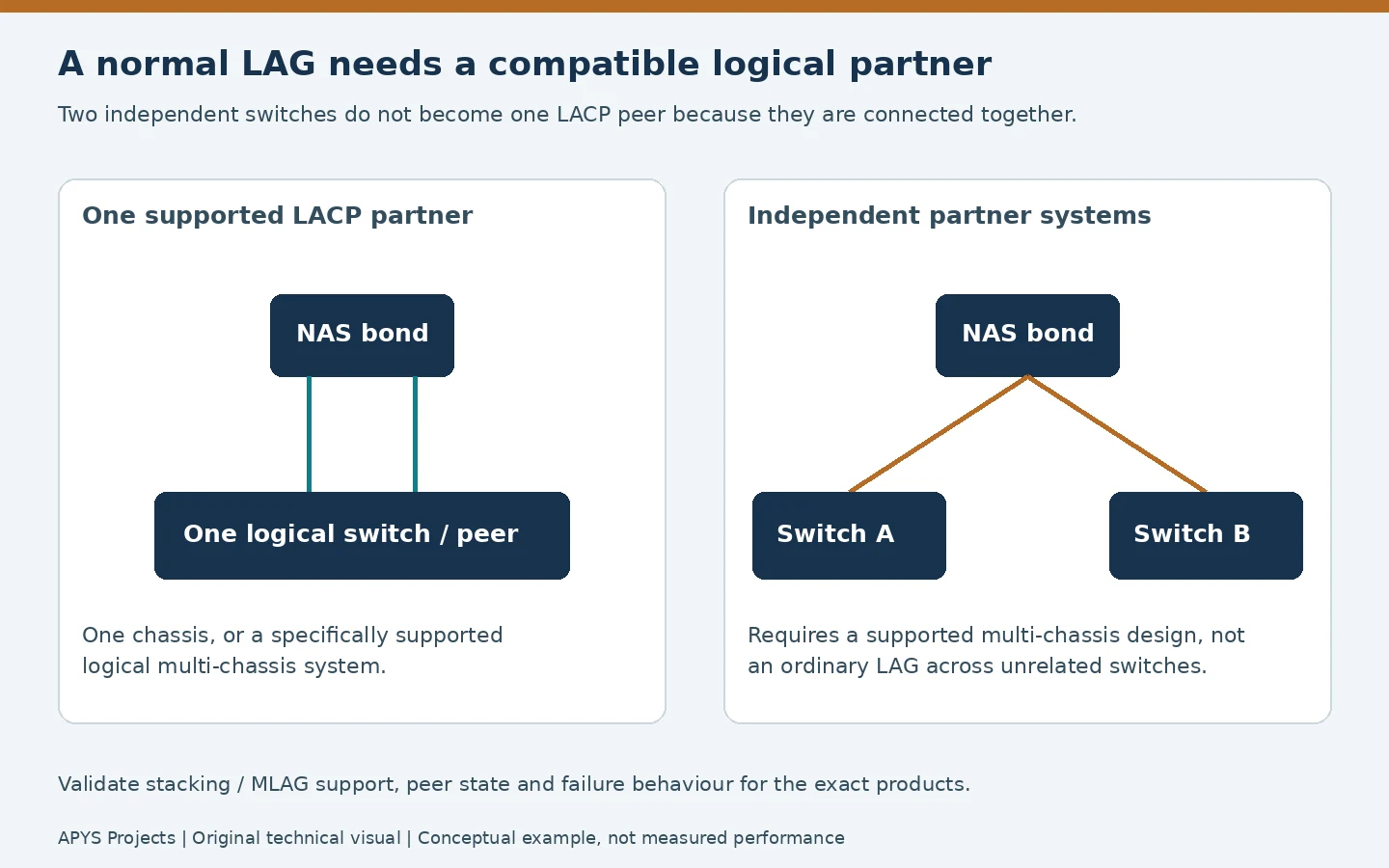
An ordinary NAS LAG should not be split across two unrelated switches. A supported stack, virtual chassis or multi-chassis aggregation design can present a compatible logical partner, but an ordinary inter-switch cable does not create that feature. Validate peer-link or control dependencies, failure handling and firmware support for the chosen architecture.
Likewise, two endpoint network ports do not guarantee LACP support. A small switch, camera, access point or server operating system may offer a different bonding mode or none. Check the complete feature set rather than interpreting “dual LAN” as an aggregation specification.
5. Failure recovery depends on eligibility, detection and minimum links
When one forwarding member fails, a supported aggregate can redistribute traffic across the remaining eligible members. Physical link-down detection and LACP timeout detection are different paths to recognising a failure. Configured timers, platform behaviour and the fault type affect recovery; there is no universal zero-loss or zero-interruption guarantee.
Some faults leave the carrier up while traffic is unhealthy. Negotiated membership is useful evidence, but it does not prove every VLAN or end-to-end application path works. Test representative traffic and inspect errors instead of relying only on a green logical-interface icon.
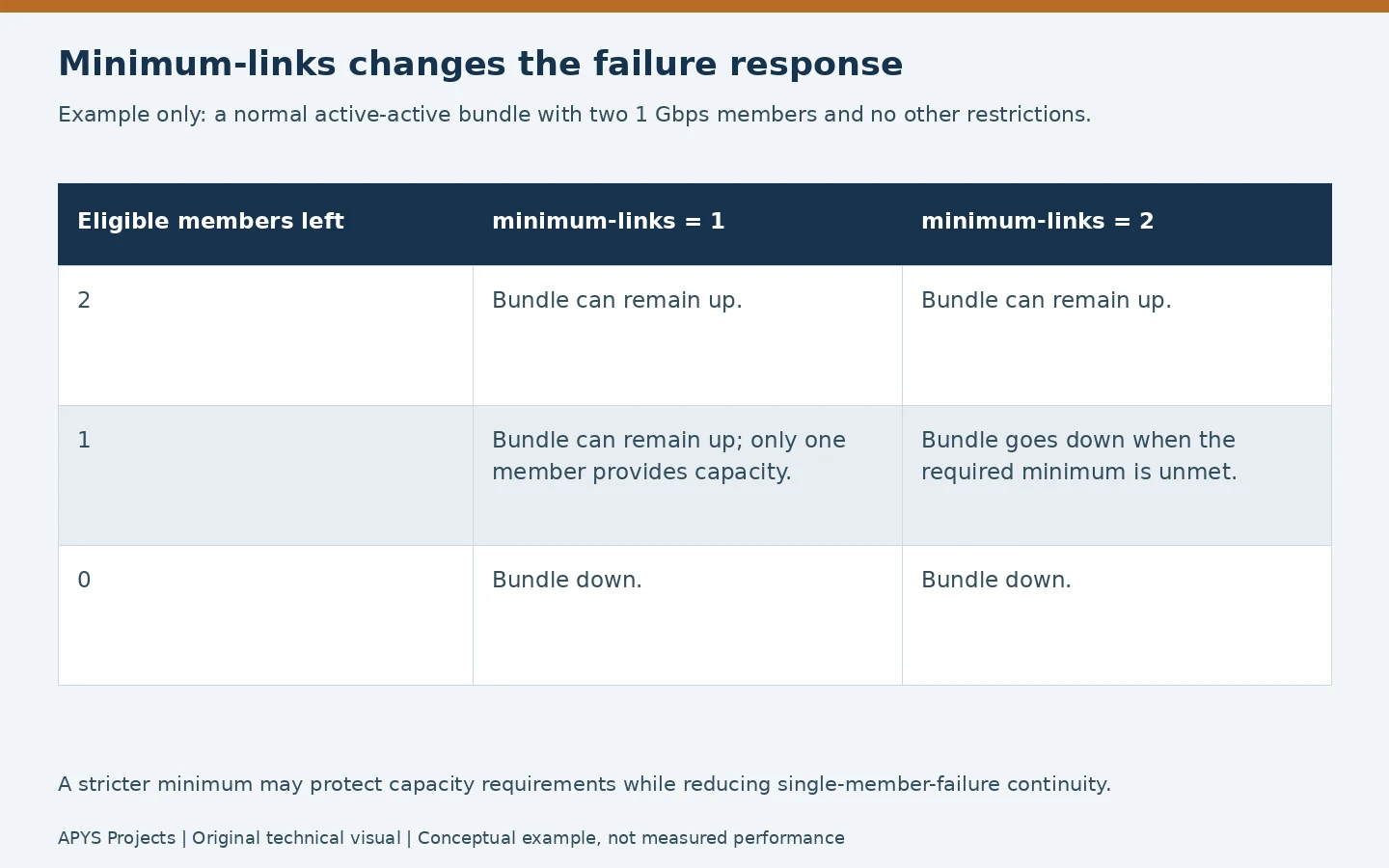
The minimum-links setting can deliberately keep a bundle down unless enough members are available. With a two-member aggregate requiring both members, losing one can take down the whole logical connection. Requiring one may preserve connectivity at reduced capacity. Select the policy from the operational requirement, not from the belief that a larger minimum always means better redundancy.
Juniper’s aggregate link-protection guidance discusses platform-specific eligibility and minimum-link behaviour. A standby-member feature, minimum bandwidth policy and multi-chassis failover are additional design choices; do not treat them as interchangeable.
6. Verify the bundle before measuring its throughput
Prepare management access and rollback before changing an uplink or NAS bond. Converting interfaces can interrupt the very session used to configure them. Save the original configuration and coordinate switch and endpoint work in an approved window.
After the change, verify the intended logical interface is up and every planned forwarding member is actually bundled and eligible. A port with carrier may instead be standalone, suspended, waiting, standby or otherwise unavailable for user traffic. Read the platform’s flags rather than assigning universal meaning to one letter.
show etherchannel summary
show lacp neighbor
show etherchannel load-balance
show interfaces port-channel 1
show interfaces counters errors
These are common Cisco-style read-only examples. Confirm syntax and interface names for the actual model and release. Inspect both ends: partner identities, member state, negotiated rates, error counters and VLAN consistency. The Junos LACP documentation gives another vendor’s operational context.
Use single-stream and multi-stream tests for different questions
iperf3 -c 192.0.2.10
iperf3 -c 192.0.2.10 -P 4
iperf3 -c 192.0.2.10 -P 4 -R
The address is documentation-only: replace it with an authorised test server running a compatible iperf3 service. The first test examines one stream; the next requests four parallel streams; -R reverses the direction. ESnet’s iperf3 manual documents these options.
Parallel streams between the same two addresses can still land on one member if the hash does not distinguish them. Include several representative client/server pairs where permitted, and observe per-member counters during the test. Different directions may distribute differently. Avoid saturating a production link without an agreed window and a stop condition.
Record endpoint NIC rates, tool versions, test direction, duration, concurrent load and member statistics. A RAM-based network benchmark does not certify disk performance; a file copy includes storage and application effects. Test both the transport path and the real workload before accepting the design.
Test the intended failure, not only the healthy state
In the agreed window, remove one verified test member or use the approved equivalent action. Observe member and logical-interface state, application interruption, remaining capacity and recovery after restoration. Test another member as applicable. Do not unplug an unidentified fibre or cable to simulate resilience.
A member-link test does not demonstrate switch-chassis resilience. Chassis, peer-link, power and route failures require separate authorised scenarios when they are in scope. The acceptance report should say exactly which failures were tested and which were not.
7. Common faults and the next useful check
| Symptom | Useful next check | Avoid assuming |
|---|---|---|
| Members have carrier; bundle does not form | LACP mode, peer identity, membership and configuration compatibility | Both cables must be defective |
| Only one member carries most traffic | Eligible state, hash fields, flow diversity and direction | Unequal loading always means failure |
| One file copy stays near one-link performance | Connection count, endpoint rate and storage limits | LACP should double every transfer |
| Some VLANs fail | Logical and member VLAN configuration on both ends | A formed LAG proves all services are correct |
| Whole bundle drops after one member fails | Minimum-links/bandwidth policy and surviving eligibility | Redundancy is necessarily broken |
If a member repeatedly enters and leaves the group, correlate physical errors, optics readings where available, partner changes and control logs. Raising timers or forcing static mode can conceal evidence without fixing the underlying fault.
8. Worked decision: shared office NAS versus one large transfer
This is an illustrative design discussion, not an APYS installation or benchmark. An office has a NAS with two supported 1 Gbps ports and many clients with 1 Gbps connections. Several users access different files at once, and the storage has sufficient measured headroom.
A correctly supported LACP connection may let concurrent conversations use more aggregate network capacity than one NAS port, subject to the hash. The acceptance test should use representative clients and inspect both members. A single client’s ordinary flow remains bounded by its own link and the selected NAS member.
Now change the requirement: one workstation must transfer a large dataset faster than 1 Gbps. Merely adding another 1 Gbps member does not establish that result. Compare a faster end-to-end physical path with a specifically supported application multichannel design, then verify storage and CPU capacity. The right choice follows the workload, not the number of unused sockets.
9. What a complete LACP handover should contain
- Logical-interface name, physical members, cable labels and the verified peer system.
- Equipment models, firmware, supported bonding mode and active/passive settings.
- Member rates, media, VLAN/MTU configuration and applicable logical-interface settings.
- Hash policy and its scope, with expected workload and single-flow limitations.
- Minimum-links or bandwidth policy, timers and the agreed reduced-capacity behaviour.
- Baseline member counters, representative throughput results and the tested failure scenarios.
- Configuration backup, rollback method, monitoring alerts and responsibility for future changes.
Link the record to the wider network handover package. A useful document explains why the bundle was chosen and how to recognise degradation, not merely that two ports show link lights.
Worked LACP capacity decision and verification sheet
The IEEE 802.1AX standard describes aggregation and resilient use of parallel links. It does not promise that each application flow is striped across every member. Determine what the actual switch and NAS distribute, and verify member eligibility and switch-peer compatibility before capacity claims.
Hypothetical two-member calculation: why the hash matters
Assume two healthy 1 Gbps full-duplex members, four independent unidirectional conversations each requesting 300 Mbps, and no other bottlenecks. Their combined request is 4 × 300 = 1,200 Mbps; raw member capacity is 2 × 1,000 = 2,000 Mbps in that direction, before protocol overhead. If a supported hash distributes three conversations to member A and one to B, estimated load is 900 Mbps vs 300 Mbps. If all four hash to A, the 1,200 Mbps request exceeds A’s 1,000 Mbps nominal rate while B may remain underused. These are arithmetic scenarios, not measured throughput; real application performance, NIC rates and CPU/drive limits vary.
| Question | Record | Pass / investigation decision |
|---|---|---|
| Are both links truly bundled? | Local/partner system IDs and keys, collecting/distributing state, member speed, VLAN and MTU policy | Expected members eligible and forwarding in the correct logical aggregate; no individual stray uplink |
| Does traffic distribute? | Per-member byte deltas during the same 30–60 s interval, flow count/direction and hash fields | Interpret imbalance with flow composition; do not demand exactly 50/50 |
| Is one stream being mis-sold as 2 Gbps? | One authorised TCP stream and controlled multi-flow comparison with endpoint CPU and disk checks | Report per-flow and combined results separately, including all bottlenecks |
| Does loss of a member work? | Approved single-member disable/restore, LACP state, interruption and app recovery | Remaining member carries only the demand it can support; record any failover interruption |
For an approved host-to-host throughput trial, ESnet iperf3 documents -P parallel streams and -R reverse direction. A multi-stream benchmark can reveal aggregate behaviour, but changing the stream count also changes CPU load and traffic hashing; it does not prove one NAS file transfer gained the aggregate rate. Test the real SMB/NFS workload independently. SMB Multichannel is a separate feature with its own support conditions.
Design stop condition: do not span one LAG across unrelated switches without documented multi-chassis support. If the sole goal is one consistently faster large transfer, compare a verified 2.5/5/10GbE path against LACP instead of buying multiple 1GbE links by assumption.
Frequently asked questions
Will two 1 Gbps links give every computer 2 Gbps?
No. Typical per-flow aggregation, client interface speed and other bottlenecks still apply. Several independent conversations may benefit from the combined capacity.
Must both sides use active mode?
At least one active side normally starts LACP negotiation. Active/active and active/passive are common compatible combinations; verify the supported behaviour and any fallback features.
Can I connect one NAS bond to two separate switches?
Only with a specifically supported architecture that presents the required compatible peer behaviour. Two unrelated switches and an inter-switch patch cable are not enough.
Is an uneven member utilisation graph a fault?
Not by itself. Inspect member eligibility, hash policy and traffic diversity. A small number of large conversations can produce a valid but uneven distribution.
Need help reviewing an office uplink or NAS connection?
APYS Projects provides networking services across India. Use our contact page to share the equipment models, current link rates, intended workload and required failure behaviour. For continuing checks and ownership, see our network AMC scope guide.
Sources and technical references
- IEEE: 802.1AX Link Aggregation
- Cisco: EtherChannel modes, requirements and operation
- Cisco: EtherChannel load balance and redundancy
- Juniper: Aggregated Ethernet LACP
- Juniper: Aggregated Ethernet link protection
- Microsoft Learn: SMB Multichannel
- Synology: SMB3 Multichannel and Link Aggregation
- ESnet: iperf3 invocation and test options