Technical review: 29 October 2026 · Office switching and loop prevention · Original diagrams and AI-generated photographic concepts
A Layer 2 network loop can turn one patching mistake into an office-wide outage. The reliable response is to identify the forwarding cycle, isolate a verified offending path and restore a documented topology. STP/RSTP, correctly classified edge ports, BPDU protection and measured storm-control policies help limit the risk. None is a reason to connect redundant cables without a design.
This guide explains loop symptoms, the evidence to collect and how protection features differ. It is intended for office IT teams, network engineers and project owners coordinating support. For wider ISP, DNS, Wi-Fi or power symptoms, begin with our office network downtime guide. Here, the focus is the Ethernet forwarding topology and its control plane.
In this guide
1. How a Layer 2 loop becomes a broadcast storm
A switching loop exists when the forwarding topology permits frames to return through a cycle. Flooded traffic—such as broadcasts and some unknown-destination traffic—can be replicated around that cycle. Ordinary Ethernet switching does not decrement an IP-style hop limit for each bridge traversal, so an IP packet’s TTL is not a general protection against this local forwarding loop.
Repeated copies consume link and switching resources. Source MAC addresses can appear to move between ports as copies arrive through different paths. Control traffic may be delayed, and management access can become unreliable precisely when it is most needed. Cisco’s Layer 2 loop troubleshooting guide describes these failure patterns.
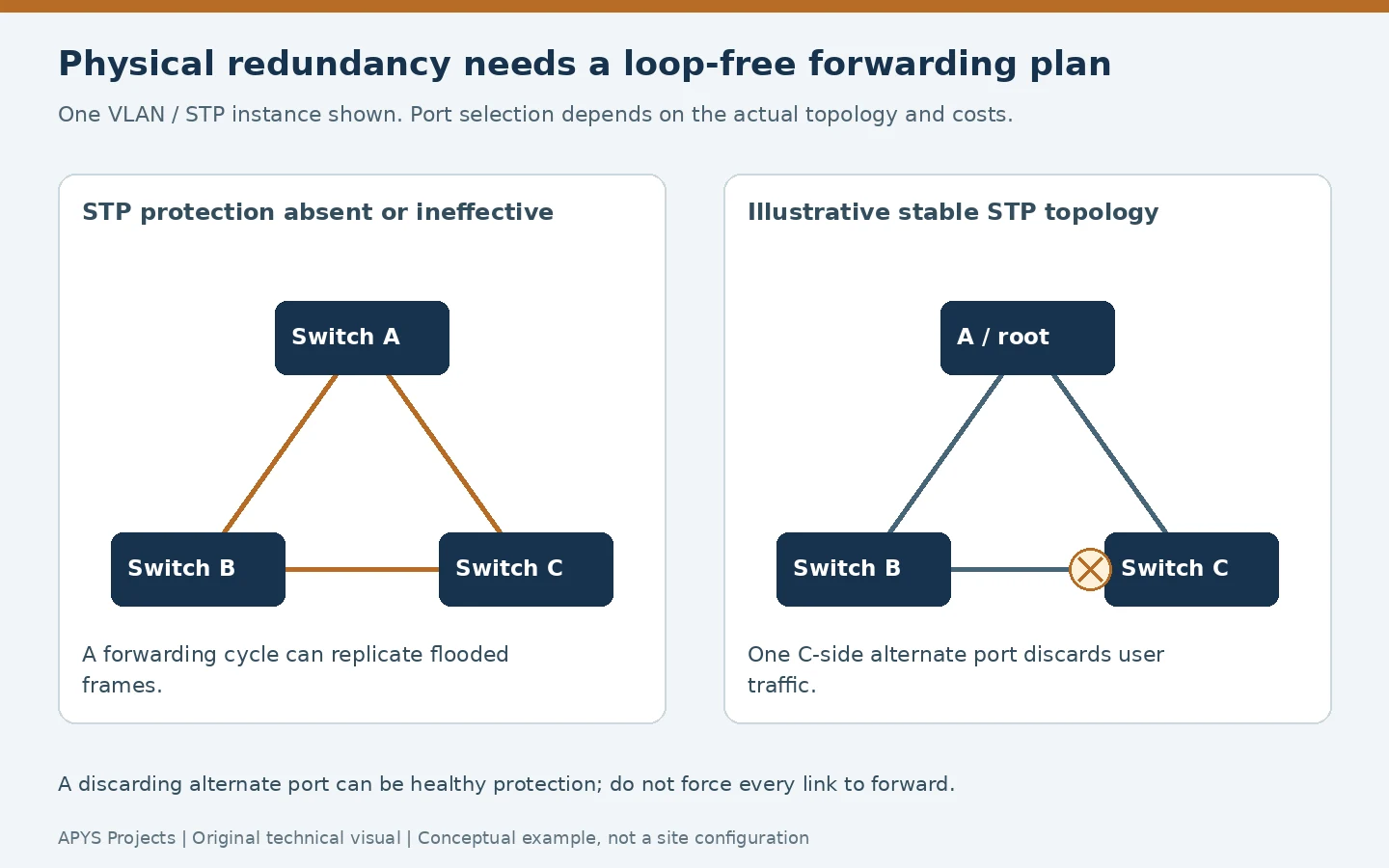
A loop and a storm are related but different. A faulty application can generate excessive broadcasts without a forwarding cycle. Conversely, a loop can disrupt service before a single counter captures an obvious peak. Investigate topology and traffic together rather than interpreting every high broadcast rate as conclusive proof.
2. Recognise the pattern without overdiagnosing it
| Observation | Evidence to correlate | Another possible cause |
|---|---|---|
| Many clients fail after patching | Time of change, affected VLANs and actual new cable path | A disconnected uplink or wrong VLAN assignment |
| Rapid repeated MAC movement | Same MAC, VLAN, ports and timing across switches | Legitimate wireless mobility, clustering or another design issue |
| High broadcast/multicast counters | Rate changes, capture samples and ingress direction | A noisy endpoint or legitimate service burst |
| BPDU Guard or inconsistent-state alert | Protection reason and connected equipment | A policy mismatch; the protection may be working correctly |
A constantly flashing LED is not a diagnosis. Nor does the busiest uplink necessarily originate the loop: it may simply carry the replicated traffic from elsewhere. Use current counters and timestamps, not cumulative packet totals compared across different uptime periods.
Do not confuse this with a duplicate IP address. An IP conflict concerns address ownership; MAC movement between switch ports concerns the forwarding path. Both can make applications unreliable, but their corrective actions differ.
3. What STP and RSTP actually protect
Spanning tree creates a loop-free active forwarding topology while retaining physical redundancy where the design supports it. Switches exchange Bridge Protocol Data Units (BPDUs), select a root and determine port roles. Root selection follows bridge identifiers and configured priorities; it is not a contest to find the switch with the fastest uplink.
Plan the intended root and backup for the relevant VLANs or spanning-tree instances. Document the protocol mode and interoperability between vendors. Different VLANs or MST instances can have different forwarding decisions; inspecting one does not verify all others.
Classic STP uses terms including blocking, while RSTP groups its port states into discarding, learning and forwarding. An alternate port in discarding can be a healthy standby path. Juniper’s spanning-tree overview explains the roles and states. Do not force a protected alternate link into forwarding simply because a monitoring screen makes it look unused.
RSTP can converge faster under suitable conditions, but the outcome depends on topology, link type, compatible neighbours and failure detection. There is no universal zero-interruption promise. Test the agreed failover behaviour with representative applications during an approved window.
4. PortFast, edge ports and BPDU Guard
PortFast accelerates startup for an intended endpoint connection; it does not switch off STP. That distinction matters when applying a profile to a live port. A verified desktop or printer connection has a different expected role from a switch-to-switch link.
BPDU Guard reacts when BPDUs arrive where they are not expected. Depending on the platform and configuration scope, it can disable a port or otherwise apply a protective action. Cisco’s PortFast and BPDU Guard guidance describes the intended endpoint use and the risk of introducing another bridge behind such a port.
BPDU Guard is not a universal detector for every possible data-plane loop. If a downstream device filters the relevant control traffic, the protection may not see the condition it is designed to act on. Preserve the intended BPDU path and consider the whole design.
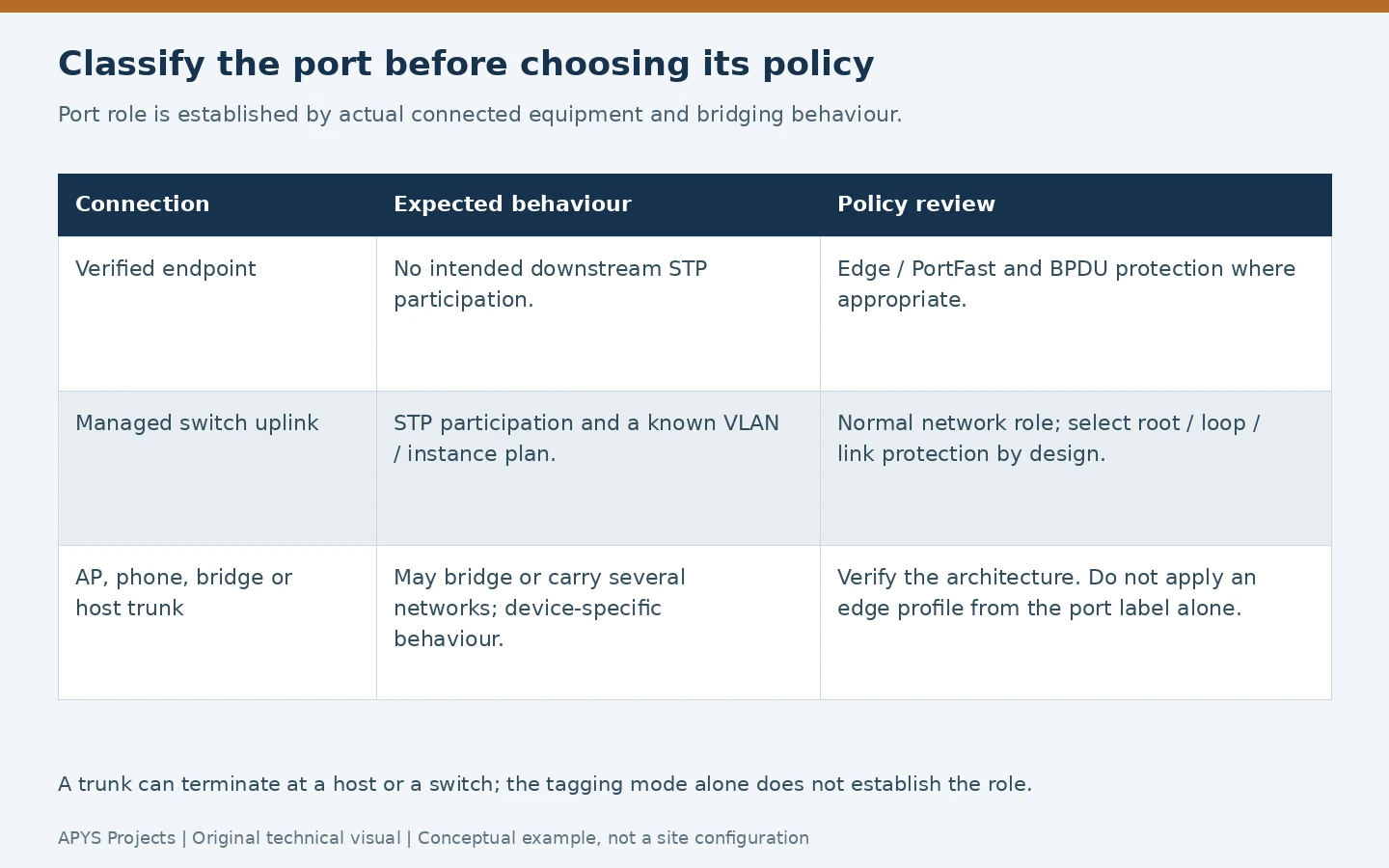
Classify access points, IP phones, software bridges and virtualisation hosts from their actual behaviour. An AP may bridge traffic; a phone can have a downstream computer; a host-facing trunk can be legitimate. The words “access port” or “trunk” alone do not establish whether the connection is safe to treat as an edge. Use a validated platform-specific profile rather than copying one onto every port.
5. Root Guard, Loop Guard and link checks are different tools
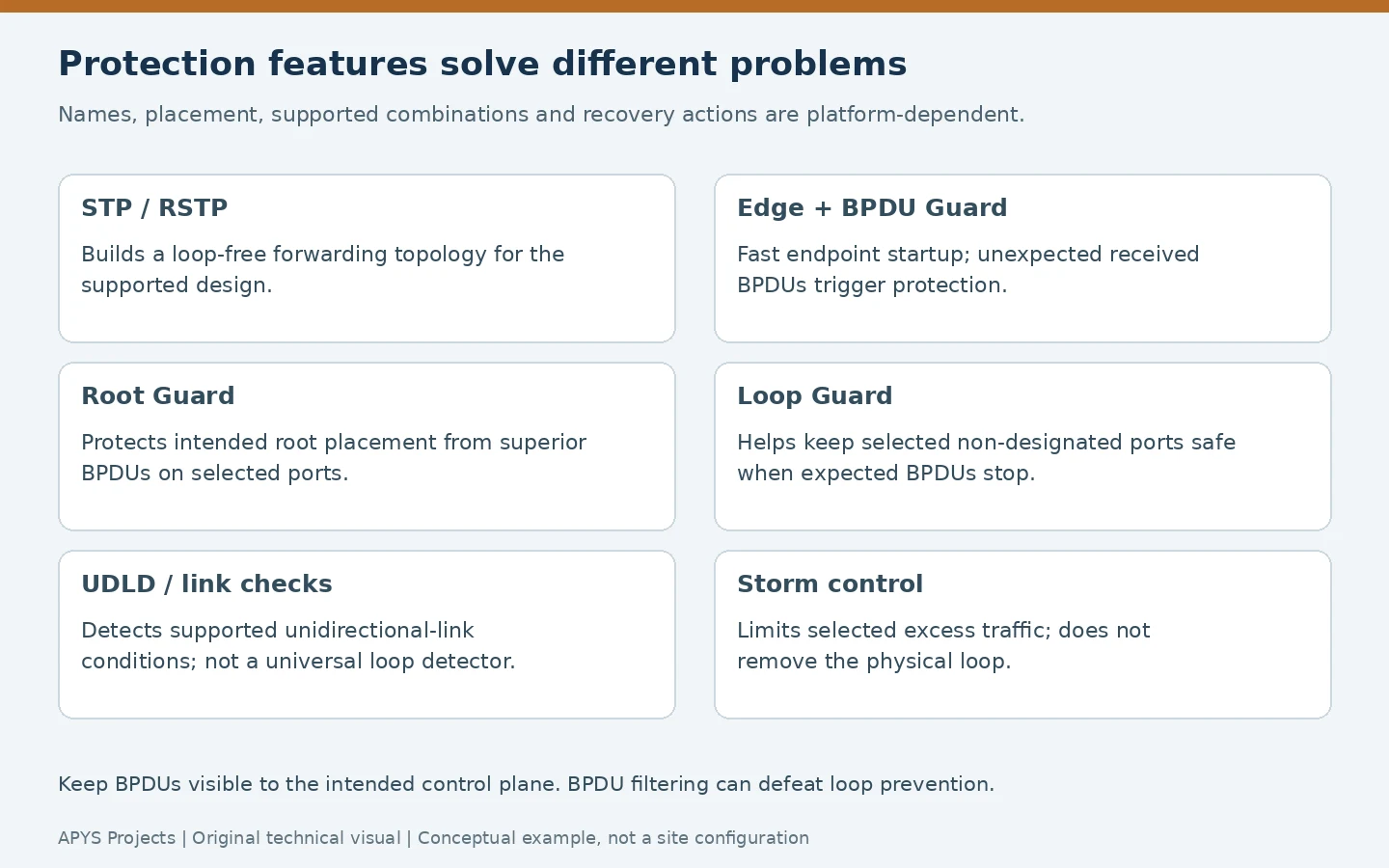
Root Guard: protect the intended root’s location
Root Guard is relevant on selected ports where a superior BPDU must not change the root placement. It can put an offending path into a root-inconsistent condition. It is not a blanket setting for every uplink: a port legitimately leading toward the intended root needs different treatment. See Cisco’s Root Guard explanation.
Loop Guard: protect against missing expected BPDUs
A link can remain physically up while the expected control messages disappear. Loop Guard helps prevent supported non-designated ports from becoming unsafe forwarding paths under that condition. Placement, compatibility and recovery depend on the STP mode and platform. Juniper’s loop-protection documentation explains the missing-BPDU problem.
Unidirectional-link detection: check the link failure mode
Features such as UDLD address supported one-way link conditions. They complement topology protection rather than replace it. Check product support, operating modes and neighbour compatibility, especially across fibre links and mixed equipment. Cisco’s MAC-flap and loop reference discusses these complementary protections.
Do not suppress BPDUs to make an inconvenient alert disappear. BPDU filtering can prevent the intended spanning-tree process from seeing a redundant path. Global defaults and interface-specific filtering can behave differently; review the exact configuration and official guide before changing it.
6. Storm control limits selected traffic; it does not remove a loop
Storm control can suppress selected traffic when its rate crosses a configured threshold. Supported traffic classes, accounting intervals, units, exception handling and actions vary by hardware and software. A platform may offer bandwidth percentages, packets per second or other supported units; these are not interchangeable numbers.
Cisco’s storm-control configuration guide describes platform-specific rate limits. A low copied threshold can discard legitimate ARP, DHCP or multicast traffic. A threshold that looks reasonable as a percentage also represents a different traffic volume on a different link speed.
Baseline normal operation, include expected startup bursts and select both the threshold and the response deliberately. Is the action dropping selected frames, raising an alert, or disabling a port? What restores service? Verify the answer rather than assuming every switch behaves the same way.
Retain STP and appropriate edge protection. Rate limiting may reduce the damage while the physical cycle still exists; it does not establish that the network is safe to return to normal.
7. A controlled investigation and containment sequence
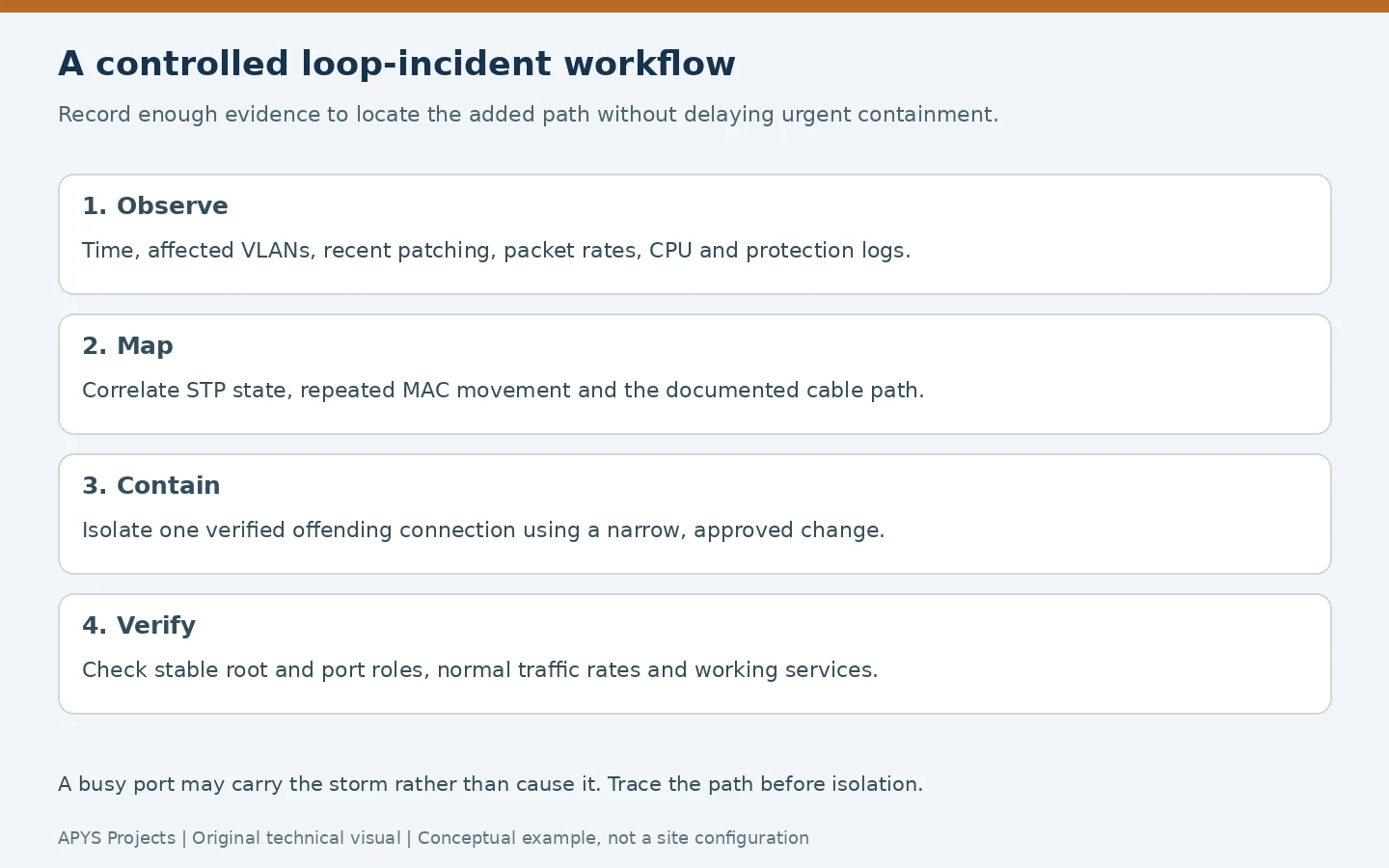
Start with the affected scope and the last known healthy state. Record new patch leads, moved desks, replaced switches and changes to bridges or wireless links. Preserve available logs before rebooting equipment, but do not let perfect evidence collection delay urgent containment when the verified loop is causing an outage.
Collect useful read-only switch evidence
These are common Cisco-style inspection examples, not a configuration recipe. Verify the syntax for the actual model and release. Substitute the real VLAN and interface identifiers:
show spanning-tree summary
show spanning-tree vlan 20
show spanning-tree vlan 20 detail
show interfaces counters errors
show interfaces status err-disabled
show logging
Look for the current root ID, root and alternate ports, unexpected state changes, protection reasons and rates before/after the incident. Inspect the relevant interface’s packet statistics and configuration. A topology-change counter needs a time context; one legitimate event is different from repeated changes during the failure. Cisco’s STP troubleshooting and design guide gives additional investigative context.
Correlate repeated MAC movement with the topology. Follow the path through downstream switches or WLAN infrastructure rather than treating an uplink as the final endpoint. Use an approved, limited capture if necessary; a congested switch CPU or mirrored destination can lose packets, so a capture is evidence from that observation point, not a perfect transcript.
Contain the verified offending connection narrowly
Confirm the connection and service owner, arrange local or out-of-band management access where necessary, and remove or disable only the verified offending path. Record the port, cable and time. Observe whether traffic rates and application access recover. If they do not, reassess the topology instead of disconnecting unrelated links in a widening guess.
Do not power-cycle every switch, disable STP globally or intentionally recreate the loop on production to prove a theory. Test failure cases in an isolated lab, or use a specifically approved maintenance procedure with a rollback plan. Critical ELV and business services sharing the network require coordination before isolation.
8. Worked example: two desk outlets connected through an unmanaged switch
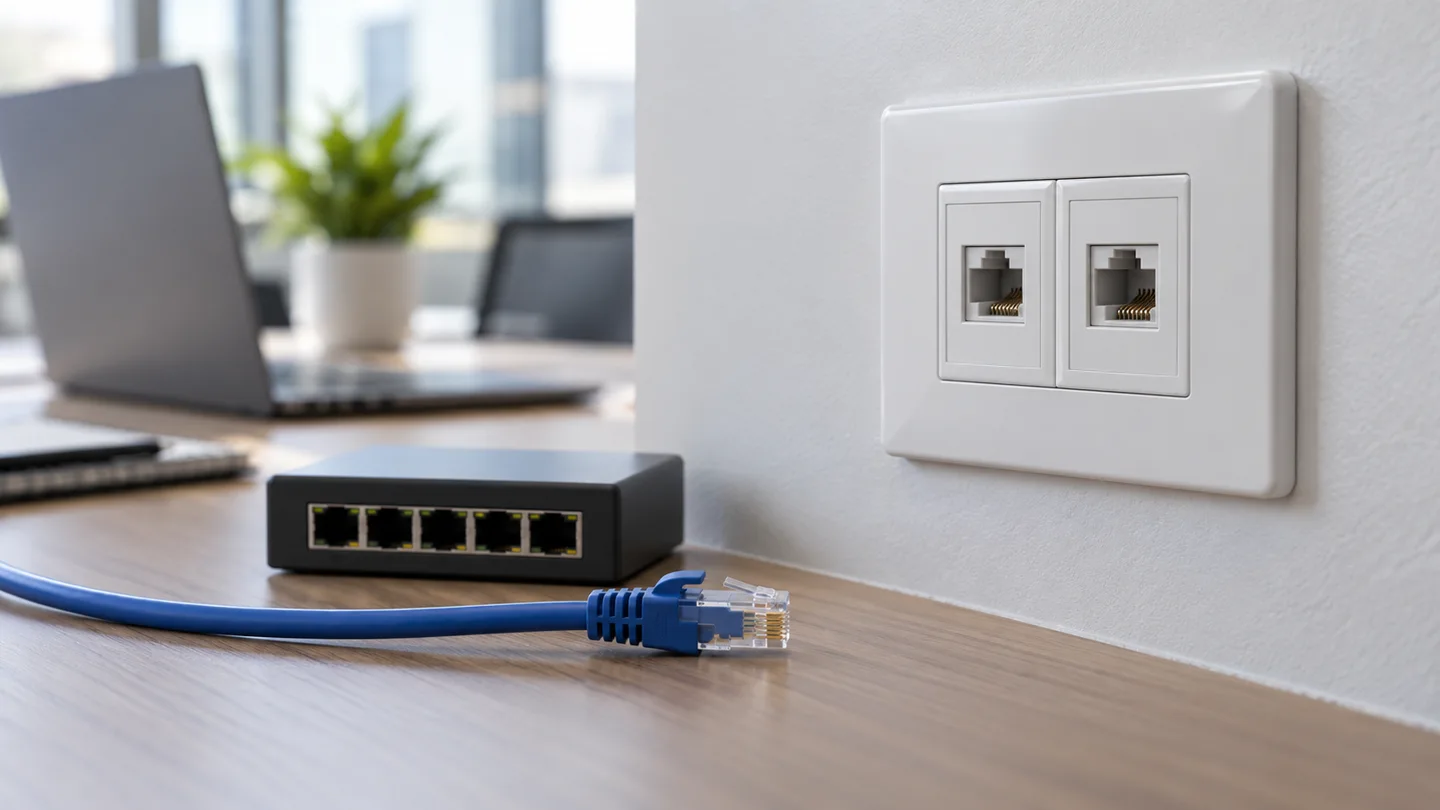
This is an illustrative incident, not an APYS client case or measured installation result. A desk switch is added for extra equipment. Someone connects it to two active wall outlets, believing the second uplink will increase speed or provide backup. Both outlets lead into the same switched VLAN.
If the resulting cycle is not controlled by effective loop prevention, traffic can recirculate. If the access-port BPDU policy detects an unexpected bridge, a port may instead be disabled and an alert raised. These are different outcomes; determine which occurred from the live state and logs.
- Confirm the change: identify the desk switch, the two outlet IDs and the corresponding access ports.
- Correlate evidence: compare incident time with MAC movement, topology events, traffic rates or the protection log.
- Contain: remove one verified unintended uplink through the agreed procedure. Keep management access and essential services in view.
- Correct the design: retain the approved connection arrangement, or replace the temporary expansion with a planned solution.
- Verify: check stable STP roles, normal rates and application operation; then update port records and user guidance.
A pair of physical links becomes a supported aggregate only when the equipment and both ends are configured for the intended design. Link aggregation deserves its own sizing and compatibility review; two spare patch cords are not equivalent. Refer to the office switch selection guide for equipment requirements.
9. Recover protected ports without hiding the cause
Read the exact protection reason before restoring a disabled interface. A BPDU Guard event is not interchangeable with a storm-control action, a physical error or another errdisable cause. Cisco’s errdisable recovery reference describes cause-specific investigation.
Remove the wrong connection or correct the approved port policy first. Then use the platform’s supported recovery method. Repeated automatic re-enabling can reintroduce the same outage if the loop remains. Root- or loop-inconsistent conditions may have different recovery rules from an errdisabled interface; use the observed state and applicable documentation.
After recovery, check the intended root for every relevant VLAN or instance, confirm expected forwarding and alternate roles, and monitor topology changes and traffic rates. Test the actual services, including voice, printing, Wi-Fi and agreed CCTV or access-control paths where applicable. Normal ping alone does not establish operational recovery.
10. Prevent recurrence with port ownership and verified changes
- Maintain a current physical and logical topology with outlet, patch-panel, switch-port and uplink identities.
- Document STP mode, intended root and backup, VLAN/instance mapping and expected blocked paths.
- Assign endpoint and network-port profiles from verified device roles, including exceptional bridges and host trunks.
- Define guard, link-check and storm-control policies with their thresholds, actions and recovery ownership.
- Control temporary desk switches and prohibit undocumented parallel uplinks.
- Back up configurations, preserve incident timestamps and test agreed redundancy changes in a planned window.
- Check the installation after moves or contractor work; a drawing is only useful if it still matches the cables.
The handover should explain which standby paths are intentionally discarding, so a later technician does not “repair” the healthy state into a loop. Our network handover checklist covers the broader documentation package.
Practical field worksheet: prove the loop and verify recovery
Why this check matters: a high broadcast counter alone does not locate a loop. Use a correlated sequence of physical-patching evidence, relevant VLAN/STP state and time-based traffic measurements before touching a live cable. The entries below are hypothetical examples, not APYS customer results.
Worked storm-control scale comparison
Suppose a platform expresses a threshold as a percentage of the physical port line rate and measures the selected traffic class accordingly. At a 1% setting, the arithmetic rate is 10 Mbps on a 1 Gbps port but only 1 Mbps on a 100 Mbps port (1,000 × 0.01 = 10; 100 × 0.01 = 1). The same percentage does not produce the same absolute cap. These numbers illustrate scale, not recommended thresholds. Real switches vary by traffic type, burst interval and action: consult the exact model guide, baseline legitimate ARP/DHCP/multicast bursts, and verify whether crossing the threshold drops frames, sends an alert or shuts the interface. See the Cisco storm-control reference.
| Hypothetical time | Evidence to retain | Decision |
|---|---|---|
| 09:12 | Two wall outlets patched into the same unmanaged desk switch; outlet and switchport IDs traced | Treat loop as a hypothesis, not yet a verdict |
| 09:14 | VLAN 20 MAC movement and interface flood rates rise; correlate timestamps and affected VLANs | Locate the physical forwarding cycle, preserve logs |
| 09:16 | Approved removal of one identified unintended desk uplink; record actual disconnected port | Contain narrowly; never disable STP globally |
| 09:20 | Rates normalise, root/alternate roles stabilise, DHCP/DNS/voice checks pass | Verify recovery and document corrected topology |
Acceptance and evidence template
- Record change window, network owner, switch model/software, affected VLAN/STP instance and intended root/backup bridge IDs.
- Save before/after topology-change counts with observation interval, interface rates, MAC-move logs, BPDU Guard cause and the exact port map; cumulative counters alone are not rates.
- Check the protected or disabled port’s connected-device role before recovery. For supported Cisco errdisable cases, identify the original trigger before considering manual/automatic re-enable; see Cisco errdisable recovery.
- Pass: the intended root and alternate ports match the design, no repeat incident under normal workload, user services work, and a safe, approved failover test behaves as documented.
Stop condition: if the root changes unexpectedly, protections repeatedly trip or business-critical endpoints remain affected, pause restoration and escalate with the recorded topology. Do not create an intentional production loop to demonstrate the issue.
Frequently asked questions
Should every switch port be forwarding?
No. A redundant topology can require an alternate path to discard user traffic for the relevant instance. Verify the intended design before treating that state as a fault.
Does PortFast disable STP?
No. It accelerates the transition for a connection expected to be at the network edge. Its suitability depends on the connected device and the platform’s behaviour.
Will BPDU Guard catch every possible loop?
No. It responds to received BPDUs under its supported configuration. Filtered control traffic and other failure modes need the wider protection design and investigation.
Can a faster switch or ISP plan fix a broadcast storm?
More capacity does not remove an unintended forwarding cycle. Correct the topology or offending traffic source, then review capacity separately.
Need help investigating an office switching loop?
APYS Projects provides networking services across India. Use our contact page to describe the affected area, recent patching and available switch evidence. For ongoing monitoring and responsibility boundaries, see our network AMC scope guide.
Sources and technical references
Related APYS services and tools: Switching and office networking service scope